
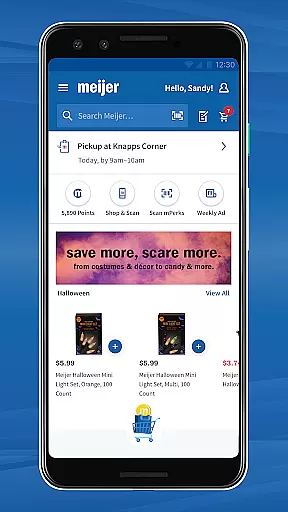
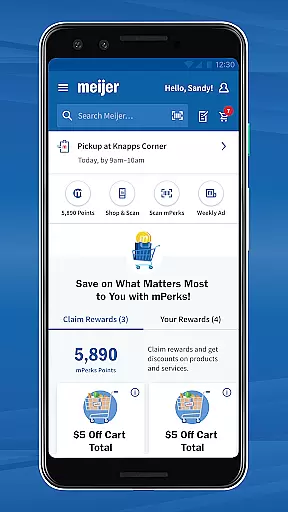
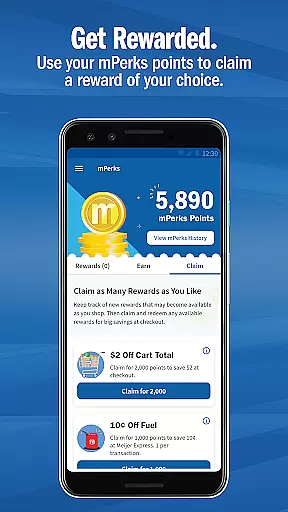
Meijer - Delivery & Pickup is a comprehensive shopping app that allows users to shop for groceries and other essentials with the convenience of delivery or in-store pickup. The app offers personalized grocery lists, mPerks coupons, and rewards without any membership fees or product markups.
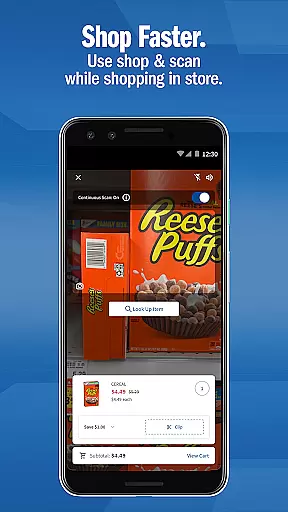
Key features include Shop & Scan functionality for in-store use, which lets you scan items and clip coupons as you shop, making checkout faster. Whether shopping online or in-store, Meijer ensures a seamless experience by integrating rewards, coupons, and easy order management.
Ideal for busy individuals or families, this app streamlines grocery shopping while maximizing savings through its robust rewards system and seasonal promotions. It's particularly useful for those who want to save time and money without sacrificing convenience.
Meijer - Delivery & Pickup stands out with its versatile features tailored for both online and in-store shoppers. Users can choose between home delivery or curbside pickup, eliminating the need to physically enter the store. The app's personalized shopping lists help streamline the ordering process, while mPerks integration ensures users can apply digital coupons and earn rewards effortlessly.
For in-store shoppers, the Shop & Scan feature revolutionizes the traditional shopping experience. By scanning items directly within the app, customers can add products to their cart, apply relevant coupons, and bypass long checkout lines. Additionally, the app provides an extensive product catalog including fresh produce, meats, dairy, household items, and seasonal collections.
The app also includes a dedicated Rewards section where users can track their progress and receive notifications about new deals. With no hidden fees and transparent pricing, Meijer makes it easy for shoppers to manage their orders, redeem coupons, and maximize their savings.
Meijer's app offers an extensive range of products, ensuring that customers can find everything they need in one place. The app categorizes its inventory into clear sections such as fresh produce, meats, dairy, household items, and more, making it easy for users to navigate through different categories.
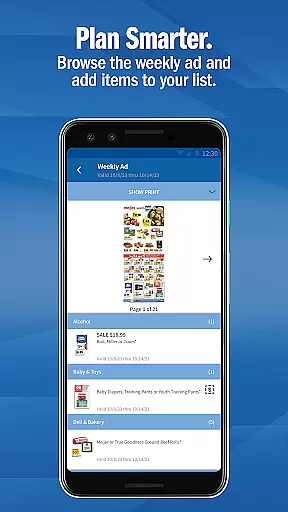
For those looking to stock up on essentials or searching for specific seasonal and holiday collections, the app provides a streamlined shopping experience. Users can explore various deals highlighted in the weekly ad, which adds another layer of savings and convenience.
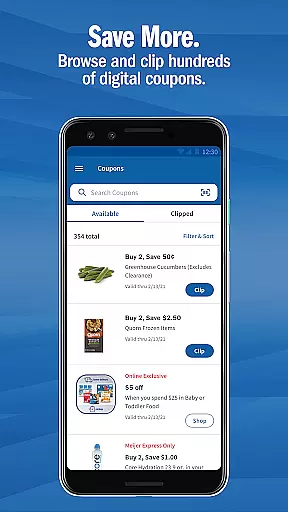
The application of mPerks coupons within each category enhances the shopping process, allowing customers to apply discounts directly when adding items to their cart. This seamless integration of product categorization with available deals ensures that shoppers not only find what they are looking for but also capitalize on cost-saving opportunities.
By organizing products into intuitive groups and offering features like Shop & Scan, Meijer optimizes both online and in-store shopping experiences. This approach helps customers efficiently manage their shopping lists while taking advantage of all available promotions and rewards.
Transparency in pricing is a core feature of the Meijer app, ensuring customers have access to the same prices online as they would find in-store. There are no hidden fees or markups on products, which builds trust and allows users to shop confidently knowing they are getting fair prices.
Additionally, the app integrates mPerks rewards and coupons seamlessly into the shopping process. Shoppers can easily browse available coupons within the app and apply them directly to their orders, whether shopping online for delivery or pickup, or using their mPerks ID in-store at checkout.
Meijer further supports competitive pricing by providing price comparisons and showcasing deals from the weekly ad. This empowers customers to make informed decisions about their purchases, comparing costs and maximizing savings without needing a membership.
With detailed order summaries available in the Orders section, users can review their purchases, including applied discounts and chosen payment methods before finalizing transactions. This level of openness not only enhances user satisfaction but also encourages continued engagement with Meijeru2019s services.
User-friendly interface
No membership required
Seamless coupon integration
Comprehensive product selection
Efficient Shop & Scan feature
Limited to Meijer stores
Occasional delivery delays
Requires internet connection
In-store only for Shop & Scan
Geographic restrictions may apply

Healthy living for less just got easier with our updated Sprouts App.
 4.50
4.50
Shop online premium refurbished electronics & trade in your old device for cash.
4.70
Shop clothes, shoes, bedding, home & more. Save with exclusive deals & rewards!
4.20
Harbor Freight Coupons - Generators, Air Compressors, Tool Storage, and More.
4.70
Shop stores, delivery & pickup
4.70
Shop, sell, & discover savings in our marketplace. Buy and sell clothing & more.
4.50
Buy now, pay later with flexible payments made to fit your budget.
4.00
Lowe’s Knows Home Improvement
4.70
Shop anywhere, manage payments, get cashback, discover Klarna Card & more.
4.80
Shop holiday gifts, fashion & home. Save with shopping deals & discounts!
4.90
Shop latest fashion trends with fast shipping & thousands of new styles weekly.
4.80
Shop stores, delivery & pickup
4.80
Buy fashion, beauty, home, & more! Save with amazing shopping deals & discounts.
4.80
Track all of your packages and online orders in one app - Amazon, FedEx, & USPS
4.70
World’s simplest mobile payment solution for machines.
4.50
The deals you love & beyond!
4.50
Scan receipts, earn gift cards & fetch rewards with CoinOut receipt scanner app.
4.30
Shop, Save and Earn | Social Shopping & Savings Deals | Real Money Payouts
4.20
The PetSmart App is a great resource for every step of your pet parent journey!
3.40
Explore Victoria's Secret app featuring intimate apparel, beauty products, Angel Rewards program, and personalized fit tools. Your complete lingerie shopping guide.



User Reviews