
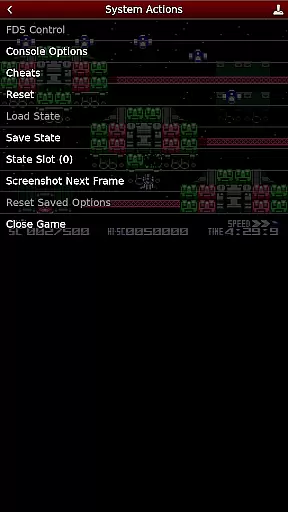
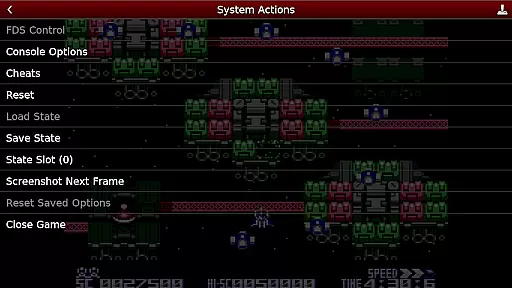
NES.emu is an advanced open-source NES emulator that brings the classic gaming experience to modern devices. Known as Famicom in Japan, this emulator focuses on delivering low audio and video latency while maintaining a minimalist user interface. It supports a wide range of devices from older models like the Xperia Play to contemporary ones such as the Nvidia Shield and Pixel phones.
The app's core functionality lies in its ability to emulate NES games with precision, including support for Famicom Disk System and VS UniSystem. With features like configurable on-screen controls and compatibility with Bluetooth or USB gamepads, NES.emu ensures an authentic and customizable gaming experience. Whether you're reliving childhood memories or discovering these classics for the first time, NES.emu offers a seamless way to enjoy retro gaming on the go.
NES.emu stands out with its robust feature set tailored for retro gaming enthusiasts. The app supports multiple file formats including .nes, .unf, and .fds, with optional compression through ZIP, RAR, or 7Z files. This versatility allows users to play a wide variety of games without worrying about format compatibility.
One of the key highlights is the Famicom Disk System emulation, which requires selecting the BIOS in the options. Additionally, the emulator supports Zapper/Gun functionality, enabling touch-based firing mechanics. Advanced customization options include editable cheat files (.cht extension) and full controller configurability. These features ensure that users can tailor their gaming experience exactly to their preferences while enjoying precise emulation of both standard NES games and more specialized formats like arcade titles.
Arcade authenticity and nostalgia are crucial elements for any emulator aiming to recreate the classic gaming experience. NES.emu, as an advanced open-source NES emulator, excels in delivering these aspects by accurately emulating a wide range of devices from the original NES/Famicom era.
The app supports various file formats including .nes, .unf, and Famicom Disk System files (.fds), ensuring that users can relive their favorite childhood games with precision. The inclusion of VS UniSystem support adds another layer of arcade realism, allowing players to insert coins and enjoy arcade-style gameplay.
By focusing on low audio/video latency, NES.emu ensures that the gaming experience is as close to the original as possible, providing users with the authentic feel and sound of classic arcade games. This attention to detail helps preserve the nostalgic value that gamers cherish.
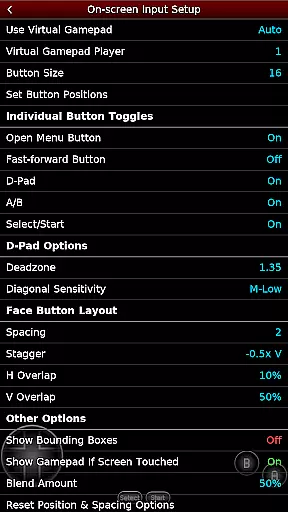
Control responsiveness is a key factor in delivering an immersive and enjoyable gaming experience. NES.emu addresses this by offering highly configurable on-screen controls that cater to individual preferences and play styles.
In addition to customizable on-screen controls, the emulator supports a wide array of external input devices such as Bluetooth and USB gamepads, including popular models like Xbox and PS4 controllers. This compatibility ensures that players can choose their preferred method of control, enhancing the overall responsiveness and comfort during extended gaming sessions.
Furthermore, the Zapper/Gun feature allows users to interact with compatible games using touch controls, simulating the excitement of light gun arcade games. Touching the screen to fire and utilizing specific gestures to simulate firing away from the TV adds an extra layer of interactivity and realism, making NES.emu a top choice for enthusiasts seeking responsive and versatile control options.
Wide device compatibility
Low audio/video latency
Customizable controls
Supports multiple file formats
Active development and updates
No ROMs included
Complex setup for beginners
Limited touchscreen optimization
Requires manual BIOS configuration
Occasional device-specific issues

Three awesome new levels for The Impossible Game.
 4.30
4.30
Sharpen your mind and reflexes while playing 4Way Dash
4.3
Mine planets, upgrade your space ship, battle others, and dominate the galaxy!
3.90
A fluid, action-packed arcade space shootout!
4.3
Suck the other’s blood and be the longest surviving mosquito!
4.40
Venture into the galaxy to fight against the invasion of space invaders.
4.60
Jump and fly your way through danger in this rythm-based action platformer!
4.50
Addictive basketball game with challenging one-touch controls
4.50
Crazy games: Kick your buddies, beat the boss, and turn the office into chaos!
4.40
Join the breathtaking chase!
4.80
Punch your way through the Streets of Rage once again!
4.80
Full featured version of Pizza Boy A (GBA emulator)
4.80
Play, Craft and Share your Endless Runner Levels on Kooply Run: Subway Craft
4.50
Granny keeps you locked in her house.
4.30
Join the art challenge: Guess the word and draw fast before the timer runs out!
4.20
Slice up a juicy storm!
4.20
Frenetic party game, pass the bomb to the other players!
3.80
This app is a very fast emulator
3.40
Play retro games with ease – NES, SNES, PSX, PSP & more supported
4.5


User Reviews