
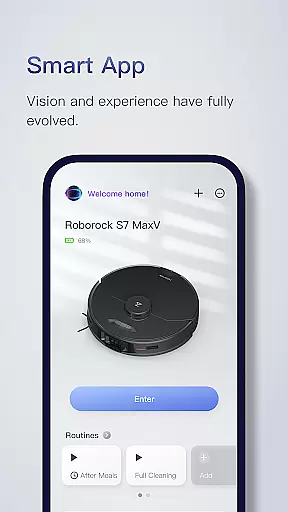
Roborock is a cutting-edge home cleaning solution that combines advanced hardware with intelligent software. The app provides complete control over your Roborock robot, allowing you to manage everything from cleaning schedules to suction strength. With features like Precision LIDAR navigation and AI-powered object recognition, it ensures efficient and safe cleaning.
The application's standout feature is its smart mapping technology, which creates detailed floorplans after the robot's first run. This enables advanced scheduling, customizable room-specific cleaning, and multi-level mapping capabilities. Whether you need stronger suction in the nursery or more water for tiled kitchens, Roborock adapts to your specific needs.
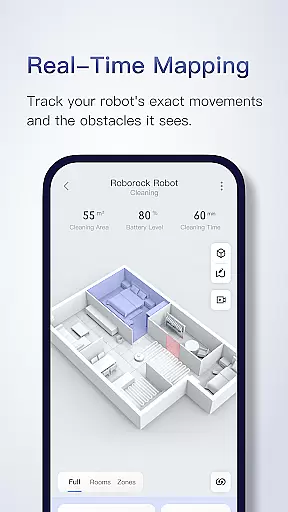
Roborock is ideal for busy households looking for a hands-off cleaning solution. Once set up, the robot can operate independently, even recognizing different floors automatically. With real-time viewing and obstacle avoidance, users can trust their home is cleaned thoroughly and safely.
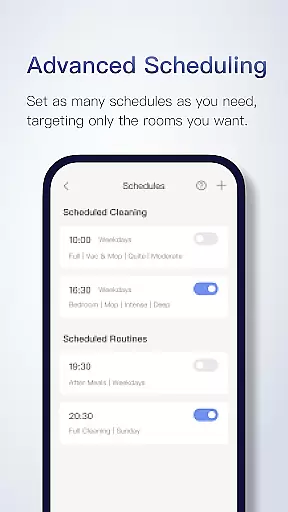
Roborock offers an impressive array of features designed to enhance home cleaning efficiency. Its Seriously Smart Mapping technology creates detailed floorplans and divides rooms automatically, enabling precise customization options. Users can set advanced schedules for different rooms, ensuring targeted cleaning at optimal times.
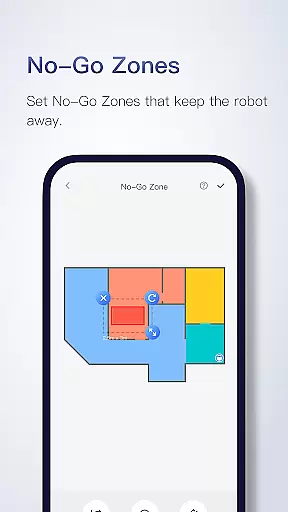
The app supports customizable cleaning settings tailored to each room's demands. You can adjust suction power, water flow, and cleaning frequency based on specific needs. Additional features include Zone Cleaning for tackling stubborn dirt, No-Go Zones to protect delicate areas, and Multi-Level Mapping for homes with multiple floors.
What sets Roborock apart is its integration of advanced technologies like ReactiveAI for object recognition and VibraRise for effective mopping. The real-time viewing feature lets users track their robot's progress and obstacle avoidance patterns. These innovations make Roborock a leader in smart home cleaning solutions.
Roborock app offers comprehensive lifestyle category coverage by integrating advanced cleaning technologies with smart home solutions. The application supports a variety of features that cater to different aspects of home maintenance and personal convenience.
With functionalities like Precision LIDAR navigation, sensor matrix for safer movement, and vision-based motion control, Roborock ensures efficient home cleaning tailored to users' specific needs. These cutting-edge features provide options for customizing cleaning schedules, adjusting cleaning strength, and even setting up no-go zones without any physical barriers.
Users benefit from the seriously smart mapping feature which allows them to view their home layout and customize cleaning for each room. Advanced scheduling and zone cleaning capabilities enable tackling more stubborn dirt in specific areas while avoiding delicate items or surfaces.
The app's multi-level mapping supports saving up to four different floor plans, making it ideal for multi-story homes. This extensive set of features highlights Roborocku2019s commitment to covering various lifestyle categories related to home cleanliness and organization.
Roborock places a strong emphasis on content authenticity and expert credibility, ensuring that all information provided within the app is accurate and reliable. As a leader in smart cleaning solutions, Roborock combines hardware innovation with software expertise to deliver trustworthy content.
The app details various technological advancements such as PreciSense, Sensient, OpticEye, ReactiveAI, and VibraRiseu2014each explained with clarity regarding its functionality and benefits. These descriptions are backed by expert knowledge in robotics and artificial intelligence, establishing credibility among tech-savvy users.
Roborock also provides clear guidelines about feature compatibility across different products, enhancing transparency. For instance, specifying which models support multi-level mapping or obstacle avoidance demonstrates attention to detail and reinforces trustworthiness.
Furthermore, contact information including customer service phone numbers and email addresses assures users they can reach out for professional support whenever needed. This level of service underlines Roborocku2019s dedication to maintaining high standards of content authenticity and expert validation.
User-friendly interface
Advanced scheduling options
Precise room customization
Multi-level mapping capability
Real-time tracking feature
Limited feature compatibility
Some features require specific models
No physical controls available
Higher price point
Steep learning curve

Get roadside help, discounts, travel tools & more — AAA is with you everywhere.
 4.80
4.80
Digital watch face design. Modern looking, hi-res & battery friendly.
4.00
Turn your watch into a key fob for your Tesla
2.90
Unique Dark Analog style for Wear OS watches.
4.4
Take Hobby Lobby with you wherever you go!
3.40
Tap to the beat with interactive videos — warm up your reflexes & have fun
4.70
Spirit Communicator is a real paranormal ghost hunting app with many fun modes.
3.90
Going above and beyond known spirit communication
3.60
LineLearner, the quick way to learn lines.
2.90
Good magnifier app to see tiny things bigger and more clearly!
4.80
Simple, stylish & fresh watch face. Customize colors, gradients & complications.
4.70
PARAVOX 4 is a professional ITC paranormal research application.
4.50
Zodiac & Horoscope Launcher: Daily Sign Predictions & Astrology
4.40
Get your life organized with My Agenda!
4.30
Earn points with every purchase with Moe Rewards.
4.20
Spiritus Ghost Box is an Audio and Visual ITC tool for paranormal research.
4.00
Smart home security protection
3.20
The Miracle Box includes methods used by Steve Huff of Huff Paranormal.
3.20
Designed to delight, impress and energize your festive spirit every single day
4.1


User Reviews