
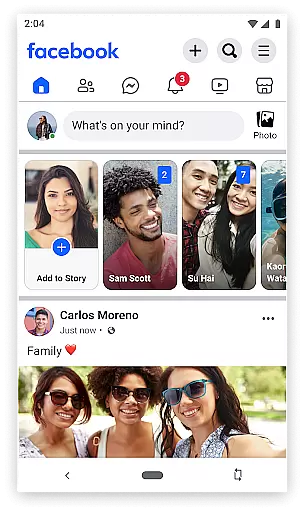
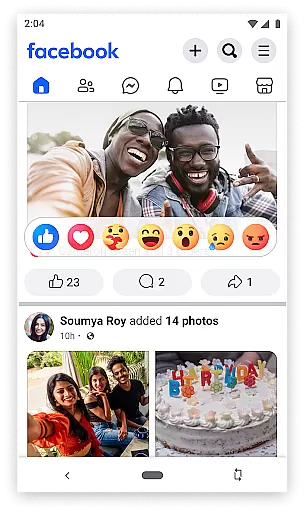
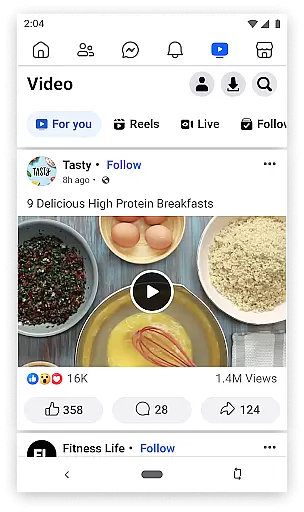
Facebook Lite is a streamlined version of the classic Facebook app, designed specifically for users with limited storage space or those operating in 2G network conditions. This social networking app allows you to stay connected with friends and family while using minimal data and phone storage. The app provides essential features such as posting status updates, sharing photos, liking posts, and engaging with your social circle through comments and reactions.
One of the key strengths of Facebook Lite is its lightweight design, which makes it accessible even on older devices or in areas with poor internet connectivity. Despite its reduced size, the app still delivers core functionalities like event planning, local business discovery, and photo album management. Whether you're looking to catch up with friends, organize your social life, or simply browse your News Feed, Facebook Lite offers a reliable and efficient way to stay engaged with your social network.
Facebook Lite stands out with its unique set of features tailored for users who need a more resource-efficient social networking experience. The app includes fundamental tools such as the ability to find and connect with friends and family, post status updates enhanced with Facebook emoji, and share photos and memes. Notifications keep you updated when others interact with your content, ensuring you never miss important social moments.
Beyond basic communication, Facebook Lite enables users to discover and engage with local events, manage photo albums, and explore local businesses with reviews and pictures. It also incorporates Facebook Marketplace, allowing users to buy and sell items locally. While maintaining these essential features, the app ensures smooth performance even in low-bandwidth conditions, making it an ideal choice for users in regions with limited internet infrastructure or for those who prefer a lighter app footprint on their devices.
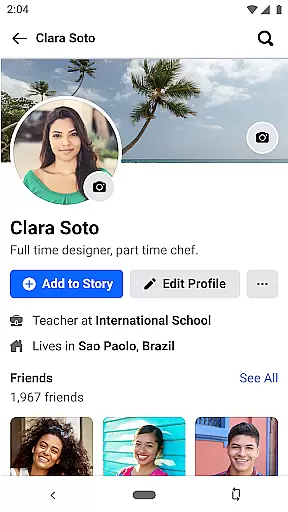
User profile customization is a fundamental aspect of any social networking app, including Facebook Lite. This feature allows users to personalize their profiles by adding profile pictures, cover photos, and personal information such as interests and work history. By doing so, users can express their individuality and make meaningful connections with others.
Facebook Lite takes authenticity seriously by implementing a verification process for user profiles. This helps ensure that the people you connect with are genuine, providing a safer environment for social interactions. Verified profiles may receive badges that signify their authenticity, which can enhance trust within the community.
The benefits of these features are significant. Users can create a space that truly reflects who they are while connecting with friends and family in a secure setting. The ability to customize and verify profiles not only enhances user engagement but also fosters a sense of community and belonging among users.
Connection discovery is an essential feature in Facebook Lite that enables users to find and connect with friends, family, and like-minded individuals. Through smart algorithms and search functionalities, the app suggests potential connections based on mutual friends, shared interests, and other relevant factors.
This functionality extends beyond just finding people you already know. It also helps you discover new communities and groups that align with your interests. Whether you're looking for a local club or a global network of professionals, Facebook Lite's connection discovery tools facilitate these interactions seamlessly.
For users, this means an enriched social experience where building networks and maintaining relationships becomes more accessible than ever. The feature encourages active participation in diverse communities, ultimately enhancing the overall value of the platform as a tool for staying connected in today's fast-paced world.
User-friendly interface
Low data consumption
Small app size
Fast loading times
Wide feature availability
Limited advanced features
No video calling
Reduced image quality
Fewer customization options
Less frequent updates

The hottest live chat app so far. Video chat and meet great people...
 4.60
4.60
Video call, live video chat & talk to strangers. Meet people on Omega!
3.60
Live video chat to connect with people around the world. Video chatting on Olive
4.40
Dating for singles. Meet lonely people nearby online. Find your match here!
4.20
Dating & make friend to chat, meet, flirt, and make real connections!
4.60
Unlimited calls & texts | WiFi voice line plus group txt | Call & text now
4.50
Go Live, Chat & Meet New People! Friends. And more than friends.
3.80
Free texting (SMS) to US, Canada & more. Free new number. Call free & Text free.
4.30
Connect and share ideas
4.10
Watch super live shows 24/7, chat & meet friends in Plamfy social networking app
4.70
Live pics from your friends - Only the photos you want to see
4.60
Watch 24/7 great live stream, or go live to boost your social followers!
4.50
TikTok Lite - Designed for speed, simplicity, and saving your phone’s space!
4.40
Watch 24/7 live stream, and make real friends nearby
4.30
A gathering place for 300 million people's life interests and hobbies
4.30
Discover an open-minded dating experience when you download today
4.10
Chill and Chat with Tagged Live Video with millions of peeps
4.10
Find your next obsession.
3.50
Message and video call your family and friends!
2.60


User Reviews