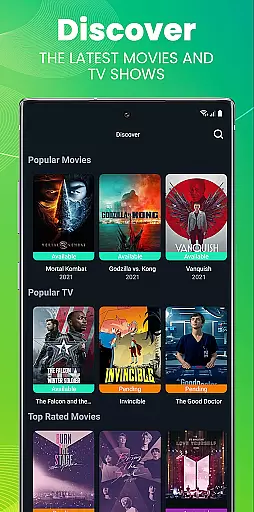
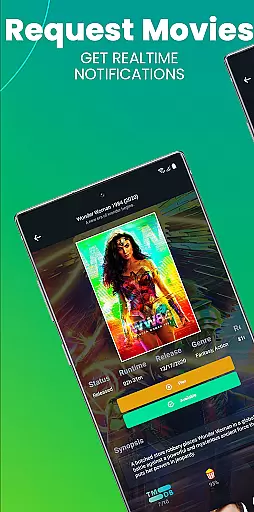
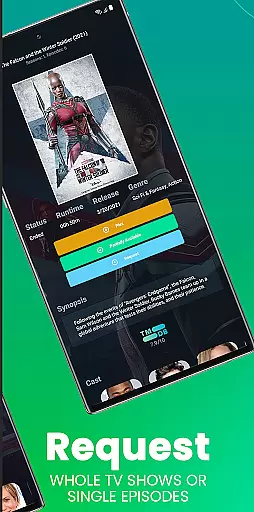
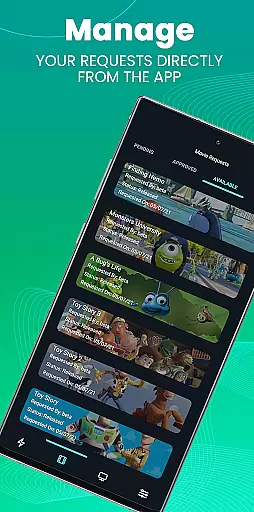
Ombi is a self-hosted entertainment management app that allows users to request content for Plex, Emby, or Jellyfin libraries. Designed for home media enthusiasts, it streamlines the process of requesting movies and TV shows by integrating with DVR tools like Sonarr and Radarr.
With its mobile compatibility, Ombi provides QR code-based login for seamless access. The app ensures a collaborative experience for shared libraries, making it ideal for households or small communities looking to manage their media efficiently.
This tool is perfect for tech-savvy users who already maintain a media server and want to empower others in their network to suggest new content easily.
Ombi stands out with its ability to integrate multiple media servers such as Plex, Emby, and Jellyfin into one cohesive platform. It supports automated workflows by linking with popular TV show and movie DVR tools, ensuring requested content is downloaded and added to your library without manual intervention.
The app offers a modern interface accessible via mobile devices through QR code authentication. This feature enhances security while simplifying user onboarding. Additionally, Ombi's modular design allows administrators to customize permissions and settings based on user roles.
Future updates promise enhanced functionality, including UI improvements and expanded features, ensuring the app evolves alongside user needs.
Ombi offers a diverse range of content options by integrating with Plex, Emby, and Jellyfin, allowing users to request TV shows and movies directly through the app. This self-hosted web application ensures that users have access to the latest media by connecting to multiple DVR tools, streamlining the content acquisition process for an optimal entertainment experience.
The platform's strength lies in its ability to provide up-to-date content from various sources, ensuring that users can find and request their desired TV shows and movies without delay. By linking to popular media servers, Ombi guarantees that users are not restricted to a limited library but instead have a vast array of options available at their fingertips.
With Ombi, users benefit from an evolving platform that regularly updates its interface and expands its functionality. This commitment to improvement means that the availability of fresh content is consistently enhanced, making certain that users can always access the newest releases and enjoy an uninterrupted flow of entertainment tailored to their preferences.
User engagement in Ombi is fostered through its interactive features that allow shared users to take an active role in content curation. By enabling individuals to request their preferred TV shows and movies, Ombi increases the time users spend interacting with the application as they become invested in personalizing their entertainment libraries.
The ease of use and seamless integration with existing media servers like Plex, Emby, or Jellyfin encourages regular usage, which naturally leads to higher retention rates. Users who have control over their content requests are more likely to return to the app frequently, checking on the status of their requests or making new ones.
As Ombi continues to evolve with updates and added functionalities, it promises even greater user involvement. The anticipation of new features creates a dynamic environment where users look forward to exploring enhanced capabilities, thus further solidifying their long-term engagement with the platform.
User-friendly interface
Seamless media integration
Automated content requests
Secure QR code login
Highly customizable
Requires existing Ombi server
Limited to self-hosting
Dependent on third-party tools
No built-in media player
Setup can be complex

Binge-worthy short dramas on DramaRush—engaging stories that fit your day.
 3.90
3.90
The OFFICIAL PeeWee Purpdrank Soundboard!
4.80
Journey to the world’s oldest rainforest and meet its Indigenous Custodians.
4.4
Stream Online TV - Watch Live IPTV Playlist & Channel with Built-In Player
4.50
Practice and master your ESP and intuition with five mode trainer.
4.20
Watch everything you want.
2.90
The Xbox app keeps you connected to your gaming community.
4.50
Catch the latest episodes of The Voice or live stream NFL games with The NBC App
4.20
Connect. Discover. Control.
3.60
Wodfix Air aggregates popular online content for you.
4.80
Original short dramas with diverse genres for a rich viewing experience!
4.80
Geooh GO is the most feature rich geocaching app available today.
4.50
Fire effects for your Philips Hue lights
4.20
Browse popular images and videos from Reddit on Android TV!
3.90
Real ghost box scanner with echo, reverb, EMF, & multi-stream channels.
3.80
Daily immersive workout plan: Body warm up & finger yoga exercises
3.80
A wonderful collection of the most beautiful sounds of animals and birds
4.5
Disney Stickers: Zootopia 2
4.2
Collaboration with popular VTubers
4.2


User Reviews