
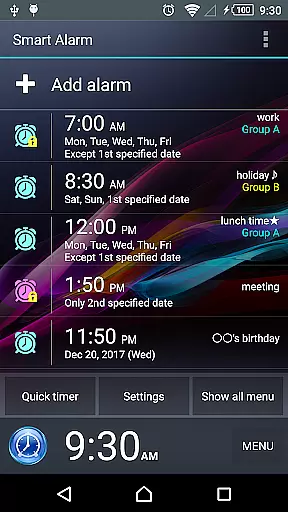
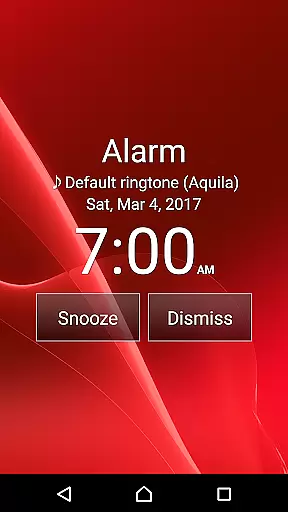
Smart Alarm is a premium alarm clock application designed for users seeking a reliable and customizable wake-up solution. This app offers advanced features beyond basic alarm functionality, including snooze options, weekly repeat settings, and holiday exclusions. Its intuitive interface allows users to personalize their alarm experience through transparency settings that display device wallpapers as app backgrounds.
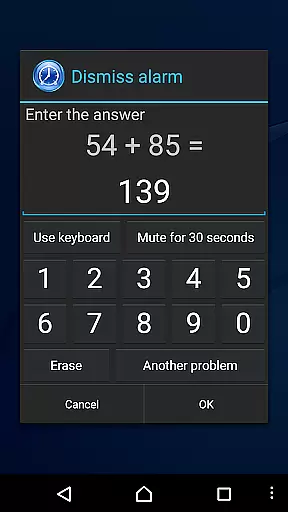
The application stands out with its practical solutions such as gradual volume increase, dual-stage vibration settings, and various alarm termination methods including math problems. These features ensure users wake up naturally and avoid accidental alarm dismissals. Whether you need a standard daily alarm or a sophisticated scheduling system, Smart Alarm provides a comprehensive solution for managing your wake-up routine effectively.
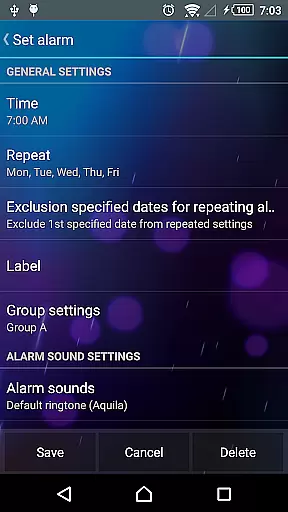
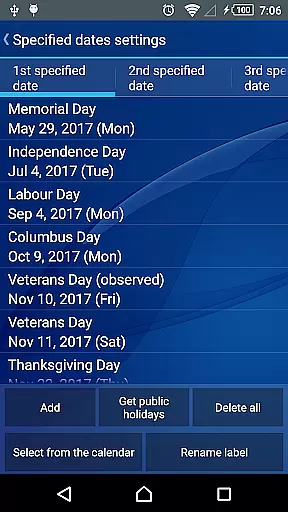
Smart Alarm distinguishes itself through its extensive feature set tailored for diverse user needs. The app supports complex scheduling with weekly repeat options and U.S. holiday exclusions, allowing precise alarm management. Users can select custom alarm sounds from their SD card and choose between speaker or headphone output based on their preference.
Advanced functionality includes dual-stage vibration settings and a gradual volume increase feature that prevents startling wake-up experiences. The app also offers customizable button sizes for alarm termination and snooze functions, reducing the risk of accidental touches. Additionally, users can set alarms to deactivate only after solving math problems or entering specific numbers, ensuring they are fully awake before turning off the alarm.
Smart Alarm offers extensive coverage of essential lifestyle features, ensuring it fits seamlessly into daily routines. The app provides robust alarm functionality with options for snoozing, repeating on specific days, and even excluding public holidays from repeat settings.
Users can customize their experience by setting personal music from an SD card as the alarm tone, adjusting vibration strength, and configuring buttons to prevent accidental stops. These customization options make it adaptable to individual preferences and needs.
The application also supports various device functionalities such as transparency settings for wallpapers, silent mode toggles, and headphone jack sensing. This ensures that users can tailor the app's behavior according to different scenarios and environments.
With its comprehensive feature set, Smart Alarm stands out in the lifestyle category by addressing both basic and advanced user requirements, making it a versatile tool for managing daily schedules effectively.
Smart Alarm ensures content authenticity by providing reliable and tested features that users can trust. The app undergoes thorough verification processes to ensure its functions operate correctly across various devices, offering peace of mind to users who rely on it for their daily routines.
While TanyuSoft does not guarantee flawless performance on all devices due to varying hardware capabilities, they maintain transparency about potential limitations. Users are encouraged to test the free version before purchasing, ensuring compatibility and reliability based on personal device specifications.
Expertise is demonstrated through thoughtful design elements like gradual alarm sound increases, two-stage vibration settings, and customizable controls. These features reflect a deep understanding of user needs and common pain points associated with traditional alarm clocks.
By combining technical expertise with practical solutions, Smart Alarm establishes itself as a credible choice within the lifestyle category, prioritizing user satisfaction and dependable performance above all else.
User-friendly interface
Highly customizable settings
Gradual wake-up options
Versatile alarm scheduling
Reliable snooze functionality
Paid version only
Device power dependency
Complex permission requirements
Limited free trial
Potential compatibility issues

Big bold digital watch face with 30 colors, 6 complications and AOD.
 4.1
4.1
Get roadside help, discounts, travel tools & more — AAA is with you everywhere.
4.80
Paranormal Spirit Bell Trigger Device
4.30
Good magnifier app to see tiny things bigger and more clearly!
4.80
Earn money & gift cards when you take surveys, play games, scan receipts & more.
4.50
Creativity and savings for kids, beginners and experts in arts and crafts
3.50
Falling Fruit is a massive collaborative map of food in our cities.
3.20
LineLearner, the quick way to learn lines.
2.90
Earn money for every survey and game you play, and get real rewards every time
4.50
Stay connected with your loved ones & vehicles | Share live GPS location updates
4.60
Discover your Nationality, Family Origin, and Ancestry from one selfie
4.50
Earn points with every purchase with Moe Rewards.
4.20
Spirit Communicator is a real paranormal ghost hunting app with many fun modes.
3.90
Unique informative Dial with Live Moon Phase at a glance!
3.60
Connect to your Shark ROBOT™ from anywhere using the SharkClean™ App.
3.60
An Eerie Musical Trigger Toy for Spirits to Play with!
3.50
Take Hobby Lobby with you wherever you go!
3.40
Customize your Wear OS watch with festive Christmas figures and colors!
4.5
The cutest Autumn watchface featuring the adorable Mr. Squirrel
4.0


User Reviews