
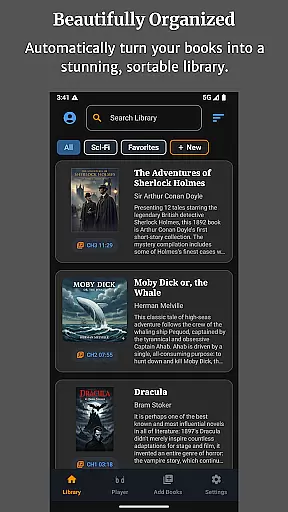
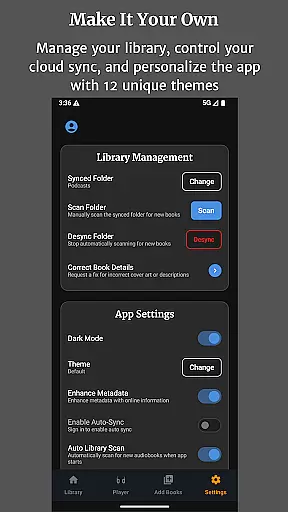
Audiobook Buddy is a comprehensive audiobook management app that transforms scattered audio files into an organized, visually appealing library. It supports syncing from local folders and popular cloud services like Google Drive, OneDrive, and Dropbox, creating a unified listening experience.
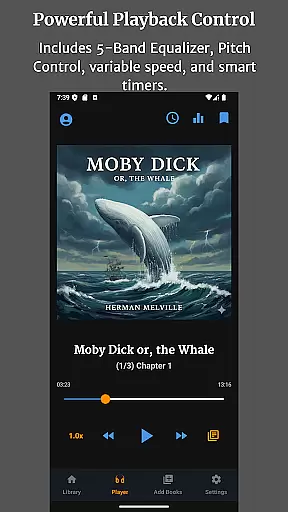
The app offers advanced playback features including a 5-band equalizer, pitch control, per-book speed settings, and sleep timer functionality. With support for background playback, lock-screen controls, and customizable themes, Audiobook Buddy provides a seamless user experience across devices.
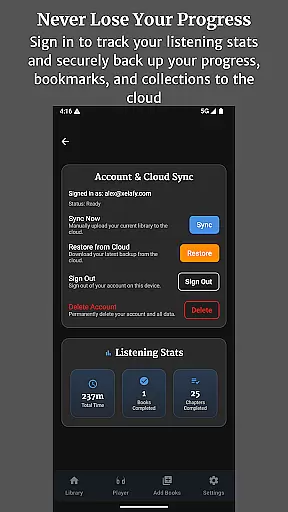
Perfect for avid listeners, the app allows tracking of total listening time and completed books, with automatic cloud backup for bookmarks and progress. Its extensive file compatibility makes it a versatile tool for managing personal audiobook collections.
Audiobook Buddy stands out with its smart library organization system that automatically groups audiobooks into collections similar to playlists. Users can create custom collections for series, genres, or authors, making large libraries easy to navigate.
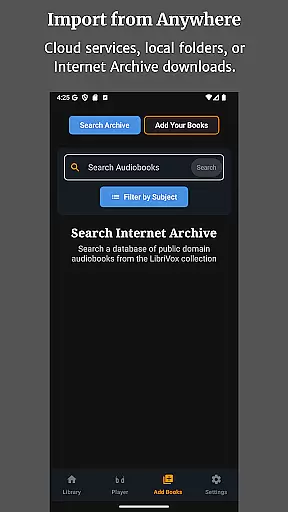
The app's playback capabilities are exceptional, offering precise control over listening experience through advanced audio settings. The inclusion of LibriVox integration expands access to public domain books while maintaining support for personal file imports in various formats.
Additional notable features include multi-language support (English, German, French, Japanese), eleven customizable themes, and full lock-screen controls. The optional home screen widget and mini player provide quick access to current audiobooks, enhancing overall usability.
Audiobook Buddy offers an extensive library of public domain audiobooks sourced from LibriVox, providing users with a vast selection of titles to choose from.
In addition to the built-in library, the app supports importing personal files and ZIP archives, allowing users to expand their library with their own collections. This feature ensures that users have access to a personalized and comprehensive audiobook collection.
Regarding copyright authenticity, Audiobook Buddy emphasizes the importance of legal content consumption by offering non-DRM titles through services like Open Library and the Internet Archive. Users can confidently enjoy their listening experience knowing that all materials are legally obtained and free from copyright infringement issues.
The app boasts full file support for various audio formats including MP3, M4A, M4B, AAC, OGG, FLAC, WAV, and WMA, ensuring that users can play audiobooks in their preferred format without any compatibility issues.
Beyond audio formats, Audiobook Buddy also reads metadata from CUE, NFO, and TXT files, enhancing the organization and searchability of the audiobook library. This feature allows for a more structured and user-friendly library management experience.
Furthermore, cover art is supported in multiple formats such as embedded art, JPEG, PNG, and WebP, enriching the visual presentation of the audiobook library. With this level of format compatibility, Audiobook Buddy delivers a seamless and visually appealing audiobook experience.
User-friendly interface
Extensive format support
Cloud sync functionality
Advanced playback options
Cross-device compatibility
No DRM support
Limited language options
Requires manual import
Occasional sync issues
Premium feature costs

Master AKC Rally signs with in-depth hints, diagrams, and expert guidance.
 4.50
4.50
The favorite Christmas story comes to life!
4.80
Read and study the Bible and other content in over 1,000 languages.
4.80
The dynamic dictionary/reference app for piano chords and scales!
4.80
8 Dr. Seuss short stories in 1 app!
4.70
Unlock more features in Lithium and show your support. Expand for details.
4.00
Research your family history to explore ancestors and search for your heritage
4.50
Fast loot guide for ARC Raiders. Simple tips, stats, maps, and item details.
4.2
World's most comprehensive dictionary app: 13 languages, all online or offline!
4.80
The Original Tropical Freshwater Aquarium Fish And Plant Care Guide
4.80
Personalized Chat with Bible
4.80
Daily Prayer, personalized Bible Study, AI-guided Insights, and Spiritual Growth
4.80
My Bible offers a comprehensive app by providing offline access, daily verses.
4.80
Watch real short episodes in just minutes— addictive, you won't be able to stop!
4.70
Zerobooks Light Novel Reader by GOLDENAGATO
4.20
"BIG A, little a. What begins with A?"
4.10
Knots 360 Pro ( 3D ) shows you animated 192 knots in 3D perspective
4.10
Enjoy your favorite books
3.50
University of North Carolina Herbarium presents the flora of TN, AL, & MS.
4.2


User Reviews