
Lithium Pro is a premium upgrade for the free Lithium app, designed to enhance your reading experience. This app unlocks advanced features that allow users to sync data across devices via Google Drive, customize themes, and access additional highlight colors. It is particularly useful for avid readers who want more control over their reading environment and seamless data management.
The application's standout feature is its ability to synchronize user data, ensuring that bookmarks, notes, and other important information are always up-to-date across all devices. Additionally, the custom theme options provide a personalized reading experience by allowing users to adjust background and text colors. These features make Lithium Pro an essential tool for those seeking both functionality and personalization in their reading apps.
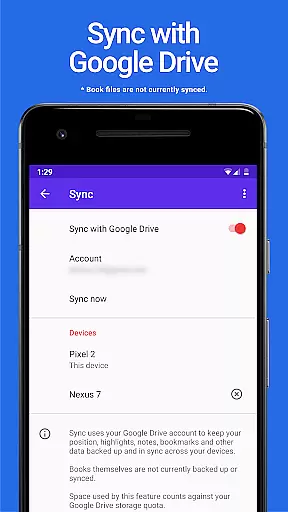
Lithium Pro offers several notable features that set it apart from its free counterpart. One of the key functionalities is the ability to sync data using a Google Drive account, which ensures that your reading progress and notes are consistently updated across multiple devices. Although book files themselves are not synced, this feature provides peace of mind knowing that your data is securely backed up.
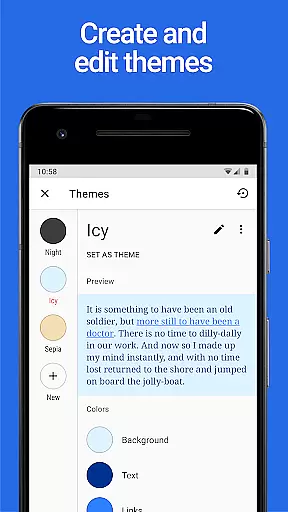
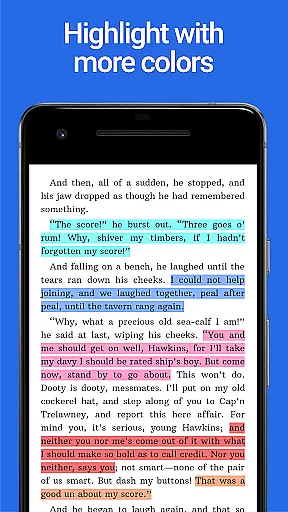
Another significant feature is the custom themes option. Users can personalize their reading experience by adjusting page background color, text color, and link colors. This level of customization allows for a more comfortable and visually appealing reading session. Moreover, the app includes additional highlight colors, giving users more ways to annotate and organize their content effectively.
These features collectively enhance the overall usability and aesthetic appeal of the Lithium app, making it a valuable upgrade for users who prioritize both functionality and personalization in their digital reading tools.
When it comes to e-books, the size of the library and the authenticity of copyrights are crucial factors for readers. Lithium Pro ensures that users have access to a vast collection of e-books, all verified for copyright authenticity. This provides peace of mind for users who want to ensure they are accessing legal content.
The app leverages Google Drive to keep your data backed up and in sync across devices, ensuring that your library is always up-to-date and accessible wherever you are. Although book files themselves aren't currently backed up or synced, the ability to maintain a consistent library across devices adds significant value.
By upgrading to Lithium Pro, users can enjoy an extensive library with the assurance that all materials are legally obtained and properly licensed. This commitment to copyright compliance enhances the overall reading experience and supports authors and publishers.
Format compatibility is essential for readers who consume content from various sources. Lithium Pro excels in this area by supporting a wide range of e-book formats, making it versatile and user-friendly. Whether you're reading EPUB, PDF, or other popular formats, Lithium Pro ensures a seamless experience.
In addition to its format support, Lithium Pro offers advanced customization options. Users can create, delete, and edit custom themes, adjusting page background color, text color, and link colors to their preference. This level of personalization enhances readability and comfort, catering to individual reader needs.
With more highlight colors and additional features on the horizon, Lithium Pro continues to improve its format compatibility and overall user experience. These enhancements make it a valuable tool for avid readers seeking flexibility and customization in their digital reading journey.
Enhanced Sync
Custom Themes
More Highlight Colors
Google Drive Integration
Personalized Experience
Requires Free App
No Book Sync
Premium Cost
Limited Customization
Device Dependent

Audiobook player with cross-device progress sync, playlists, and widget support.
 4.80
4.80
The Psalms for singing
4.0
Scan. Price. Grade.
4.60
Read popular romance books and web novels on the fantastic ebook reader
3.50
8 Dr. Seuss short stories in 1 app!
4.70
Read books PDF, EPUB, WORD, KINDLE, MOBI! Your ebook reader among reading apps.
4.80
Build family tree & discover DNA, family history heritage, origins and ancestors
4.60
A story reading app: Read stories, novels and books, or write your own.
3.90
A highly sophisticated app for all of your mobile reading—any format, any time
4.50
The Original Tropical Freshwater Aquarium Fish And Plant Care Guide
4.80
Discover Stars and Planets: Live Map Shows Current Constellations in Full Detail
4.70
Daily Devotional Widgets & Hourly Verses. Listen to Bible & Watch Holy Stories
4.70
Find, discuss, and organize your world of books and shows.
4.60
Werewolf novels & romance stories in audiobooks for book lovers! Werewolf storie
4.60
Master AKC Rally signs with in-depth hints, diagrams, and expert guidance.
4.50
Cute bedtime story for kids
4.30
Essential Technical Rescue Field Operations Guide 6, the Industry Standard Guide
4.20
"BIG A, little a. What begins with A?"
4.10
All in one Calibre libraries on your phones and tablets.
3.80


User Reviews