
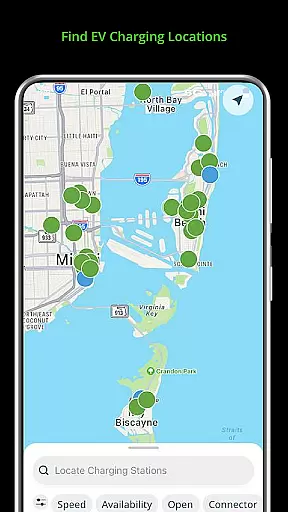
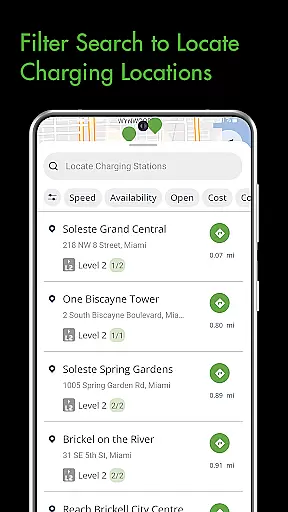
Blink Charging Mobile App is a comprehensive solution for electric vehicle (EV) owners, designed to simplify and enhance the EV charging experience. The app allows users to locate public EV charging stations with ease, using various search criteria such as zip code or business name. It also provides real-time monitoring of charge sessions, including energy delivered and costs, ensuring transparency and control over the charging process.
One of the standout features is the ability to manage home charging stations, like the HQ 200, directly from the app. Users can configure settings, track charging history, and receive status notifications. Additionally, the app supports an expanded network that includes SemaConnect stations, offering drivers more options and flexibility when charging their vehicles. This integration creates a seamless experience across different charging networks, making it an invaluable tool for EV owners.
The Blink Charging Mobile App offers a robust set of features tailored for EV owners. One key feature is the ability to locate EV charging stations effortlessly. Users can search by multiple parameters including zip code, city, or business name, ensuring they can find a station no matter where they are. The app also provides detailed information about each charging station, helping users make informed decisions.
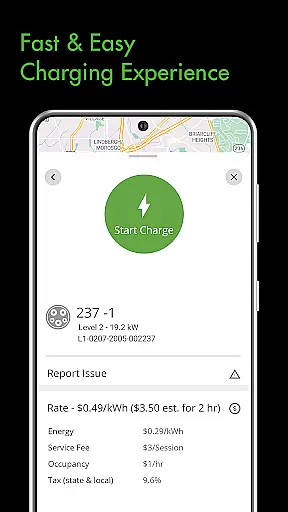
Another significant feature is the management of charge sessions. Users can monitor real-time data such as energy delivered, charging speed, and estimated costs. The app also sends notifications for various statuses, keeping users informed throughout the charging process. Furthermore, the app allows users to set up and manage home charging stations like the HQ 200, providing convenience and control right at their fingertips.
When it comes to electric vehicle (EV) charging, having access to detailed vehicle information is crucial for an optimal charging experience. The Blink Charging mobile app provides EV drivers with comprehensive details about their charging sessions.
The app allows users to monitor real-time information during a charge, including occupancy time, estimated costs, and energy delivered. This data empowers drivers to make informed decisions about their charging habits and manage their EV's battery health effectively.
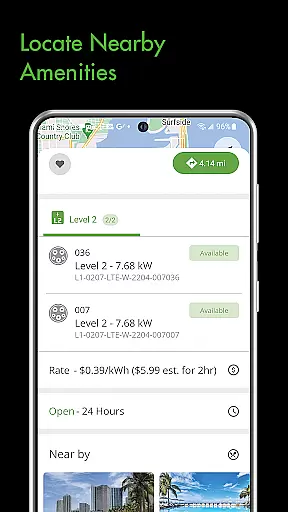
Additionally, the app offers specifics about the charging stations themselves, such as location, availability, and the current vehicle charging speed. With these insights, users can efficiently plan their charging stops and enjoy a seamless charging process.
By delivering detailed vehicle and charging information directly to the user's fingertips, the Blink Charging app ensures that EV drivers have all they need for a convenient and efficient charging experience.
Price transparency in EV charging is essential for drivers to understand the costs involved and manage their expenses. The Blink Charging mobile app excels in providing clear and upfront pricing information for its users.
Through the app, drivers can view the estimated cost of a charging session before they begin, allowing them to anticipate expenses and budget accordingly. This feature eliminates surprises and builds trust between the service provider and the consumer.
Besides displaying costs, the app also enables users to find and utilize charging stations within the expanded Blink Network, which now includes SemaConnect stations. This ensures competitive pricing and flexible payment options through the appu2019s integrated wallet system.
With price transparency at its core, the Blink Charging app equips EV drivers with the necessary financial information to make cost-effective decisions while on the go.
User-friendly interface
Comprehensive charging network
Real-time session monitoring
Home charger management
Convenient notification system
Limited to EV owners
Occasional connectivity issues
Requires account setup
Some features are subscription-based
Not all chargers are free to use

Ultimate OBD2 Car Scanner: Diagnostics, Service and Modification Tool
 4.30
4.30
Ferrari inspired analog & digital watch face with quick access and premium style
4.1
Theme for Car Launcher
4.4
The Texaco App allows you to pay for fuel from the comfort of your car!
4.80
Lexus app currently supports 2010 or newer vehicles (2018 or newer for Hawaii).
4.80
Instantly redesign your car with AI. From sporty to futuristic, try it all.
4.50
Shop cars & see your financing
4.60
7-Day Returns on All Cars
4.80
Marathon ARCO Rewards members earn rewards & apply the rewards for fuel savings!
4.80
Take Control of Your Car
4.80
Practice the drills within MotoJitsu Master Riding Program Volume 1 & 2!
4.80
1M+ high-quality auto parts at your fingertips. Fitment guaranteed.
4.70
Find Your Local Store or Shop Online for the Car, Truck, or SUV Parts You Need
4.70
CVT diagnostics with ELM327 for Nissan-based vehicles
4.40
Secure mobile payments & fuel savings at Phillips 66®, Conoco® and 76® stations
4.40
A smarter way to park and reserve your spot ahead of time.
4.40
Your car is talking. Start listening.
4.30
PayByPhone: A quick and easy way to pay for parking.
3.80
AlfaOBD software for Fiat Group cars native diagnostic
3.70


User Reviews