
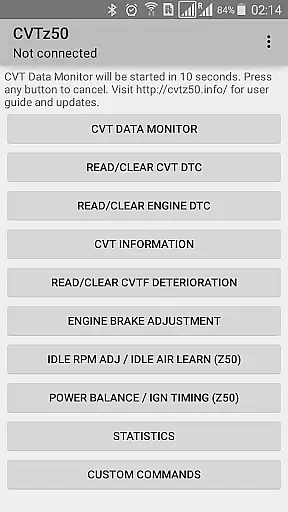
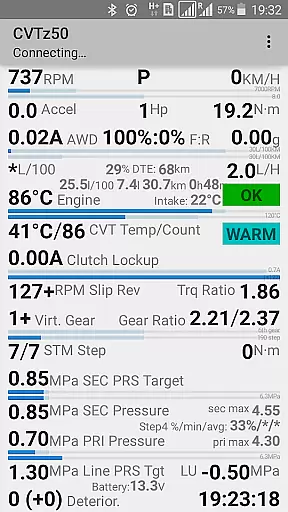
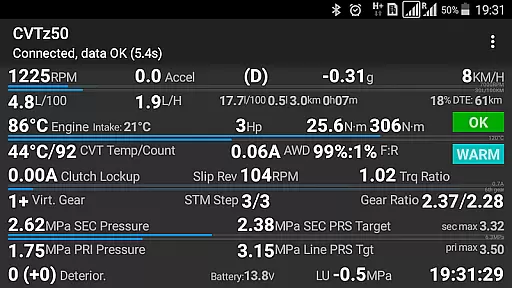
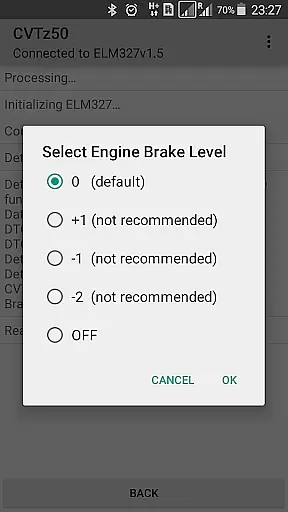
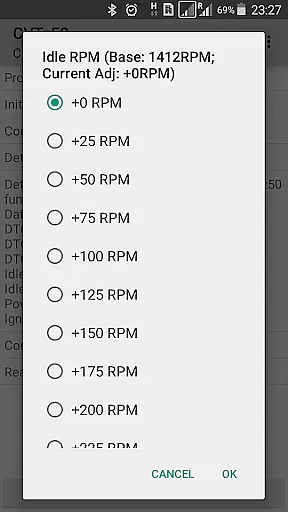
CVTz50 is a specialized diagnostic tool designed for Nissan Murano Z50/Z51 and other vehicles equipped with Jatco CVTs. This application enables users to read and clear both CVT and engine diagnostic trouble codes, monitor real-time CVT parameters, and adjust critical settings like engine braking level and idle RPM. Compatible with Android devices running 4.2 or higher, it requires an ELM327 adapter (revision 1.5 or lower) to connect with the vehicle's onboard system.
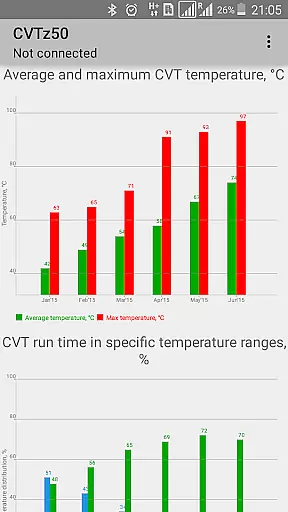
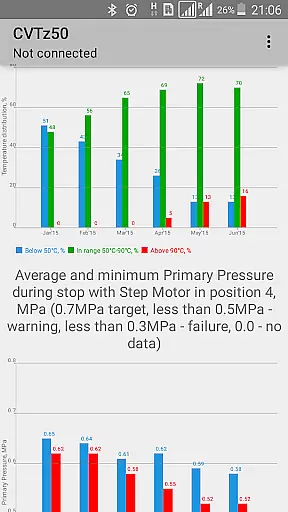
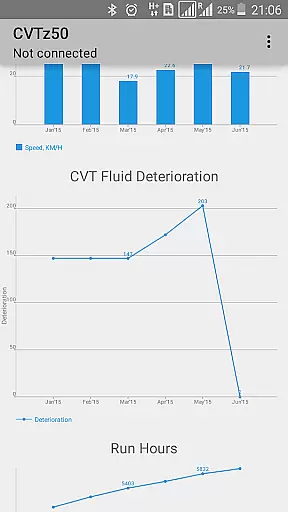
The app provides comprehensive monthly statistics on temperature conditions, pressures, mileage, and fluid deterioration, making it an essential tool for proactive vehicle maintenance. Its unique compatibility with a wide range of Nissan and Mitsubishi models makes it particularly valuable for mechanics and car enthusiasts who need reliable diagnostic data at their fingertips.
CVTz50 stands out with its robust feature set tailored for advanced vehicle diagnostics. The app allows users to perform critical functions such as adjusting Idle RPM and Ignition timing, conducting Idle air volume learning, and monitoring CVT fluid deterioration. These features are especially beneficial for older Murano models produced before 2010.
Another key highlight is the CVT Data Monitor, which offers real-time tracking of crucial parameters including CVT temperature, pressures, gear ratios, and torque converter lockup status. The app also supports partial functionality for various Nissan, Mitsubishi, and Renault models, providing a versatile diagnostic solution for a broad spectrum of vehicles. With its detailed monthly statistics, CVTz50 empowers users to maintain optimal vehicle performance through informed decision-making.
CVTz50 provides comprehensive diagnostic data specifically for vehicles equipped with Jatco CVT transmissions. The application allows users to access detailed vehicle information, including transmission parameters like temperature, pressures, and gear ratios.
Through its intuitive interface, users can retrieve specific trouble codes related to both the CVT and engine systems. This feature ensures that vehicle owners have a clear understanding of their car's current condition and any underlying issues that may need attention.
The app also supports monthly statistics collection on various critical parameters such as temperature conditions, fluid deterioration, and mileage. This long-term data tracking helps users maintain their vehicles more effectively and make informed decisions about necessary maintenance or repairs.
One of CVTz50's key advantages is its cost-effectiveness. The application offers a demo version, allowing potential users to verify compatibility with their ELM327 adapter and vehicle before making a purchase. This approach ensures complete price transparency and helps users avoid unexpected expenses.
By providing a free demo, CVTz50 enables users to test its core functionalities, such as reading diagnostic trouble codes and monitoring CVT parameters. This try-before-you-buy model demonstrates the developer's confidence in the product's value and effectiveness.
The app's pricing structure is straightforward, with no hidden fees or in-app purchases. Users can be certain they are getting a professional diagnostic tool at a reasonable price point, making it an attractive option for both professional mechanics and DIY enthusiasts who want to maintain their vehicles efficiently.
User-friendly interface
Comprehensive diagnostic tools
Real-time parameter monitoring
Wide vehicle compatibility
Detailed monthly reports
Requires specific hardware
Limited to compatible vehicles
Dependent on ELM327 adapter
No iOS support
Complex for beginners

OBD2 car scanner and diagnostics: read Check Engine, DTC, economy....
 4.30
4.30
OBD1 ECMs application. Data log or tune directly from your phone or tablet!
4.60
Monitor specific TOYOTA parameters by adding this plugin to Torque Pro.
2.00
Wonder how much horsepower and torque your car/truck makes? Look no further.
3.40
OBDII - ELM327 Terminal tool for 96-00 Volvos
4.50
Blink Charging Mobile app makes finding an EV charger an intuitive experience.
3.80
Car Sounds Engine Sounds app welcomes Auto Lovers to feel Car Simulator Sound
4.20
View your car’s service records and find out when maintenance is due.
4.70
O'Reilly Pro will streamline your parts lookup and ordering process!
3.20
7-Day Returns on All Cars
4.80
Find Your Local Store or Shop Online for the Car, Truck, or SUV Parts You Need
4.70
DMV Test Pro offers all the updated FREE DMV tests online.
4.60
Instantly redesign your car with AI. From sporty to futuristic, try it all.
4.50
Taximeter; the professional's choice
4.30
ODB2 based monitoring application for the Chevy Bolt (2017-2021)
4.00
Boost profits and hit your goals faster with GigU's amazing tools for gigworkers
4.00
BlueDriver® is a Premium Diagnostic OBD2 Scan Tool. www.BlueDriver.com
3.90
PayByPhone: A quick and easy way to pay for parking.
3.80
Easily notify car owners in urgent situations, safe, fast, multilingual.
4.3


User Reviews