
BlueDriver OBD2 Scan Tool is a professional-grade automotive diagnostic application that transforms your smartphone or tablet into an advanced scan tool. Designed for both professional mechanics and DIY enthusiasts, this app pairs with the BlueDriver Bluetooth Sensor to provide comprehensive vehicle diagnostics.
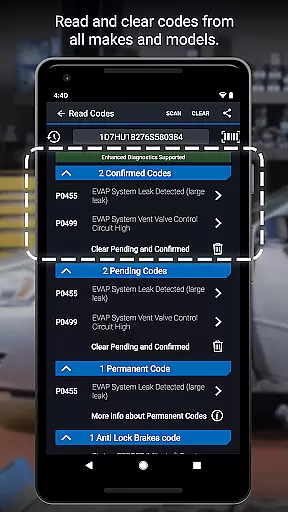
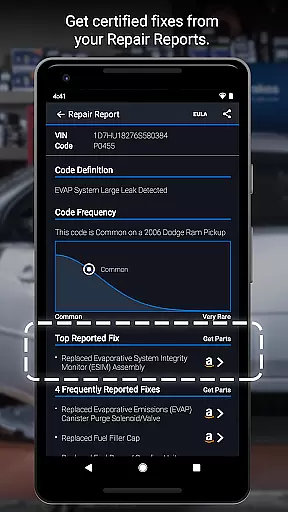
The app allows users to read and clear diagnostic trouble codes from various systems including engine, ABS, airbag, and transmission. It also generates detailed Repair Reports specific to the vehicle's make, model, and year, helping users understand issues and make informed repair decisions. With features like Mode 6 test results, smog readiness checks, and live data graphing, BlueDriver offers a complete diagnostic solution without the need for physical cables.
Whether performing routine maintenance or addressing check engine lights, BlueDriver provides clear, actionable information to help users maintain their vehicles effectively. Its wireless Bluetooth connectivity and support for enhanced diagnostics on many vehicle brands make it a versatile tool for modern automotive care.
BlueDriver stands out with its robust feature set tailored for comprehensive vehicle diagnostics. The app supports reading and clearing codes from multiple vehicle systems including engine, ABS, airbag, and transmission, providing users with a complete diagnostic picture.
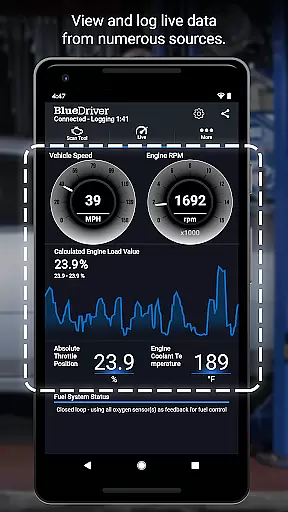
One of the key innovations is the ability to generate professional-grade Repair Reports based on the exact vehicle and trouble code. These reports are stored in the cloud, allowing users to access them across devices. The app also provides advanced diagnostic capabilities such as Mode 6 test results, freeze frame data capture, and multi-PID live data graphing.
Additional notable features include wireless Bluetooth scanning, metric/imperial unit selection, and plain-language explanations of likely fixes. The app's enhanced diagnostics coverage extends to most major vehicle manufacturers, with specific support varying by region. The integration with a database of millions of real-world fixes ensures users receive practical, verified solutions for their vehicle issues.
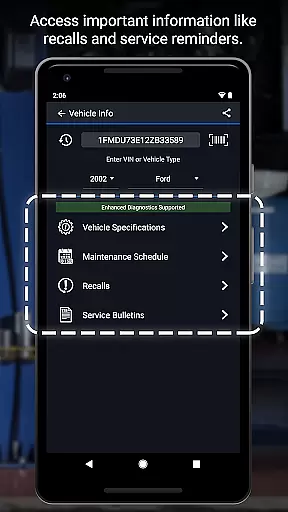
Accessing detailed vehicle information is crucial for effective diagnostics and maintenance. BlueDriver OBD2 Scan Tool provides comprehensive data specific to your vehicle's make, model, and year.
The application reads and clears trouble codes from various systems including engine, ABS, airbag, and transmission. It also generates professional-grade Repair Reports tailored to your exact vehicle specifications.
Users benefit from advanced features like Mode 6 on-board monitoring, smog readiness checks, and freeze frame data. These capabilities ensure mechanics and DIY enthusiasts can make informed decisions about necessary repairs.
With support for live data graphing and multi-PID interactive displays, BlueDriver offers an in-depth look at vehicle performance metrics. This level of detail empowers users to understand their car's health and address issues accurately.
Price transparency in automotive tools ensures users understand the costs involved before making a purchase. BlueDriver OBD2 Scan Tool positions itself uniquely by offering a free app that pairs with a separately sold Bluetooth Sensor.
Unlike many diagnostic tools requiring subscriptions or recurring fees, BlueDriver operates on a one-time sensor purchase model. This approach allows users to access extensive features without additional charges.
The app provides clear information about its pricing structure during setup. Users can preview Repair Reports by entering their VIN and trouble code, understanding potential costs before buying the sensor.
This transparent pricing model extends to its enhanced diagnostics coverage, which varies by vehicle brand and region. Customers appreciate knowing exactly what they're paying for, whether it's for GM, Ford, Toyota, or other supported models.
User-friendly interface
Comprehensive diagnostic coverage
Wireless Bluetooth functionality
Detailed Repair Reports
No subscription required
Sensor sold separately
Limited free features
Device compatibility issues
Occasional connection problems
Advanced features require newer vehicles

Take Control of Your Car
 4.80
4.80
Theme for Car Launcher
4.1
Launcher for use in the car
4.40
Better fuel to help keep you on the road
3.20
Get your personalized financing options and shop for used cars today!
4.20
Car Values, Research and More
4.80
Mobile Phone Parking - So easy to park
3.70
Available in select states.
4.00
Marathon ARCO Rewards members earn rewards & apply the rewards for fuel savings!
4.80
Trip computer+car diagnostic tool with widest variety of features and dashboard!
4.70
Browse millions of cars, track vehicle listings or sell your car today
4.70
OBD1 ECMs application. Data log or tune directly from your phone or tablet!
4.60
Find, search, and browse 40,000+ used cars, SUVs, and trucks.
4.50
Instant diesel savings. No credit checks or fees. Nationwide growing network.
4.40
Autotrader is your online solution for buying and selling new and used cars.
4.40
Realtime Charts is a plugin for the Torque Pro App (OBD 2 & Car)
4.20
ODB2 based monitoring application for the Chevy Bolt (2017-2021)
4.00
Discover new and used cars in Syria easily! Browse ads and connect with sellers.
3.70
The Smarter Way Forward
3.30


User Reviews