

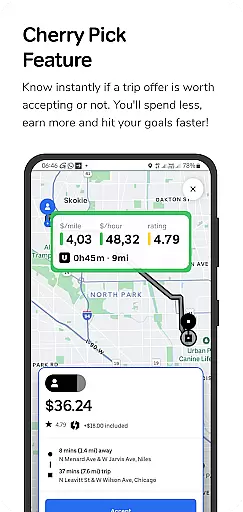
GigU is the leading smart assistant designed specifically for rideshare drivers in the US, helping them maximize earnings on platforms like Uber and Lyft. The app's standout feature is its Cherry Pick tool, which instantly evaluates trip offers to determine their profitability.
Key functionalities include live smart indicators showing earnings metrics, a color-coded grading system for trip valuation, and voice notifications for hands-free decision-making. These features ensure drivers can make informed choices quickly and safely, ultimately increasing their income potential while minimizing unnecessary expenses.
Ideal for rideshare drivers who want to optimize their work efficiency, GigU provides valuable insights that help achieve earning goals faster while maintaining complete account security without requiring platform passwords.
GigU offers an impressive array of specialized features tailored for rideshare drivers. Its core functionality revolves around the Cherry Pick feature, which uses advanced algorithms to analyze trip offers in real-time.
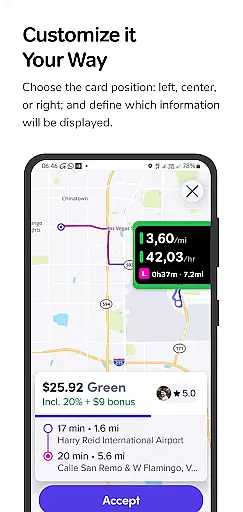
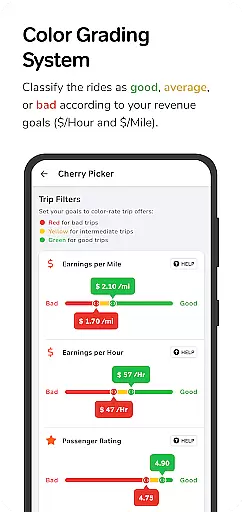
The app provides detailed analytics through its live smart indicators, displaying crucial metrics such as earnings per mile, hour, and minute. The innovative colored grading system categorizes trips based on user-defined parameters, making it easy to identify the most profitable opportunities at a glance.
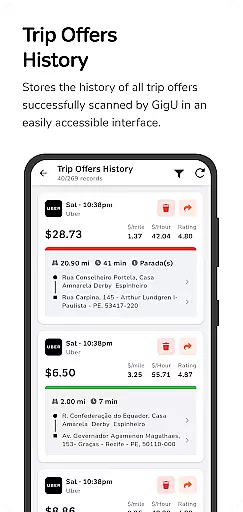
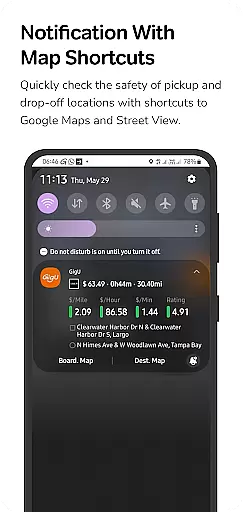
Additional features include quick map shortcuts for location safety checks, comprehensive trip history tracking, and voice notifications for enhanced convenience. The optional accessibility service integration ensures seamless operation while maintaining strict privacy standards.
In the ridesharing industry, having access to detailed vehicle and trip information is crucial for drivers seeking to maximize their earnings. GigU revolutionizes this aspect by providing live smart indicators that display essential metrics such as earnings per mile, per hour, and per minute.
This feature ensures that drivers can make informed decisions about which trips to accept or decline. The colored grading system further enhances this by rating trips based on user-defined settings, offering a quick visual cue to assess potential profitability.
By integrating with platforms like Uber and Lyft, GigU ensures that all valuable trip data is captured and processed in real-time without compromising user security. This empowers drivers to optimize their routes and time, ultimately leading to increased earnings.
Price transparency is vital for rideshare drivers who need to understand the true value of each trip offer. GigU addresses this through its innovative Cherry Pick feature, which instantly evaluates whether a trip offer is worth accepting.
The app provides a comprehensive breakdown of each ride's financials, including shortcuts to Google Maps and Street View for assessing pickup and drop-off locations. This allows drivers to factor in safety and convenience alongside potential earnings.
Additionally, GigU maintains a detailed history of all scanned ride offers, ensuring drivers have a clear record of past opportunities. With voice notifications further enhancing accessibility, GigU delivers an unmatched level of price transparency in the ridesharing market.
User-friendly interface
Real-time trip analysis
Enhanced earning potential
Robust security measures
Comprehensive analytics
Limited to rideshare platforms
Requires accessibility permissions
Premium features may cost extra
Occasional notification delays
Learning curve for new users

On the CarShield app, you can view contracts, make payments, & request roadside.
 4.40
4.40
Theme for Car Launcher
4.4
CVT diagnostics with ELM327 for Nissan-based vehicles
4.40
Play what you want through Android Auto
4.90
Discover new and used cars in Syria easily! Browse ads and connect with sellers.
3.70
Simplify your drive
3.90
Car Values, Research and More
4.80
Secure mobile payments & fuel savings at Phillips 66®, Conoco® and 76® stations
4.40
Shop, finance, or sell today.
4.80
The Texaco App allows you to pay for fuel from the comfort of your car!
4.80
View your car’s service records and find out when maintenance is due.
4.70
Your go-to app for car, truck & SUV parts, DIY tools, and expert repair help.
4.70
Quick and easy car diagnostics to get you the right fix.
4.70
Find Fast EV Chargers | Charge Your Vehicle at 1,100+ Fast Car Charging Stations
4.60
Taximeter; the professional's choice
4.30
Your car is talking. Start listening.
4.30
OBD diagnostics, Live Data, DPF regeneration for BMW
4.00
Read and delete OBD codes with any ELM327 OBD scanner. Coding functions included
3.40
O'Reilly Pro will streamline your parts lookup and ordering process!
3.20


User Reviews