
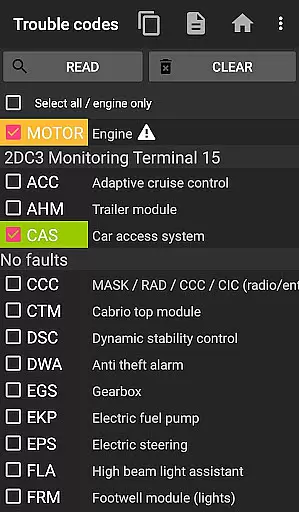
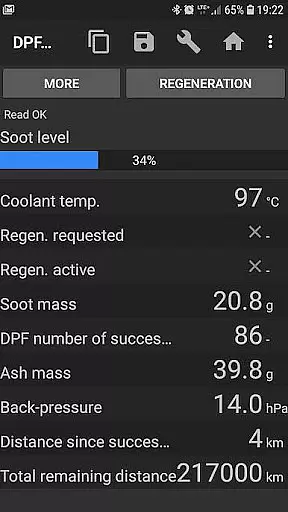
bimmer-tool is a comprehensive diagnostic application designed specifically for BMW car owners and enthusiasts. This app allows users to read and clear fault codes, request DPF regeneration, and access real-time engine data from their vehicles. With compatibility across various BMW models, it provides an essential toolset for monitoring vehicle health and performance.
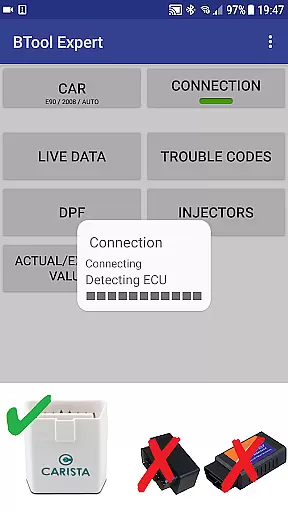
For older BMW models manufactured before 2008, the app recommends using a K+DCan USB cable connection for optimal functionality. It also supports wireless ELM adapters, although some functions may be limited. The application works seamlessly with recommended OBD adapters, ensuring reliable connectivity and accurate data retrieval.
Whether you're performing routine maintenance or diagnosing complex issues, bimmer-tool offers valuable insights into your BMW's operational status. From tracking exhaust fumes pressure to resetting service intervals, this app empowers users to maintain their vehicles efficiently while saving on professional diagnostic services.
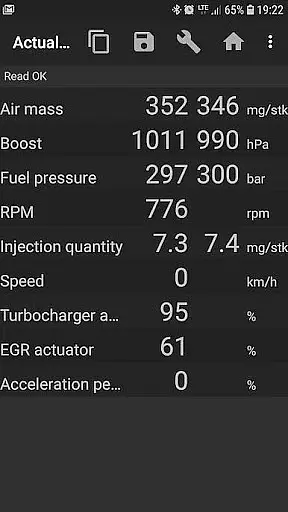
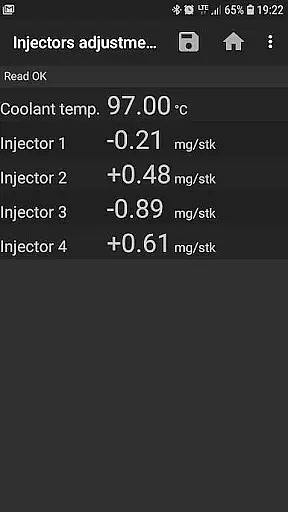
The bimmer-tool app boasts an impressive array of features tailored for BMW diagnostics. Users can read detailed DPF regeneration status, request regeneration processes, and reset adaptation values after filter replacements. The app provides access to critical engine parameters such as injector adjustments, air mass readings, intake manifold pressure, and fuel pressure.
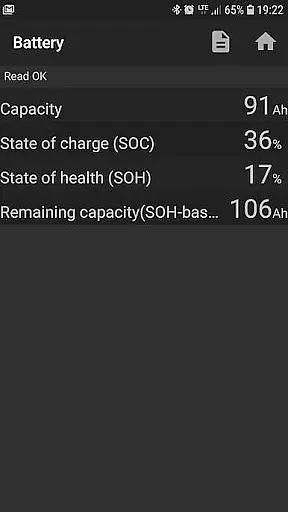
Advanced logging capabilities allow users to save data to CSV files for in-depth analysis. Additional functionalities include battery replacement registration without altering properties, resetting blocked lamp circuits due to short-circuit errors in E-series models, and managing oil/brake service intervals. These features collectively enable comprehensive vehicle monitoring and maintenance.
The application supports multiple connection types including K+D-Can USB, ENET cable/WiFi adapters, and ELM327 Bluetooth/WiFi adapters. Each connection type caters to specific vehicle models and user preferences, ensuring broad compatibility. By providing these diverse connection options, bimmer-tool ensures that users can select the most reliable method for their diagnostic needs.
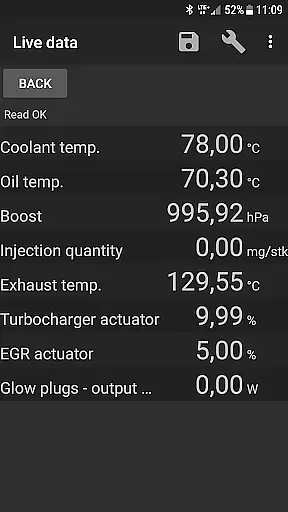
bimmer-tool provides comprehensive access to detailed vehicle information, which is crucial for BMW owners who want to understand their car's health and performance. The app allows users to read engine live data, including parameters such as air mass, intake manifold pressure, and fuel pressure. This real-time data offers insights into the engine's current operating conditions.
Additionally, bimmer-tool enables the reading of injectors adjustments and exhaust fumes pressure, giving a complete picture of the vehicle's internal workings. These features are particularly beneficial when diagnosing issues or fine-tuning engine performance. For those who have recently replaced components like the DPF filter, the app also supports resetting adaptation values, ensuring optimal functionality post-replacement.
The ability to log data to a CSV file further enhances the utility of this app. Users can analyze this logged information later, providing an invaluable resource for tracking changes over time or consulting with professional mechanics. With these capabilities, bimmer-tool empowers BMW drivers with knowledge and control over their vehicle's maintenance and performance optimization.
While bimmer-tool itself does not directly deal with monetary transactions, it promotes price transparency by detailing the costs associated with vehicle diagnostics and maintenance. By allowing users to perform complex functions such as reading fault codes and requesting DPF regeneration themselves, the app can significantly reduce service fees charged by official dealerships or third-party workshops.
The application outlines specific requirements for OBD adapters, listing both budget-friendly and premium options. This openness about compatible hardware ensures that users can make cost-effective decisions when purchasing additional equipment. Recommendations range from affordable Bluetooth adapters to more reliable K+DCan USB cables, catering to different budgets and needs.
Moreover, bimmer-tool's detailed guidance on using the app reduces the likelihood of incurring unexpected expenses due to incorrect usage or avoidable mistakes. By offering a transparent overview of what is needed for successful diagnostics, users can better manage their automotive maintenance costs. This approach ultimately leads to greater financial predictability and control for BMW owners utilizing the advanced features of bimmer-tool.
User-friendly interface
Comprehensive diagnostic tools
Wide range of supported adapters
Real-time engine data access
Detailed fault code information
Limited functionality for older models
Requires compatible OBD adapter
Wireless connection may be unstable
Some features need specific cables
Professional equipment might be costly

ODB2 based monitoring application for the Chevy Bolt (2017-2021)
 4.00
4.00
Realtime Charts is a plugin for the Torque Pro App (OBD 2 & Car)
4.20
Wonder how much horsepower and torque your car/truck makes? Look no further.
3.40
Better fuel to help keep you on the road
3.20
Digital Car Key/Launcher, Screen Mirror, Android Dashboard, Remote Wireless Link
4.40
Get more out of your AAWireless adapter with this companion app | aawireless.io
4.80
By enthusiasts, for enthusiasts
4.00
Shop cars & see your financing
4.60
Quick and easy car diagnostics to get you the right fix.
4.70
View your car’s service records and find out when maintenance is due.
4.70
Oil change service & coupons for car maintenance at Valvoline Instant Oil Change
4.70
1M+ high-quality auto parts at your fingertips. Fitment guaranteed.
4.70
Find Your Local Store or Shop Online for the Car, Truck, or SUV Parts You Need
4.70
CVT diagnostics with ELM327 for Nissan-based vehicles
4.40
Automotive Electrical Wiring Diagrams
4.40
Car Sounds Engine Sounds app welcomes Auto Lovers to feel Car Simulator Sound
4.20
Blink Charging Mobile app makes finding an EV charger an intuitive experience.
3.80
DIY Vehicle Wheel Alignment
4.3
Theme for Car Launcher
4.2


User Reviews