
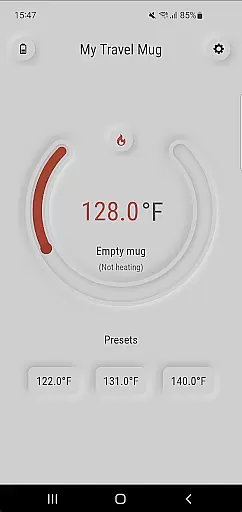
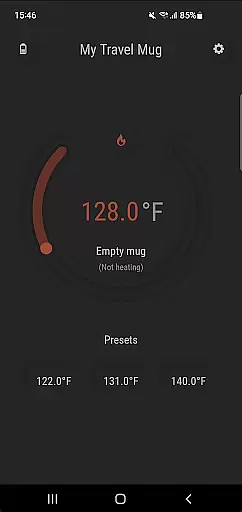
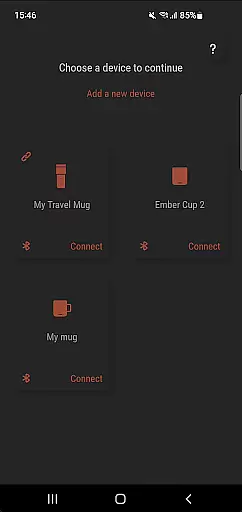
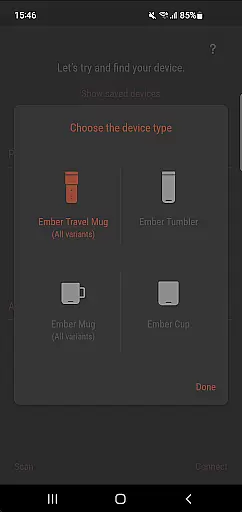
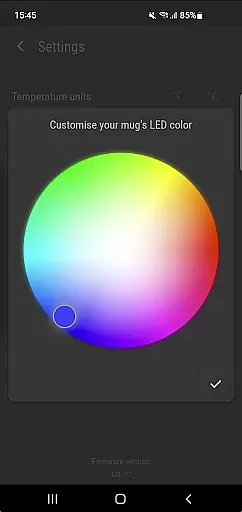
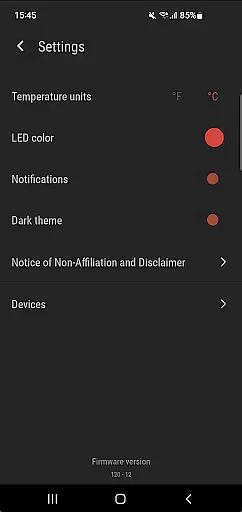
Ember Supreme is a feature-rich companion app designed specifically for users of Ember smart mugs. This application allows you to control and customize various settings of your Ember mug, including setting the target temperature in your preferred unit, changing the LED color, and even renaming your mug. The app supports multiple Ember products such as Ember Mug 1 & 2, Ember Cup 1 & 2, Ember Travel Mugs, and Ember Tunblers.
With its intuitive interface and reliable performance, Ember Supreme enhances your smart mug experience by providing precise temperature control and personalization options. Whether you're at home or on the go, this app ensures that your beverage is always at the perfect drinking temperature, making it an essential tool for coffee and tea enthusiasts.
Ember Supreme offers a comprehensive set of features tailored to enhance your interaction with Ember smart mugs. One of the standout capabilities is the ability to set and maintain your desired drinking temperature with precision. You can choose between Fahrenheit and Celsius, ensuring that your preferences are met regardless of your location.
In addition to temperature control, the app provides customization options such as changing the LED color of your mug and renaming it to something more personal. These features not only add a layer of personal touch but also make it easier to identify your mug in shared environments. With support for a wide range of Ember products, Ember Supreme is a versatile tool that caters to different user needs and preferences.
Ember Supreme offers comprehensive lifestyle management specifically tailored for users of Ember smart mugs. The app covers essential features that enhance the experience of using Ember products.
With support for multiple Ember devices including Mug 1 & 2, Cup 1 & 2, Travel Mugs, and Tumblers, it ensures that all your Ember products can be managed from one convenient location. This extensive device compatibility makes it an indispensable tool for those invested in the Ember ecosystem.
Users benefit from the ability to customize their mug's settings such as target temperature, temperature unit preference, LED color, and even naming their mug. These personalization options allow for a tailored experience that fits individual preferences and lifestyles.
The Ember Supreme app provides authentic and credible content directly aligned with the official Ember product line. As a companion app developed to work seamlessly with Ember smart mugs, it guarantees that all functionalities are verified and supported by the manufacturer.
Each feature, from setting the target temperature to adjusting the LED color, is designed based on genuine user needs and expert knowledge of Ember products. This ensures that every interaction with the app delivers reliable and accurate results.
By maintaining strict quality standards and working closely with Ember's product development team, the app establishes itself as a trustworthy source for managing your Ember devices. Users can feel confident that they are receiving expert-level guidance and control over their smart mugs.
User-friendly interface
Precise temperature control
Wide product compatibility
Customizable LED colors
Personalized mug naming
Limited to Ember products
No advanced scheduling
Requires constant connectivity
Basic UI design
Occasional syncing issues

Designed to delight, impress and energize your festive spirit every single day
 4.0
4.0
Paranormal Spirit Bell Trigger Device
4.30
Discounts, savings, and rewards
4.20
See wait times and check into a hair salon ahead of time with Online Check-In.
4.80
A unique and customizable watch face which rotates its layout every minute.
4.80
DailyGift can help you record your habits and get rewards along the way!
4.60
AAA Mobile provides on-the-go access to the services you know and trust.
4.60
No more juggling multiple apps, now you can control everything in one place!
4.60
Decorate your home screen with custom icons, color widgets, themes & wallpapers
4.70
Good magnifier app to see tiny things bigger and more clearly!
4.80
Your store’s deals, where you are.
4.80
Digital smart watch face made for Wear OS.
4.70
Retro animated weather with hourly forecast Watch Face for Wear OS
4.60
Unique "Isometric" style digital watch face for Wear OS
4.50
PARAVOX 4 is a professional ITC paranormal research application.
4.50
Use your device sensors to detect energy and convert it into spoken words.
4.10
Spiritus Ghost Box is an Audio and Visual ITC tool for paranormal research.
4.00
Big bold weather watch face with dynamic backgrounds and 3 complications
4.3
Celebrate the holidays with Advent Calendar: daily surprises and festive fun!
4.3


User Reviews