
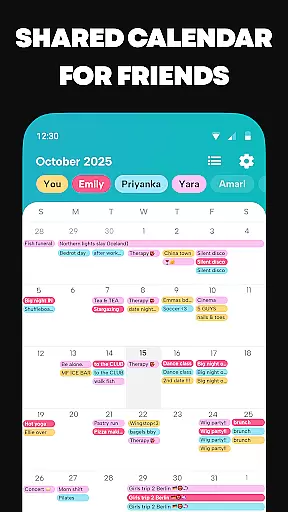

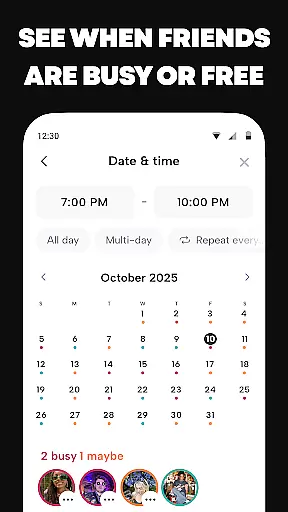


Howbout is a dynamic shared calendar application specifically designed for social connectivity among friends. This app revolutionizes traditional calendars by integrating fun and interactive features into scheduling. With millions of users already on board, Howbout allows you to effortlessly organize and share plans with your social circle. The app's core functionality lies in its ability to create color-coded events, manage availability, and customize the calendar to reflect personal styles, making it an essential tool for modern social planning.
Beyond basic scheduling, Howbout offers advanced features such as integrated group chats, event notifications, and the ability to sync with existing calendars like Google or Apple Calendar. Its unique activity feed and reaction system foster engagement, while privacy controls ensure users maintain authority over their shared information. Whether coordinating group outings or simply staying updated on friends' plans, Howbout transforms how individuals interact within their social networks.
Howbout distinguishes itself through a variety of innovative features tailored to enhance user experience. One standout capability is its color-coded event system, which allows users to visually organize their schedules and assign specific colors to different friends or groups. This feature not only streamlines event management but also adds a personalized touch to each calendar entry. Additionally, the app provides tools for creating detailed plans directly from group chats, incorporating notes, reminders, locations, and even GIFs to make organizing more engaging.
Another key aspect is the app's robust sharing functionality. Users can seamlessly sync external calendars, send invites via links, and control who sees specific events or details. The inclusion of a built-in chat system further enhances communication, keeping all discussions related to plans centralized. These features collectively enable users to transition smoothly from chatting about plans to executing them, ensuring that every step of the process remains intuitive and efficient.
Furthermore, Howbout prioritizes both customization and privacy. Users can personalize their profiles with pictures and themes while setting granular permissions for each event or group. This flexibility ensures that everyone can tailor their experience to suit individual preferences without compromising security. By combining these elements, Howbout successfully bridges the gap between utility and enjoyment in social planning apps.
User profile customization is a crucial aspect of any social application, allowing users to express their individuality and establish their digital identity. Howbout excels in this area by providing a comprehensive suite of personalization options.
With Howbout, users can add a profile picture, choose colors that reflect their personality, and set up their calendar with elements that resonate with their unique preferences. This level of customization ensures that each user's profile is not only a true representation of themselves but also easily recognizable by their friends.
In terms of authenticity verification, while the app description does not detail specific measures, it emphasizes privacy settings that give users control over who sees what within their calendar. This feature indirectly supports authenticity by empowering users to share genuine information with selected friends, fostering a trusted community environment.
The ability to customize and manage sharing settings enhances user engagement and satisfaction, as individuals can tailor their experience on Howbout to match their social comfort levels, ultimately leading to more meaningful interactions.
Connection discovery is an essential feature for social apps, enabling users to find and connect with friends, thereby enriching their social experience. Howbout facilitates this process through several innovative functionalities.
One of the standout features is the shared calendar, which allows for easy group calendar sharing. This function helps users keep track of their friends' activities and synchronize plans effortlessly, promoting a more connected social circle.
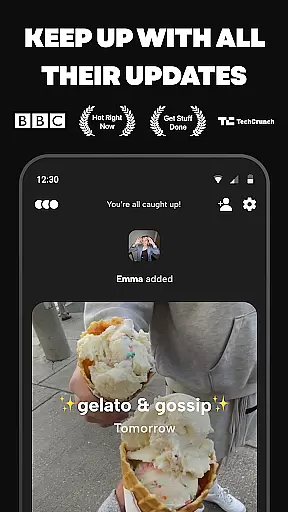
Additionally, Howbout incorporates a friends-only activity feed, which lets users stay updated on their friends' latest plans and updates. This feed encourages continuous interaction and keeps the user engaged with the community, as it provides a platform for 'snooping'u2014a light-hearted way of saying users can keep tabs on their friends' happenings.
Moreover, the built-in group chat for every plan and direct messaging capabilities ensure that planning and communication occur seamlessly within the app. These tools not only aid in discovering new connections but also in maintaining and strengthening existing ones, making Howbout a dynamic space for nurturing friendships.
User-friendly interface
Highly customizable options
Integrated chat functionality
Robust privacy controls
Vibrant community engagement
Limited professional tools
Potential overstimulation
Occasional sync issues
Feature overload for some
Privacy concerns for new users

The hottest live chat app so far. Video chat and meet great people...
 4.60
4.60
Dive into diverse fandoms. Connect, create, reblog.
3.90
Discover an open-minded dating experience when you download today
4.10
Instant video chat with cool people. Live video call & make friends with Monkey!
3.80
Chill and Chat with Tagged Live Video with millions of peeps
4.10
Message and video call your family and friends!
2.60
Connection Beyond Content
4.50
Create your personal AI chatbot: talk, roleplay, and connect with characters!
4.10
Free texting (SMS) to US, Canada & more. Free new number. Call free & Text free.
4.30
Live pics from your friends - Only the photos you want to see
4.60
A little connection can go a long way
4.60
Match, chat & date with singles nearby. The dating app to find true love
4.50
Live video chat to connect with people around the world. Video chatting on Olive
4.40
Build Your Team With One App
4.30
Honest dating app where real people find genuine love and real matches.
4.20
Random chat & meet online. Find your soulmate or someone special and have fun!
3.90
Resonate & Date with New Match
3.70
Follow the Truth! Join America's leading free-speech social platform.
3.10
This is to support the developer of Infinity for Reddit. No exclusive features.
4.0


User Reviews