

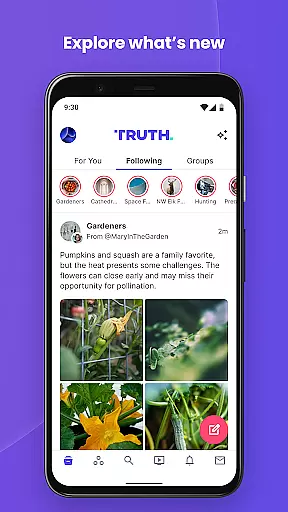






Truth Social is a free-speech social media platform designed to counter the increasing censorship by mainstream Big Tech companies. It allows users to express their thoughts and share content without fear of being silenced or canceled. The app provides an open space where individuals can engage in unrestricted conversations, making it particularly valuable for those who feel marginalized by traditional social media platforms.
The platform offers essential features like profile customization, a dynamic Truth Feed that displays posts from followed accounts, and powerful content creation tools. Users can post Truths, Re-Truths, photos, videos, and polls while staying informed through real-time interactions. With its focus on free expression and open dialogue, Truth Social serves as an important alternative for users seeking a more balanced social media environment.
Truth Social stands out with its robust feature set tailored for free expression and meaningful connections. The Profile section lets users personalize their presence through avatars, backgrounds, and activity tracking such as follower counts and post history. This helps users build their digital identity while fostering genuine engagement within the community.
The Truth Feed is another highlight, aggregating posts from followed accounts into a vibrant stream enriched with multimedia elements like images, links, and videos. Additionally, the Compose Truths tool empowers users to contribute to discussions by posting various types of content, including text, photos, polls, and video links. Advanced privacy controls are also available, allowing users to manage direct messages, set auto-deletion preferences, and control notification settings for a secure and customizable experience.
User profile customization is a fundamental aspect of any social platform, allowing individuals to express their unique identity. On Truth Social, users can personalize their profiles with avatars and backgrounds that reflect their personality. This level of customization not only enhances user engagement but also fosters a sense of community and belonging.
Authenticity verification is equally important in creating a trustworthy environment. While the app description does not specify the methods used for verification on Truth Social, such processes typically involve confirming the identity of users to ensure the credibility of interactions. Verified profiles can significantly enhance the reliability of the content shared across the platform.
The ability to track personal connections through follower and following counts adds another layer of interaction. Users can monitor their network's growth and understand their influence within the community. This feature encourages active participation and helps maintain an engaged user base.
Moreover, maintaining a history of posts and likes allows users to revisit their contributions and preferences over time. Such functionality not only aids in personal reflection but also assists in building a consistent narrative and presence on the platform. By offering these comprehensive profile features, Truth Social empowers its users to create meaningful and authentic connections.
Connection discovery is a pivotal feature in social media platforms, enabling users to find and engage with like-minded individuals. Truth Social facilitates this process by providing robust search capabilities. Users can look for specific voices or topics of interest, ensuring they stay informed and connected with relevant content.
Once a user finds a profile of interest, they have the option to follow directly from the search results. This streamlined approach simplifies the process of expanding one's network. Alternatively, users can view profiles before deciding to follow, allowing for informed choices about whom to connect with based on shared interests or mutual connections.
The platform's design encourages exploration and interaction. By integrating thumbnail photos, links, and other rich media into feeds, it brings conversations to life and makes them more engaging. These elements help users quickly assess the relevance and appeal of potential connections, enhancing the overall experience.
Furthermore, direct messaging capabilities complement connection discovery by allowing private, one-on-one chats. Users can set messages to auto-delete after a specified period, adding a layer of privacy and control. With these features, Truth Social not only aids in discovering new connections but also ensures that interactions remain secure and meaningful, fostering a vibrant and dynamic community.
User-friendly interface
Free speech focus
Customizable profiles
Real-time notifications
Multimedia sharing
Limited user base
Potential misinformation
Fewer integrations
Privacy concerns
New platform risks

Dive into diverse fandoms. Connect, create, reblog.
 3.90
3.90
Meet Strangers Online, Live Video Chat & Make Random Video Calls on Joi!
4.30
Live video chat to connect with people around the world. Video chatting on Olive
4.40
Date single & make friend
4.60
Watch super live shows 24/7, chat & meet friends in Plamfy social networking app
4.70
Resonate & Date with New Match
3.70
This version of Facebook uses less data and works in all network conditions.
4.60
A little connection can go a long way
4.60
TikTok Lite - Designed for speed, simplicity, and saving your phone’s space!
4.40
Raise cute Pengus with friends
4.70
live inside your fandom
4.60
A video app from OpenAI - AI video generation by the maker of ChatGPT
4.60
Global short video platform: epic effects, trending videos & vibrant community!
4.40
Dating for singles. Meet lonely people nearby online. Find your match here!
4.20
Discover an open-minded dating experience when you download today
4.10
Create & share photos, stories, & reels with friends you love
3.90
Instant video chat with cool people. Live video call & make friends with Monkey!
3.80
Go Live, Chat & Meet New People! Friends. And more than friends.
3.80
Message and video call your family and friends!
2.60


User Reviews