
Remind is an essential communication tool designed for the education sector, helping students, educators, and parents stay connected in real time. The platform supports seamless interaction across any device, ensuring that important school-related information is always accessible. With features like private contact protection and multi-language support, Remind bridges communication gaps effectively.
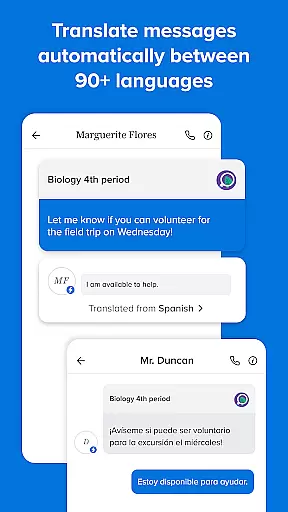
One of the standout capabilities of Remind is its ability to translate messages into over 90 languages, making it a versatile solution for diverse educational communities. Additionally, users can share files, photos, and links from popular websites, enhancing collaboration among teachers, students, and families. Whether you're coordinating with teachers or keeping track of assignments, Remind ensures that staying engaged with your school community is simple and efficient.
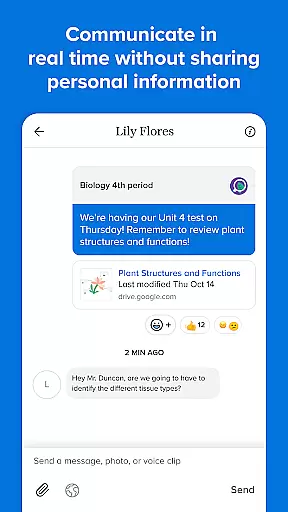
Remind offers a comprehensive set of features tailored to streamline school communication. Its real-time messaging functionality allows instant updates between teachers, students, and parents without revealing personal contact details, thus maintaining privacy. This feature alone transforms how educational stakeholders interact, offering convenience without compromising security.
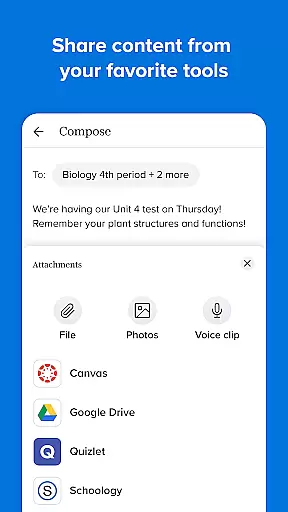
Beyond basic messaging, Remind supports multimedia sharing, enabling users to send files, images, and web content effortlessly. The app's translation feature is another major advantage, breaking language barriers by providing translations in more than 90 languages. These robust capabilities make Remind a powerful tool for fostering inclusive and effective communication within any educational setting.
In the realm of education, the precision and reliability of content are paramount. Remind ensures that all shared materials, from messages to files, maintain a high standard of accuracy. This commitment supports the platform's goal of fostering successful learning environments for students.
Through Remind, educators can distribute resources such as documents, images, and links with confidence. The assurance comes from the platform's dedication to preserving the integrity of educational content, thus empowering teachers to focus on teaching rather than fact-checking.
Furthermore, the ability to translate communications into over 90 languages not only broadens accessibility but also reinforces the credibility of the information shared. By prioritizing authoritative sources and verified translations, Remind solidifies its role as an essential tool in modern education.
Remind stands out by facilitating personalized learning experiences tailored to individual student needs. The platform's features enable educators to craft unique learning journeys by sharing targeted resources and feedback directly to students and parents.
With real-time communication capabilities across any device, Remind allows for timely interventions and support. Teachers can adapt their teaching strategies based on immediate feedback loops, ensuring that each student receives guidance pertinent to their academic progress.
This personalized approach extends beyond mere messaging; it encompasses the sharing of multimedia content that caters to diverse learning styles. As a result, Remind not only enhances engagement but also promotes a more inclusive and effective educational process.
User-friendly interface
Real-time messaging
Multi-language support
Private contact protection
Multimedia sharing options
Limited advanced tools
Occasional notification delays
No offline functionality
Dependent on internet access
Basic free version

Welcome to the Speak Navajo Language Application - Volume 1
 4.50
4.50
An interactive enhancement of the Sesame Street classic.
4.50
Quiz App to help case managers studying for CCMC Certification, 200+ Questions
3.40
Master note reading with StaffWars….
4.00
Your best partner for learning Japanese words. Based on a best-selling textbook.
2.80
The FE Clock is a way to track sun & moon around the circle of the earth.
4.30
Hasbro’s classic CANDY LAND game is now a gorgeous interactive storybook app.
2.30
Learn to make peaceful contact with extraterrestrial civilizations
4.10
Fun, personalized math learning games that adapt to your child’s needs.
4.40
Engage in learning science and math with the award-winning PhET simulations!
4.70
Prepare for the BCBA / BCaBA exam. Study ABA with the ABA Wizard app.
4.60
Latest TLC Practice Questions! Multiple languages available!
4.50
Nighty Night Circus - Bedtime story for kids
4.10
Break Language Barriers with AI—Learn Language Anytime, Anywhere!
4.00
An aviator’s preparation, study and test tool for FAA Knowledge Exams.
4.00
Your guide to thousands of satellites and spacecraft in orbit around Earth!
3.90
Deal Craps (Practice Craps Payouts)
3.80
Test prep for Indiana students
4.2
Animals pop up and make sounds—learn names and noises in Peekaboo Barn!
4.2


User Reviews