
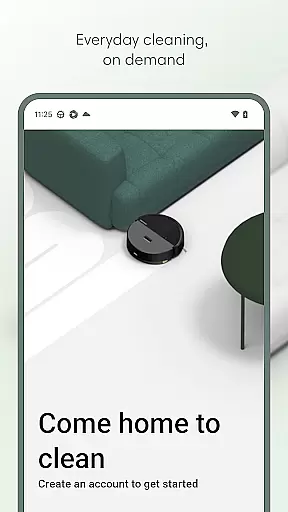
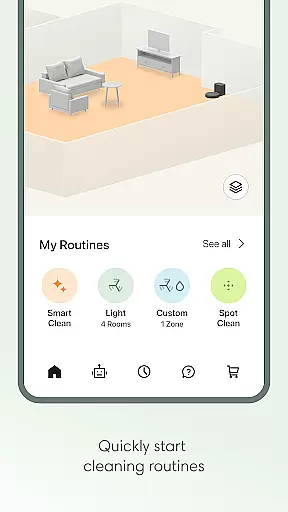
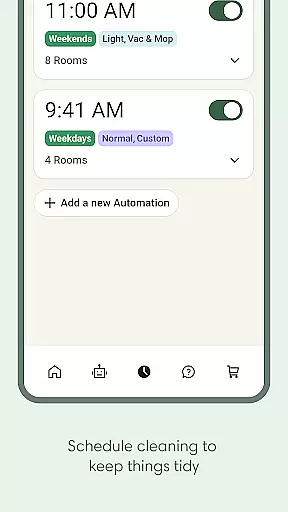
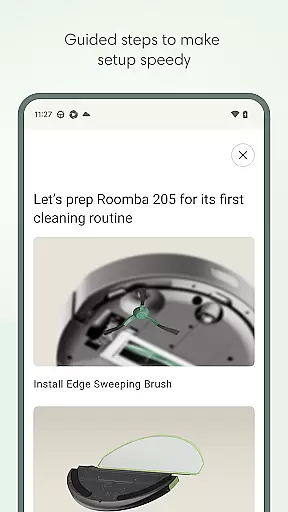
Roomba Home is a smart cleaning management app designed for Roomba robot vacuum owners. The application allows users to remotely control their robotic vacuums, offering functionalities such as starting, stopping, and scheduling cleaning sessions. With compatibility across multiple Roomba series, it provides an intuitive interface to manage cleaning routines, customize home maps, and adjust specific cleaning settings.
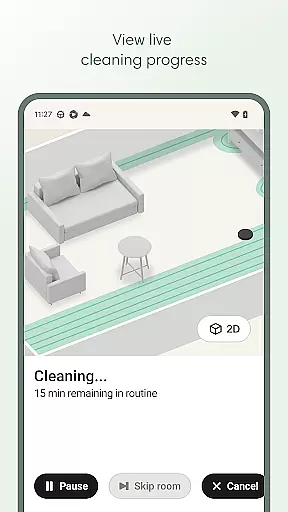
The app's standout feature is its ability to create personalized cleaning schedules and offer real-time insights into the cleaning process. Users can see exactly where the robot is cleaning and make adjustments on the fly. Additionally, the Roomba Home app supports smart home integrations, including voice control through Alexa, Siri, or Google Assistant, making daily cleaning tasks effortless and efficient.
Whether you need to clean specific rooms or set up recurring cleaning cycles, Roomba Home ensures your living space remains spotless with minimal manual intervention. Its proactive maintenance alerts and seamless user experience make it an essential tool for modern households looking to optimize their cleaning routines.
Roomba Home offers a comprehensive suite of features that enhance the user's interaction with their robotic vacuum cleaner. One of the key highlights is the Routine Builder, which allows users to effortlessly create customized cleaning schedules. You can select specific rooms, adjust cleaning modes like vacuuming or mopping, and fine-tune settings such as suction power and mopping liquid levels.
In addition to scheduling, the app provides advanced mapping capabilities. Users can save up to five detailed maps of their home, label rooms, and add zones for targeted cleaning. Real-time controls enable users to monitor and direct the robot's movements during cleaning sessions. This level of precision ensures that every corner of your home receives the attention it needs.
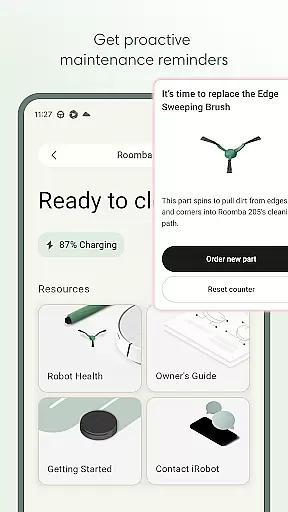
Smart home integration further elevates the user experience. With support for voice commands via Alexa, Siri, or Google Assistant, controlling your Roomba has never been easier. The app also includes a Health Dashboard that monitors the status of your robot and accessories, providing timely maintenance suggestions to keep everything running smoothly.
The Roomba Home app offers comprehensive lifestyle category coverage by integrating multiple essential home management features into one intuitive platform. This includes advanced cleaning scheduling, personalized routine creation, and detailed home mapping functionalities.
Users can access a wide array of customization options that cater to various household needs. The app supports creating specific cleaning zones, labeling rooms, and adjusting suction levels based on different floor types, ensuring every area of the home receives optimal care.
In addition to core cleaning functions, the application provides proactive maintenance alerts and health monitoring for both the robot and its accessories. These features help maintain peak performance while extending the product's lifespan, offering users peace of mind regarding their investment.
Furthermore, seamless smart home integration through voice control compatibility with major platforms like Alexa, Siri, and Google Assistant enhances the overall lifestyle experience. This connectivity allows users to manage their cleaning routines hands-free, making daily household maintenance more convenient than ever before.
The Roomba Home app demonstrates exceptional content authenticity by providing verified information directly from iRobot, the industry leader in robotic home cleaning solutions. All features and recommendations are based on extensive research and development by experts in robotics and home automation.
Expert credibility is evident through the app's intelligent recommendation system, which suggests optimal cleaning patterns based on historical data and user behavior. The application's ability to identify frequently dirtied areas and adjust cleaning intensity accordingly showcases the depth of expertise behind its development.
Additionally, the app includes a comprehensive Robot Maintenance & Health Dashboard, designed by technical specialists to ensure proper device operation. This feature provides users with professional-grade insights into their robot's performance metrics and maintenance needs, backed by iRobot's decades of experience in the field.
The inclusion of real-time cleaning insights and map accuracy further reinforces the app's authoritative position in the lifestyle category. These features are continuously refined through rigorous testing and user feedback, maintaining the highest standards of reliability and effectiveness in home cleaning management.
User-friendly interface
Real-time cleaning insights
Voice command compatibility
Customizable cleaning schedules
Advanced mapping features
Limited to 2.4 GHz Wi-Fi
Not compatible with all models
Requires initial setup time
Premium features may need subscription
Dependent on stable internet connection

Chat, meet genuine singles in your area. Real connections start with being real.
 4.30
4.30
Immerse yourself in the serenity of lavender fields and white butterflies
4.0
Discounts, savings, and rewards
4.20
Earn money & gift cards when you take surveys, play games, scan receipts & more.
4.50
Play fun games, complete quick surveys, and earn money. It's fun and easy!
4.40
Mixing Colors for Menswear
4.20
An Eerie Musical Trigger Toy for Spirits to Play with!
3.50
Vehicle ownership simplified. Get the myChevrolet® app today.
4.60
DailyGift can help you record your habits and get rewards along the way!
4.60
Pay your rent, submit work orders and much more with the RentCafe Resident App.
4.70
Retro animated weather with hourly forecast Watch Face for Wear OS
4.60
The all-new Cync app. The simple, connected app for Cync and C by GE.
4.50
A smart Siddur with halachic times
4.50
This minimalist yet classic board design brings a futuristic twist to your wrist
4.20
Smart controls for your Ember Smart Mugs
4.10
Spirit Communicator is a real paranormal ghost hunting app with many fun modes.
3.90
Healthy eating timer app to track meal pace, improve habits, and eat slowly.
4.1
Discover how to help puppies stay calm around noise with this helpful app.
4.3
Futuristic watchface inspired by Back to the Future: sleek, retro, timeless
4.5


User Reviews