
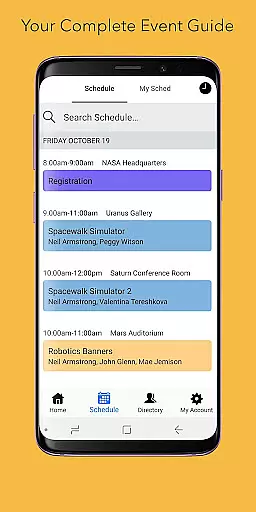
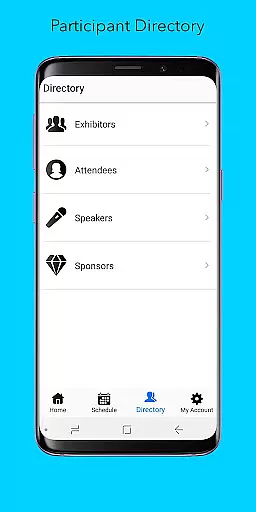
Sched is a leading platform for session registration and attendance management, designed to streamline the organization of complex multitrack events. This app allows event organizers and attendees to manage all event details in one place, ensuring a seamless experience. With features like full scheduling, personalization options, and comprehensive directories, Sched enhances how people interact with events. The platform's vision is to create a world where events are truly experienced rather than merely endured, offering tools that make every event more engaging and efficient.
Whether you're an event organizer looking to provide better experiences or an attendee wanting to maximize your participation, Sched offers practical solutions. Its offline caching feature ensures users always have access to their schedules, even without an internet connection. By centralizing event information and providing easy access to key functionalities, Sched transforms how modern events are managed and enjoyed.
Sched boasts a variety of robust features tailored to enhance event management and participation. One of its standout capabilities is the full schedule view, which lets users conveniently browse entire event schedules without needing physical guides. This feature saves time and reduces confusion, making event navigation effortless. Additionally, the app provides powerful personalization tools, enabling users to log in and modify their schedules on-the-go or sign up for public events by creating attendee accounts.
Another significant feature is the directory of professional profiles for speakers and exhibitors, offering users detailed insights into key participants. This helps attendees make informed decisions about which sessions to attend. Furthermore, Sched is equipped with offline caching, ensuring users can access their schedules anytime, regardless of connectivity issues. These features collectively ensure that Sched not only meets but exceeds the expectations of both event organizers and attendees, delivering a superior event experience.
Task creation and detail customization are essential features for event management applications like Sched. This functionality allows event organizers to create detailed sessions, workshops, or presentations with specific information such as time, location, speaker details, and session descriptions.
Sched offers an intuitive interface where organizers can easily input and adjust session details. The platform supports rich text formatting, enabling the addition of links, images, and formatted text to make session descriptions more engaging and informative for attendees.
For users, this means they can expect a well-organized event with all necessary information readily available. They can plan their attendance by reviewing detailed session descriptions, understanding the context and objectives of each session, and choosing those most relevant to their interests or professional development.
The value lies in enhancing the overall event experience. Attendees can navigate through a comprehensive schedule, making informed decisions about which sessions to attend, thus maximizing their event participation and engagement.
Reminder settings in event apps like Sched play a crucial role in ensuring attendees do not miss important sessions. This feature allows users to set up personalized alerts for upcoming events or sessions, based on their preferences and schedule.
Sched provides flexible options for setting reminders. Users can choose how far in advance they wish to be notifiedu2014whether it's minutes, hours, or days before a session starts. This flexibility ensures that reminders fit seamlessly into attendees' personal schedules and preferences.
The benefit to users is significant. With timely reminders, attendees can better manage their time at events, arriving punctually to sessions and avoiding scheduling conflicts. This leads to a more relaxed and enjoyable event experience, free from the stress of missing key sessions.
Ultimately, reminder settings contribute to higher attendee satisfaction and engagement. By keeping participants informed and on track, Sched helps them make the most out of every event, enhancing both learning opportunities and networking potential.
User-friendly interface
Comprehensive scheduling
Offline functionality
Personalized profiles
Real-time updates
Limited free features
Occasional sync issues
Requires account creation
Premium costs
Complex setup

The calendar app in this 2026 year see all dates.
 4.20
4.20
Create Birthday Cards in Birthday Invitation Maker and Birthday Card Creator App
3.00
PheedLoop Go! is the mobile event app for events powered by PheedLoop.
4.40
Get live football here
4.30
No invest, Easy way to earn USDT through crypto cloud mining
3.80
Beautiful invitation cards + easy RSVP tracking for any event. Design Invites.
4.80
RAISE-365 makes fundraising easy and fun!
3.20
Microsoft Ignite is an event that showcases latest advancements in technology
4.00
Design Invitations & Cards for Any Occasion
4.80
Fantasy of Lights Event App
5.00
The KRUU app - plan, celebrate, remember
4.80
Plan your wedding for free on the go: vendors, budget, website and checklists!
4.80
Text message invitations for birthday party, wedding, graduation, baby shower +
4.60
Invitation Card Maker, Design & share wedding, birthday & party invites fast
4.40
Local events, contests, and giveaways for local dads
3.70
Purchase line-skip passes, drinks, cover, and more at bars and clubs
3.50
TV Garden - World Live TV : Play & cast your videos seamlessly!
3.20
Mobile Event Guide for Greater NY Dental Meeting
4.1
Browse events, find transportation, keep up with the latest news from your team
4.3


User Reviews