
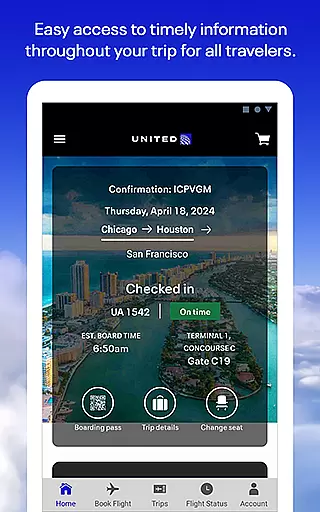
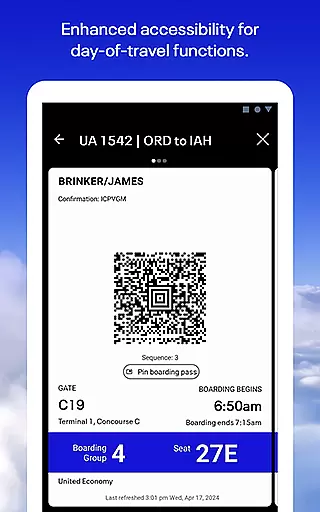
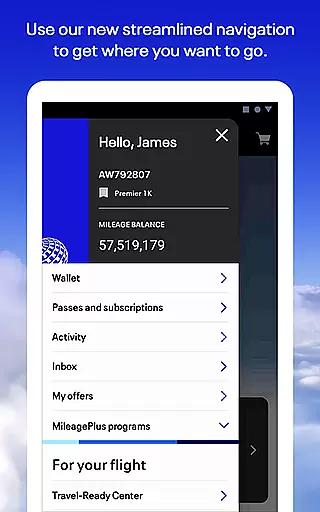
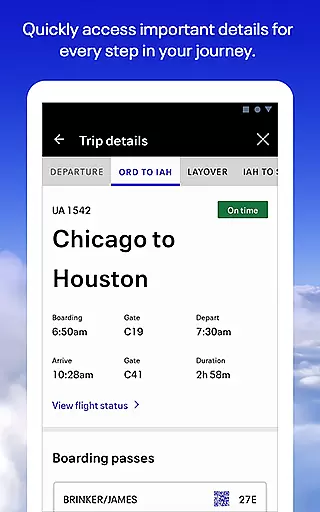
United Airlines app is your all-in-one travel companion, designed to simplify every step of your journey. With a comprehensive suite of features, the app allows users to search and book flights across United's global network, check in seamlessly, and access boarding passes directly from their mobile devices. The app also provides essential tools for managing reservations, selecting seats, and tracking checked baggage.
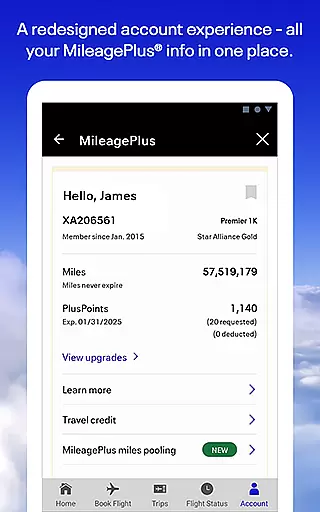
Beyond basic booking functions, United Airlines app offers innovative solutions like the Travel-Ready Center to ensure passengers meet all travel requirements. Its built-in terminal guide helps travelers navigate airports efficiently while exclusive in-flight entertainment options keep passengers engaged during their journey. Frequent flyers can conveniently manage their MileagePlus accounts and redeem reward miles through the app.
This application is particularly valuable for business travelers and frequent flyers who need to stay organized and informed throughout their journeys. By consolidating all essential travel information in one place and providing 24/7 customer support through various communication channels, United Airlines app delivers significant time-saving benefits and peace of mind to its users.
The United Airlines app distinguishes itself through its extensive feature set that covers the entire travel lifecycle. One of its standout capabilities is the comprehensive flight management system, which enables users to not only book flights but also make changes to existing reservations with ease. The app's seat map functionality provides detailed cabin layouts, allowing passengers to select their preferred seats based on specific preferences.
A key innovation is the Travel-Ready Center, which helps passengers verify they have all necessary documentation before traveling. The app's bag tracking feature uses advanced technology to provide real-time updates on checked luggage, giving travelers peace of mind. Additionally, the built-in airport navigation tool offers terminal maps and gate information, streamlining the airport experience.
For in-flight entertainment, the app integrates seamlessly with aircraft systems, offering a wide selection of movies and games. The MileagePlus management system is another valuable feature, allowing members to track their mileage balance, view available awards, and redeem points directly within the app. These features collectively create a comprehensive travel management solution that saves users time and enhances their overall travel experience.
When it comes to booking travel, ensuring the authenticity of your reservations is paramount. The United Airlines app provides a secure and reliable booking experience across its global network. Every flight you book is instantly confirmed and integrated into your itinerary, offering peace of mind.
The app allows users to easily book flights for themselves or on behalf of others, providing flexibility for both individual and group travel. With real-time seat maps and fare information, customers can make informed decisions while planning their trips. This transparency ensures that all bookings are accurate and trustworthy.
Additionally, the app's Travel-Ready Center prepares travelers for their journey by providing essential information and requirements. Whether it's visa details, health declarations, or baggage policies, users can be confident in the legitimacy of their travel documents. This comprehensive approach to booking ensures a seamless experience from start to finish.
Understanding the true cost of travel is crucial for making informed decisions. The United Airlines app excels in providing clear and comprehensive pricing information throughout the booking process. Customers can view all applicable fees, taxes, and surcharges before finalizing their purchase.
The app's dynamic pricing engine displays real-time fare updates, allowing users to compare different flight options based on cost and convenience. This feature enables travelers to find the best value for their money while maintaining full visibility into what they're paying for. The ability to modify search parameters helps in discovering more economical alternatives.
Furthermore, the app offers various payment options and clearly outlines any additional costs associated with ancillary services such as baggage fees or seat selection charges. This level of price transparency empowers users to budget effectively and avoid unexpected expenses during their travel journey.
User-friendly interface
Comprehensive flight management
Real-time bag tracking
Extensive entertainment options
24/7 customer support
Limited international features
Occasional bugs
Heavy data usage
Complex navigation
Ads in free content

MyTSA gives you 24/7 access to info that passengers frequently request from TSA.
 4.10
4.10
Real-time flight tracking with live maps and flight status updates.
3.70
Replace your car trips with the world’s largest shared electric vehicle company.
4.90
Download now and start earning rewards on hotels, tours, and everything travel.
4.50
Amplify Your Experience
3.00
Booking your bus tickets has never been easier
4.70
Book now to save with exclusive travel deals on hotels, flights, cars & packages
4.70
Rent the perfect car for wherever you’re going
4.90
Book flight, car or packages. Instant access to hotel discounts & travel deals
4.80
It drives. You ride.
4.90
Bus tickets at unbeatable prices with routes across the US. All aboard FlixBus!
4.70
Navigation on hikes is no longer a problem. Download the map, put notes and go!
4.60
NEW! Vacation with Ease.
4.60
Discover the power of one-way location tracking. Share your location securely.
4.50
Now you can book homes, experiences, and services—all in our redesigned app.
4.40
Navigate your world faster and easier with voice navigation & street view map
4.20
Get real-time traffic, directions, search and find places
4.10
Maps Speedometer shows your current speed in any app
3.60
View delays, closures, and weather-related conditions on Missouri state roads.
3.30
Honest Expedia app review based on real user experiences—customer service problems, booking issues, One Key rewards, and comparisons.



User Reviews