
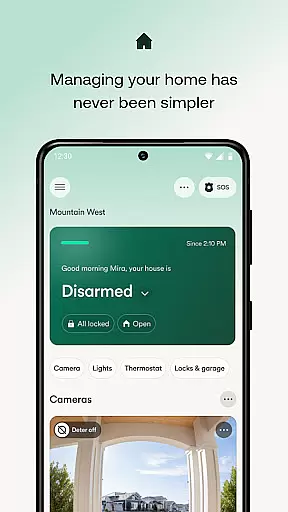
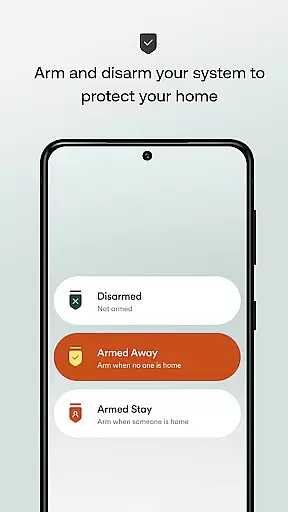
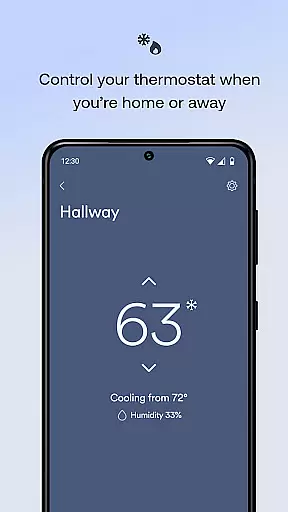
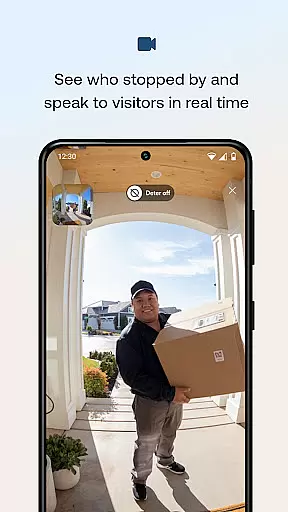
Vivint is a comprehensive smart home application that integrates home security, energy management, and smart home features into one platform. The app allows users to control their entire home system remotely, including arming or disarming the security system, managing smart locks, viewing live camera feeds, and adjusting thermostats. With its intuitive interface, Vivint makes it easy for homeowners to manage their homes from anywhere, ensuring both convenience and safety.
One of the standout features of Vivint is its ability to automate various aspects of home management through custom actions. Whether you're checking on your home's security status, adjusting the temperature, or unlocking doors for guests, the app provides seamless control. Additionally, the app supports high-definition video monitoring with two-way communication, making it possible to interact with visitors even when you're not at home.
The app is particularly useful for those who want to enhance their home's security while also optimizing energy usage. By allowing users to create custom schedules for lights and thermostat adjustments, Vivint helps save money and reduce energy waste. This combination of security, convenience, and energy efficiency makes Vivint an invaluable tool for modern homeowners.
Vivint offers a wide array of features designed to make home management smarter and more efficient. One of its core functionalities is the ability to arm or disarm your security system remotely. This feature ensures that your home remains secure whether you're inside or away. Additionally, the app supports custom actions that allow users to automate various tasks such as setting the thermostat, turning off lights, or locking doors, all through a single interface.
Another significant feature is the high-definition video monitoring capability. Vivint provides clear 180x180 HD video feeds, enabling users to see and speak with visitors through their doorbell cameras using two-way talk functionality. This feature enhances home security by allowing homeowners to interact with visitors in real-time, even when they are not physically present. Furthermore, the app includes a 30-day DVR recording option and Smart Clips, which help users review important events around their home.
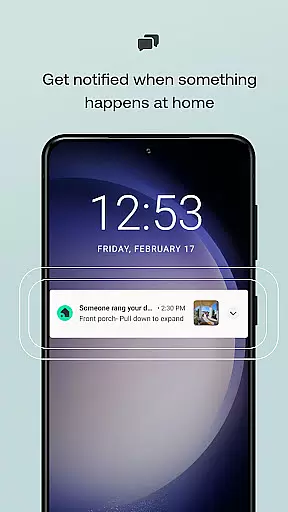
Energy management is another area where Vivint excels. Users can create custom schedules for their lighting and thermostat settings, ensuring optimal energy usage throughout the day. The app also sends alerts and notifications for various events, such as when a package is delivered or if a garage door is left open. These proactive notifications help users stay informed and take immediate action when necessary, further enhancing the overall smart home experience.
When managing a smart home, the authenticity of property listings and statuses is crucial. The Vivint app ensures that all information regarding your home's security and management systems is accurate and up-to-date.
Through real-time updates and status indicators, users can verify the condition of their smart locks, garage doors, and security systems directly from the app interface. This feature provides peace of mind by confirming that your home is secure and properly managed at all times.
The app's integration with various smart devices means that any changes made to your home's security or environmental controls are immediately reflected in the app. This seamless synchronization allows homeowners to trust the app as a reliable source for their home's current state.
By ensuring that all property-related notifications and statuses are genuine and timely, the Vivint app empowers users to make informed decisions about their home security and management, enhancing both safety and convenience.
Effective home management encompasses control over various aspects of your living space, and the Vivint app excels in providing comprehensive tools for this purpose. With functionalities ranging from energy management to advanced security features, it simplifies the complexities of modern home oversight.
Users can create custom schedules for lighting and climate control, which not only enhances comfort but also contributes to significant energy savings. The ability to adjust these settings remotely adds an extra layer of convenience, allowing homeowners to optimize their home environment even when they're away.
Beyond basic controls, the app offers sophisticated features such as live camera feeds, two-way communication through doorbells, and smart deterrence options. These capabilities ensure that you remain connected to your home, enabling you to respond promptly to any situation that may arise.
By consolidating all these functions into a single platform, the Vivint app streamlines home management tasks, making it easier than ever to maintain a secure, efficient, and comfortable living space.
User-friendly interface
Comprehensive security features
Remote home management
Energy-saving options
HD video monitoring
Subscription required
Higher cost
Dependent on internet
Limited third-party integration
Complex setup

Use Home by ShowingTime to easily manage showings, tours, feedback and more
 3.60
3.60
Make Renting Easy
4.40
Unlock AI-based barcode scanning and support the development of Grocy Android
4.1
An awesome mobile app for Home Security Surveillance - uses ZoneMinder
3.20
Draw your floor plan smartly. Make house design blueprint with home planner app
3.60
Design house plans in 2D & 3D, style furniture, and preview renovation layouts
3.70
Plants, Beauty, Collectibles
4.60
Search for Homes, Rentals, Agents & Schools
4.70
Houses for Sale & Homes for Rent: Buy Homes, Rent Apartments & Sell Real Estate
4.80
Turn old phones into security cameras, baby monitors, pet cams, and more.
4.70
Map-based search app for apartments and homes for rent.
4.60
Tailored Care Guides For Houseplants, Indoor Plants, Garden Plants & Flowers.
4.60
AI-powered home design, interior design, home decor, and room design solutions
4.50
Control the scent and ambiance of your home and car, right from your phone.
4.50
The only mappable smart lights for custom decoration.
4.50
The official app for Home Assistant. Control your home anywhere in the world.
4.30
Fully control your Philips TV with this all-in-one remote control app.
4.20
Technology powering many in-home services for residents across the United States
3.80
An easier way to make payments and maintenance requests from anywhere.
3.50


User Reviews