
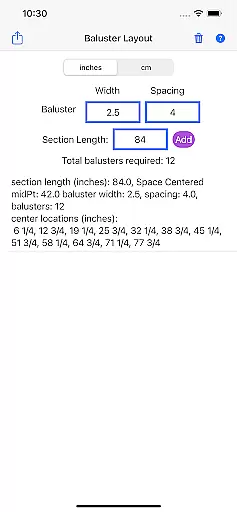
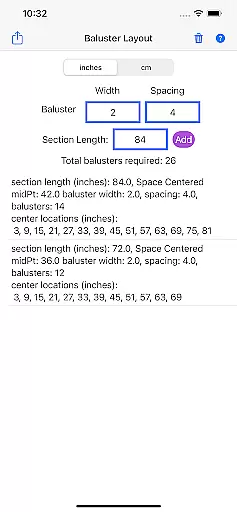
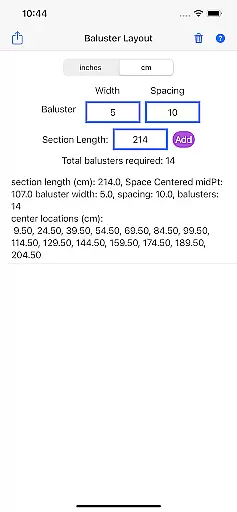
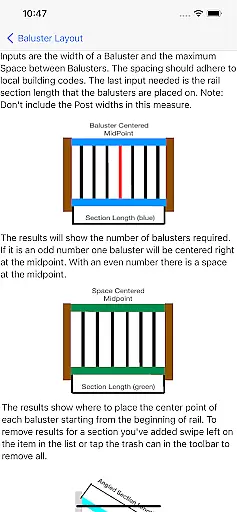
Baluster Layout is a specialized application designed to assist deck and stair builders in calculating baluster spacing with precision. The app's core functionality lies in its ability to determine the exact number of balusters needed and their precise placement, ensuring compliance with building code requirements.
What sets Baluster Layout apart is its user-friendly interface that allows builders to input railing length, baluster width, and desired spacing. The app then performs calculations for optimal spacing, even accommodating projects with multiple railing sections, each having unique dimensions. This makes it an invaluable tool for both professional builders and DIY enthusiasts.
The app finds particular utility in scenarios where accuracy and adherence to safety standards are paramount. By providing detailed results and eliminating manual calculation errors, Baluster Layout not only saves time but also ensures the creation of visually appealing and code-compliant structures.
Baluster Layout offers a rich set of features tailored to the needs of those involved in baluster installation projects. One of its standout characteristics is the precision spacing feature, which calculates the optimal distance between balusters to meet strict building codes.
In addition to handling simple installations, the app excels in managing complex projects involving multiple rail sections. Users can work with different dimensions for each section, offering unparalleled flexibility. Furthermore, unit flexibility allows users to switch between inches and centimeters, catering to the specific needs of diverse projects.
Each feature within Baluster Layout is designed to provide tangible value to its users. Detailed results offer a comprehensive breakdown of baluster requirements and placements, saving time, reducing hassle, and preventing costly mistakes. This focus on detail and compliance ultimately leads to safer and more stable structures.
In the realm of home improvement and construction, having reliable measurements and calculations is essential for ensuring that all components fit perfectly and meet safety standards. Baluster Layout offers a dependable solution for calculating baluster spacing with precision, providing assurance that your railing project will comply with building codes. The app employs an algorithm that takes into account railing length, baluster width, and desired spacing to deliver accurate results every time.
Users benefit from the app's ability to handle complex projects involving multiple railing sections, each with unique dimensions. This ensures that whether you're working on a straightforward deck railing or a more intricate stairway system, Baluster Layout can adapt to the specific needs of your project. By offering flexibility in unit selection, either inches or centimeters, it caters to a wide range of project specifications and user preferences.
The authenticity of the data provided by Baluster Layout is one of its key selling points. It eliminates the guesswork and potential errors associated with manual calculations, thus guaranteeing that the information you receive is not only precise but also practical for implementing directly into your construction process. With detailed results outlining the number of balusters needed for each section and their exact placement, users can trust that they are getting a product that is both authentic and immensely useful.
Beyond just calculating baluster spacing, Baluster Layout incorporates features that contribute to efficient home management during construction or renovation projects. Its capacity to save time and reduce hassle is invaluable for both professional builders and DIY enthusiasts who need to manage various aspects of their projects with ease. By streamlining the calculation process, it allows users to focus on other critical elements of construction management, such as material procurement and workforce coordination.
The app's ability to prevent costly mistakes cannot be overstated. In construction, an error in measurement can lead to wasted materials and compromised structural integrity. Baluster Layout mitigates these risks by ensuring that all baluster placements adhere strictly to safety regulations and building codes, which is crucial for maintaining the stability and security of any deck or stair railing.
Moreover, the visual appeal of a finished structure is significantly enhanced when precise calculations inform its design. The app helps create code-compliant structures that are not only safe and stable but also aesthetically pleasing. This dual focus on functionality and aesthetics is what makes Baluster Layout an indispensable tool in any homeowneru2019s or builderu2019s arsenal, elevating it from a simple calculator to a comprehensive home management feature for those undertaking baluster installation projects.
Accurate calculations
User-friendly interface
Time-saving tool
Unit flexibility
Compliance assurance
Limited to balusters
No 3D visualization
Basic design layout
Few customization options
Requires manual input

Draw your floor plan smartly. Make house design blueprint with home planner app
 3.60
3.60
Our app allows Sunrun customers to monitor systems, pay bills, and get support.
3.80
Download today to join the community to help bring lost pets home faster.
4.70
Control Fire TV & mirror your phone screen instantly over Wi-Fi.
3.30
The Merkury Smart app makes it easy to control your smart devices.
4.50
WiZ smart light system
4.40
Turn old phones into security cameras, baby monitors, pet cams, and more.
4.70
Looking for the perfect apartment finder app? Find beautiful rental homes here!
4.60
Make your phone a surveillance camera remote with a home camera app for Android!
4.40
View houses and apartments for rent, updated daily.
4.80
Plants, Beauty, Collectibles
4.60
Wobble Fix Tool
4.40
AI Home Designer & Room Planner: Decorate your interior space with AI
4.40
3D House Design and AI Room Planner - from floor plans to full interior design.
4.40
Control your thermostat, comfort, and home monitoring from your phone
4.30
Turn your phone into a wifi cam with smart features and umlimited reach.
4.20
Find contractors for all home renovation projects. Remodeling, repair, and more.
4.20
This Fire TV Remote control's your Fire TV Device and Insignia Fire TV Remote
3.70
Universal TV Remote for TV, control all Smart TVs with your mobile phone.
4.1


User Reviews