
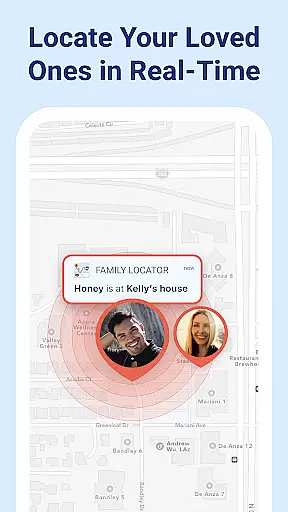

Find my Phone - Family Locator is a comprehensive safety and connection app designed to help families stay connected through real-time location tracking. Using advanced GPS technology, the app allows users to view live locations of family members on a private map, ensuring peace of mind in crowded areas or during travel.
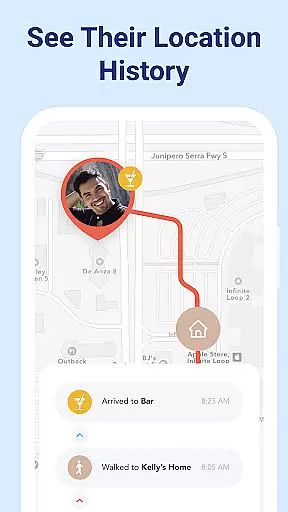
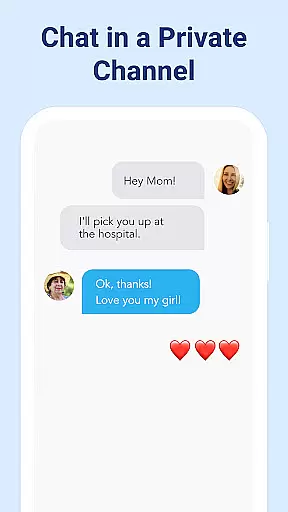
The app offers key features such as arrival and departure alerts, an SOS button for emergency situations, and flight tracking for family members who frequently travel. Additionally, it includes a secure in-app chat feature and location history, making it easy to maintain constant communication and review past movements. These functionalities are particularly useful for parents monitoring their children's whereabouts or caregivers assisting dependents.
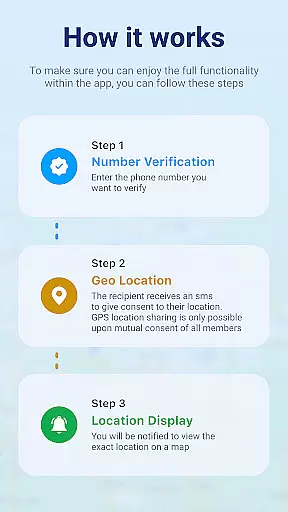
With its focus on privacy and transparency, Find my Phone - Family Locator ensures that all location sharing is based on mutual consent. The app provides clear notifications about data usage and allows users full control over their permissions. This makes it an ideal tool for family safety, promoting trust and responsible use among close contacts.
Find my Phone - Family Locator stands out with its robust set of features tailored for family safety. One of its core functionalities is real-time location tracking, which displays the current positions of family members on a private map. This feature is complemented by arrival and departure alerts, notifying users when their loved ones reach or leave specific locations like home or school.
In emergency situations, the SOS button allows users to instantly share their location with trusted contacts. For families with members who travel often, the app also includes flight tracking, providing updates on flights and sending notifications upon arrival. To enhance communication, Find my Phone offers a private in-app chat and quick check-in options, enabling users to confirm their safety with a simple tap.
Another notable feature is the location history, which lets users review past locations of family members. All these capabilities are supported by transparent permission requests and detailed explanations, ensuring users remain in control of their data. By combining advanced GPS technology with privacy-focused design, Find my Phone - Family Locator delivers a reliable solution for maintaining family connections and ensuring safety.
Booking authenticity is a crucial feature for any travel and local application, ensuring that all reservations and location data are accurate and reliable. Find my Phone - Family Locator excels in this area by providing real-time location updates and transparent notifications about location sharing.
The app employs advanced GPS technology to deliver precise location tracking, allowing users to view their family members' live locations on a private map. This ensures that the information displayed is both current and authentic, fostering trust among users.
By requiring explicit consent from each member before location sharing becomes active, the app guarantees that all location data is shared knowingly and willingly. This commitment to informed consent enhances the authenticity of bookings and location tracking within the app.
Ultimately, the robust privacy measures and transparent user consent protocols ensure that every location update and notification within Find my Phone - Family Locator is genuine, providing peace of mind for families relying on its services.
Price transparency is essential for users to understand the costs associated with using an application. Although Find my Phone - Family Locator focuses primarily on safety and connection rather than monetary transactions, it maintains transparency in its optional permissions and data usage policies.
The app requests necessary permissions such as location services, notifications, contacts, and access to photos and camera, clearly explaining the purpose of each request. These permissions enable features like real-time location sharing, geofencing, and personalized profile pictures without hidden costs or data exploitation.
Users remain in control at all times, with the ability to adjust permissions in device settings. This openness about what data is accessed and why ensures there are no unexpected charges or privacy breaches, aligning with the app's commitment to privacy and responsible use.
By prioritizing clear communication and user control over data access, Find my Phone - Family Locator establishes itself as a trustworthy tool for family safety, free from covert fees or misleading terms of service.
Real-time GPS
Private messaging
Emergency alerts
Flight tracking
User consent
Limited free
Battery drain
Invite only
Permission heavy
No offline

Navigate your world faster and easier with voice navigation & street view map
 4.20
4.20
A packing list app that helps you remember what to pack for a trip.
3.10
A Camino de Santiago Guidebook from St. Jean Pied de Port to Santiago
3.60
The #1 Parent App in Brevard County
4.2
Navigation on hikes is no longer a problem. Download the map, put notes and go!
4.60
Discover the power of one-way location tracking. Share your location securely.
4.50
All-in-one delivery and taxi app. Ride, food, & grocery delivery app.
4.80
Everything you need for your trip in one place with the Volaris app.
3.60
The United app puts valuable travel information in the palm of your hand.
4.70
It drives. You ride.
4.90
Plan where to stand and shave minutes off your trip!
4.80
Vacationing on CARNIVAL? Maximize your fun on board with the ultimate cruise app
4.60
The best way to book travel
4.60
Flight booking, hotel booking & more - all in one place with the Southwest App!
4.50
Get the app that knows where you’re going - view your flight, check in & more
4.50
Managing your travel should be easy. With the Amtrak app, it is.
4.30
CLEAR provides a safer, easier way through airports, stadiums, and beyond.
4.20
OFFLINE detailed information about the Florida National and State Parks
4.0
Locate and navigate to local holiday displays
4.0
Honest Expedia app review based on real user experiences—customer service problems, booking issues, One Key rewards, and comparisons.



User Reviews