
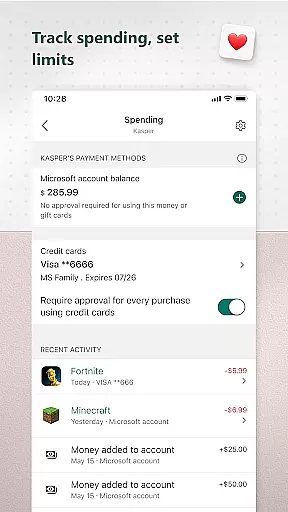
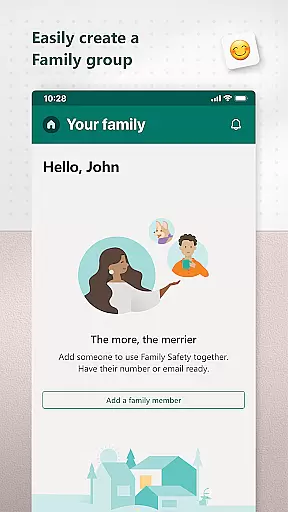
Microsoft Family Safety is a comprehensive parenting app designed to help families develop healthy digital habits while ensuring children's safety online. The app allows parents to set up parental controls, manage screen time, and filter inappropriate content across multiple devices including Android, Xbox, and Windows.
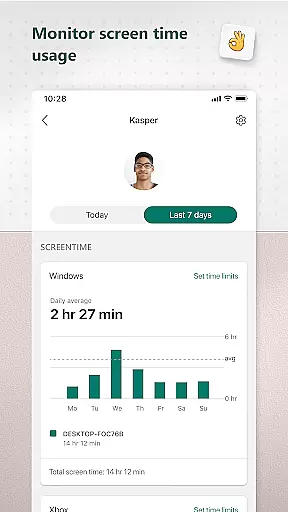
One of the key features is its activity reporting system, which provides weekly summaries of children's screen time and app usage. This helps parents better understand their family's digital behavior and start meaningful conversations about online activity. Additionally, the app offers device management tools that enable parents to set time limits on specific apps or entire devices.
The app also ensures children can safely explore the digital world by enforcing age-appropriate web filters and blocking access to unsuitable apps and games. With Microsoft's commitment to privacy, all data is securely managed, giving families peace of mind while using the app.
Microsoft Family Safety comes packed with features that cater to both parents and children. For parents, the app offers detailed activity reports that track screen time and app usage, helping them monitor their children's digital habits. These reports are delivered weekly via email, providing an overview of each child's online activity.
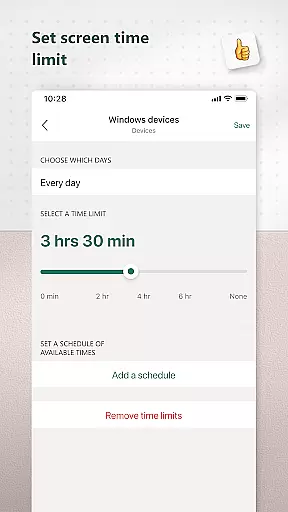
Screen time management is another standout feature. Parents can set specific time limits for individual apps or entire devices, ensuring kids maintain a healthy balance between screen time and other activities. The app also sends notifications when children request additional screen time, allowing parents to make informed decisions.
Content filtering ensures a safe browsing experience by restricting access to inappropriate websites and apps. The app uses Microsoft Edge's kid-friendly browsing mode and blocks apps based on age ratings. These robust parental controls give parents the tools they need to create a secure digital environment for their children.
Microsoft Family Safety provides a reliable and credible parenting solution that is designed to help parents manage their children's digital activities effectively. The app offers features such as activity reports, screen time management, and content filters, all of which are developed with the input of experts in child safety and digital wellness.
The credibility of the content within Microsoft Family Safety is backed by Microsoft's commitment to privacy and security. They ensure that your data and your family's information are protected, without selling or sharing location data with third parties like insurance companies or data brokers. This gives parents peace of mind knowing that their family's privacy is respected and safeguarded.
Expert validation comes from the app's adherence to strict privacy standards and meaningful choices regarding data collection and usage. Parents can make informed decisions about their family's digital habits, supported by weekly email summaries and detailed activity logs that provide insights into their children's online behavior.
By using accessibility, app usage, and device admin service permissions, the app ensures that parental controls are respected and that children can only access age-appropriate content, thus reinforcing the trust parents place in Microsoft Family Safety as a tool for nurturing healthy digital habits.
Growth tracking in Microsoft Family Safety is an essential feature that allows parents to monitor and guide their children's development in the digital world accurately. By providing detailed activity reports, the app enables parents to understand how much time their children spend on various apps and games, helping them to foster balanced digital habits.
The accuracy of growth tracking is enhanced through precise screen time limits that can be set across devices on Xbox and Windows. This ensures that the time children spend on their devices aligns with the expectations and rules set by their parents, promoting healthier lifestyle choices.
Parents receive notifications when their child requests more time, allowing for real-time adjustments and discussions about digital habits. This feature not only tracks growth but also opens up channels for communication between parents and children regarding responsible technology use.
With its robust content filters, Microsoft Family Safety ensures that children are accessing only age-appropriate material, further refining the accuracy of growth tracking. These filters block inappropriate apps and games and enable kid-friendly browsing, ensuring that children's digital experiences contribute positively to their overall development.
User-friendly interface
Multi-device compatibility
Comprehensive activity reports
Robust content filters
Privacy-focused design
Limited iOS support
Requires Microsoft account
Some features are premium-only
Occasional syncing issues
Complex setup process

Family parental control app: limit screen time, block apps, GPS tracker.
 4.20
4.20
Play activities, milestones, expert-led classes, baby tracker, and more!
3.00
Affirmations | Stories | Bible
4.10
FamilyMode helps you manage your family’s digital lives—at home or on the go.
4.30
Save money on diapers. Get the Pampers Rewards app.
3.90
Track pregnancy health and wellness with pregnant tracker from healthcare advice
4.2
GeoLog - Real-Time Location Tracker
4.40
Speech Therapy Exercises For All!
4.40
FamilyAlbum helps you share, save, and remember your child's special moments.
4.80
Pinardin - Smart Parental Control, Online Safety & GPS Tracking!
4.80
SENSORYSOOTHE and SENSORSAFE: Making car seats smarter and families safer.
4.70
It is a screen time management tool for games and mobile applications
4.50
Free symptom & med tracker with expert-reviewed tips.
4.30
Magic chalkboard coloring and drawing!
4.20
Limit screen time, Block Apps & Games, Monitor with Parental control app
4.20
The Baby’s Bounty App is your hub to register for our diaper banks in Nevada
3.70
Screen Time, App and Web Block & Monitoring, Location Tracker
3.60
SemLog aims to raise awareness among families and their children
3.40
Lullabies, Night Light & Age-based Routines to help your baby fall asleep
4.4


User Reviews