
The Sherwin-Williams Color Expert app is a powerful tool for anyone looking to refresh their living space with the perfect paint color. This innovative app takes the guesswork out of choosing paint colors by offering advanced visualization and recommendation features. Whether you're planning a full home renovation or just updating a single room, this app provides everything you need to make confident color choices.
Key features include a sophisticated color visualizer that lets you see how different shades will look in your actual space. The app also offers personalized color recommendations based on your existing decor, helping you create harmonious color schemes. Additionally, users can save their favorite colors, order physical samples, and explore various color collections. These tools make it easy to experiment with different options before making any final decisions.
This app is particularly useful for homeowners who want to visualize changes before committing to them. By allowing users to see how colors will appear in their specific lighting conditions and alongside their current furnishings, the Sherwin-Williams Color Expert app helps prevent costly mistakes and ensures satisfying results.
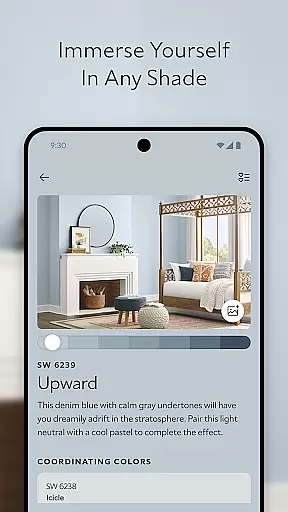
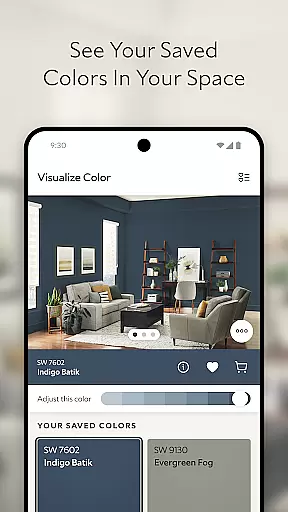
The Sherwin-Williams Color Expert app stands out with its comprehensive suite of features designed to simplify the color selection process. At its core is the advanced COLOR VISUALIZER tool, which uses sophisticated algorithms to accurately project how different paint shades will appear in your specific environment. This feature allows users to photograph their space and instantly apply various Sherwin-Williams® colors to their walls, providing realistic previews of potential outcomes.
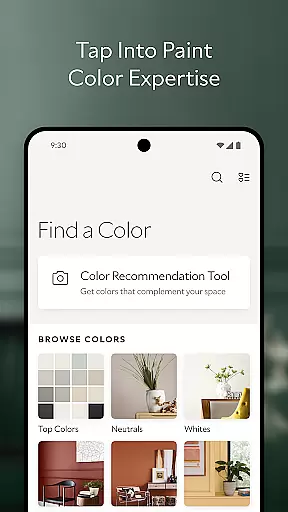
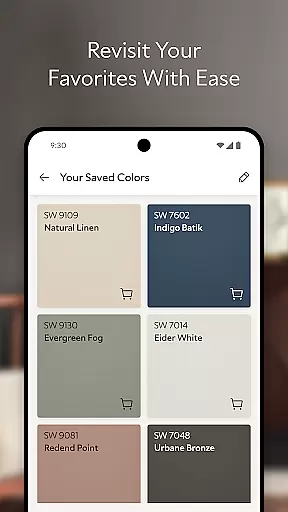
Another standout feature is the PERSONAL COLOR RECOMMENDATION TOOL, which leverages artificial intelligence to analyze your space and suggest complementary colors. This intelligent system considers existing furniture, flooring, and lighting conditions to recommend shades that will enhance your home's aesthetic. The app also includes robust SAVE & PLAN functionality, enabling users to store their favorite colors and order physical samples directly through the interface.
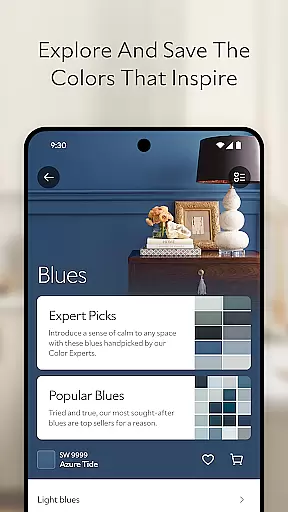
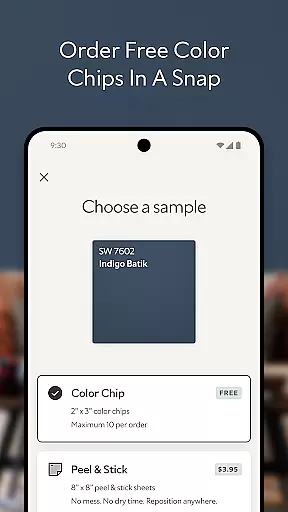
For those seeking inspiration, the EXPLORE & DISCOVER section offers extensive browsing capabilities. Users can navigate through Sherwin-Williams® colors by family, collection, or current design trends. The app even facilitates ordering physical color chips and peel & stick samples, allowing for real-world testing in different lighting conditions throughout the day. These features collectively create a comprehensive color selection ecosystem that supports users from initial inspiration to final application.
In the realm of home improvement, ensuring the authenticity of color options is paramount. The Sherwin-Williams Color Expert app provides a trustworthy platform for exploring paint colors, guaranteeing that each option presented is an authentic Sherwin-Williamsu00ae product. This verification process ensures users can rely on the digital swatches and recommendations as accurate representations of real-world outcomes.
The app's extensive collection of colors is directly sourced from the Sherwin-Williamsu00ae database, ensuring that every shade you explore is genuine and available. By integrating official color families, collections, and trending palettes, the app maintains a consistently updated and verified selection. This commitment to authenticity empowers homeowners and professionals alike to make informed decisions without second-guessing the legitimacy of their choices.
Furthermore, the ability to order physical color chips and peel & stick samples directly through the app enhances the authenticity verification process. These tangible references allow users to experience how a color will look in their home's unique lighting conditions before making a final commitment. This feature bridges the gap between digital visualization and physical application, reinforcing the app's dedication to providing reliable and authentic property listings.
Beyond color selection, effective home management features are crucial for planning and executing a successful painting project. The Sherwin-Williams Color Expert app offers robust tools for saving and organizing your favorite colors, streamlining the planning process. With the ability to save colors for future projects, users can create personalized palettes that cater to their specific needs and preferences.
The app's SAVE & PLAN functionality allows users to seamlessly integrate their chosen colors into their home environment. By ordering samples directly through the app, individuals can physically experience their selected shades in their intended spaces. This hands-on approach not only simplifies the decision-making process but also enhances project organization by keeping all color-related information in one accessible location.
Moreover, the COLOR VISUALIZER tool contributes significantly to home management capabilities. By enabling users to instantly see how different colors will appear in their spaces, the app facilitates better spatial planning and coordination. This feature helps prevent costly mistakes and ensures that each color choice harmonizes with existing decor and architectural elements. The combination of these comprehensive home management features makes the Sherwin-Williams Color Expert app an indispensable tool for any painting project.
User-friendly interface
Accurate color matching
AI-powered recommendations
Comprehensive color library
Direct sample ordering
Requires good lighting
Subscription needed
Limited offline use
Device compatibility
Learning curve

The official app for Home Assistant. Control your home anywhere in the world.
 4.30
4.30
Convert your Phone to HiSense Smart TV Remote Control
4.70
AI floor creator to design your dream house, plan rooms & style your home
4.00
SmartRent - Opening Doors To A Smarter World
4.40
Floor Plan Creator Home Design with 2D interior design and 3d view.
3.90
Find contractors for all home renovation projects. Remodeling, repair, and more.
4.20
Find your next home, house, apartment, condo, casa, flat, rental, studio, or bed
4.70
Samsung remote app helps control all Samsung Smartthings TVs. Fast and Stable!
4.10
A Smarter Home in Seconds
4.70
Houses for Sale & Homes for Rent: Buy Homes, Rent Apartments & Sell Real Estate
4.80
Real estate app to find homes for sale or rent in the right neighborhood for you
4.70
Map-based search app for apartments and homes for rent.
4.60
Innovative and budget-friendly housing options
4.60
AI Home Designer & Room Planner: Decorate your interior space with AI
4.40
Smart AI plant care schedules, Real plant experts, support & Thriving community!
4.20
Design your dream home with 3D planning app, Visualize your dream home in 3D.
4.20
Book your local plumber 24/7, track your service order & get exclusive coupons
4.00
IP camera view and playback, for your WiFi cam or home security cctv system.
3.70
Control Fire TV & mirror your phone screen instantly over Wi-Fi.
3.30


User Reviews