
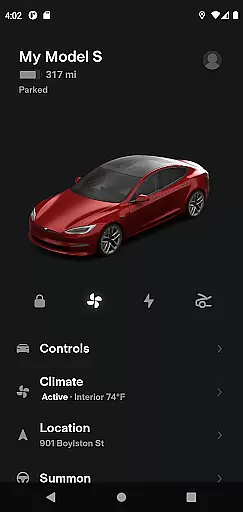
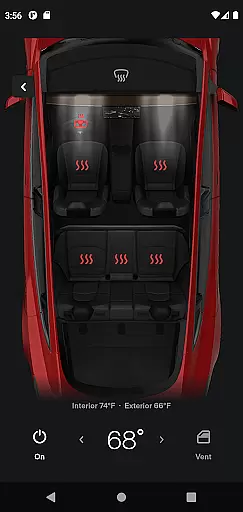
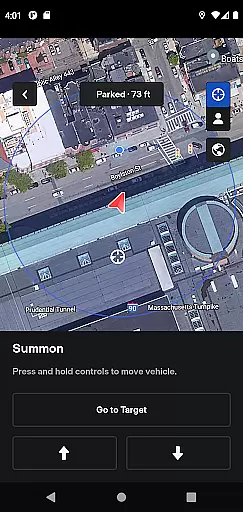
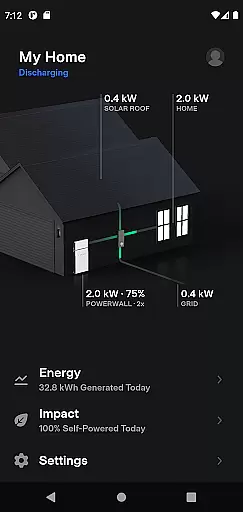
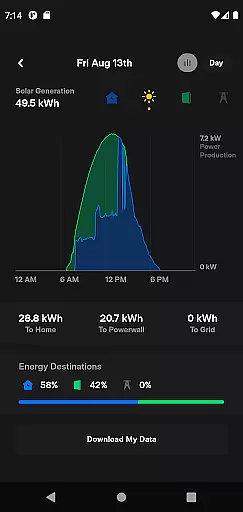
Tesla app serves as a comprehensive remote control and monitoring system for Tesla vehicle owners, enabling seamless interaction with their cars and Powerwalls from any location. The application provides real-time charging updates, climate control before driving, remote locking and unlocking, and vehicle location services. Additionally, it supports navigation setup, media control for passengers, and even light or horn activation to locate the parked vehicle. For those with Autopilot-enabled vehicles, the Summon feature allows users to maneuver their car out of tight spaces effortlessly. Powerwall integration offers energy storage monitoring, solar production data, and battery usage tracking, although these features require Powerwall 2.
This app is particularly beneficial for Tesla owners who wish to maintain constant connectivity with their vehicles, ensuring convenience, security, and optimal energy management. Whether you're at home or on the go, the Tesla app empowers you to manage your vehicle's functionalities efficiently, enhancing both daily commutes and long-term ownership experience.
The Tesla app boasts an array of sophisticated features designed to elevate the user's interaction with their Tesla vehicle. One standout capability is the real-time charging progress tracker, which not only displays current charge levels but also allows users to initiate or halt charging sessions remotely. This ensures that your vehicle is always charged to your preferred level when needed. Another remarkable feature is the pre-conditioning option, enabling users to heat or cool their car prior to driving, a function that proves especially useful in extreme weather conditions, even if the vehicle is parked indoors.
Furthermore, the app includes advanced security measures such as remote lock and unlock functions, alongside GPS-based vehicle location services that provide directions or track movement. Passengers can enjoy enhanced entertainment options through quick media controls, while the Summon feature caters to Autopilot-equipped models, facilitating effortless parking maneuvers. Lastly, the Powerwall integration offers detailed insights into energy storage, solar production, and battery usage, promoting sustainable living practices among Tesla owners.
The Tesla app offers an extensive range of features that cater to various aspects of a user's lifestyle, ensuring comprehensive coverage of needs for both vehicle and home energy management.
With capabilities ranging from real-time vehicle charging monitoring to climate control and even Powerwall energy storage oversight, the app provides a holistic approach to managing your Tesla products.
This broad feature set allows users to interact with their vehicles and homes in ways that are both innovative and practical, enhancing convenience and efficiency in daily life.
By integrating functionalities like remote vehicle summoning and solar production data download, the app ensures that it addresses multiple facets of a modern, tech-savvy lifestyle.
The Tesla app is developed directly by Tesla, a renowned leader in electric vehicles and renewable energy solutions, which guarantees the authenticity and reliability of its content.
All features within the app are designed and maintained by experts who specialize in automotive technology and energy management systems, ensuring that users receive accurate and trustworthy information about their vehicles and Powerwalls.
Moreover, the direct communication link between the app and Tesla products means that all data presented to users is precise and up-to-date, reflecting the latest status and analytics available.
This level of expert-backed credibility provides peace of mind for users relying on the app for critical functions such as energy usage tracking or vehicle location services.
User-friendly interface
Comprehensive vehicle control
Real-time charging updates
Remote climate management
Advanced security features
Limited to Tesla products
Requires internet connection
Powerwall 2 needed for full functionality
Dependent on vehicle model
Potential privacy concerns

Digital watch face design. Modern looking, hi-res & battery friendly.
 4.00
4.00
What is my face shape? Find out your face shape from picture, see fitting frames
3.90
A daily quote for success
4.3
Tap to the beat with interactive videos — warm up your reflexes & have fun
4.70
Unique "Isometric" style digital watch face for Wear OS
4.50
Discover your Nationality, Family Origin, and Ancestry from one selfie
4.50
The Wyze app is your gateway to a smarter life and a safer home.
4.40
Decorate your home screen with custom icons, color widgets, themes & wallpapers
4.70
Earn money for every survey and game you play, and get real rewards every time
4.50
Retro animated weather with hourly forecast Watch Face for Wear OS
4.60
Earn money & gift cards when you take surveys, play games, scan receipts & more.
4.50
The Work of Byron Katie— the mobile app for inner peace.
4.40
Chat, meet genuine singles in your area. Real connections start with being real.
4.30
Paranormal Spirit Bell Trigger Device
4.30
Smart home security protection
3.20
Big bold weather watch face with dynamic backgrounds and 3 complications
4.3
Discover how to help puppies stay calm around noise with this helpful app.
4.3
Immerse yourself in the serenity of lavender fields and white butterflies
4.2
Wear your favorite memories, loved ones, pets or travel photos on your watch
4.4


User Reviews