
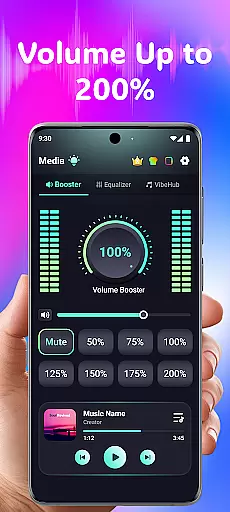
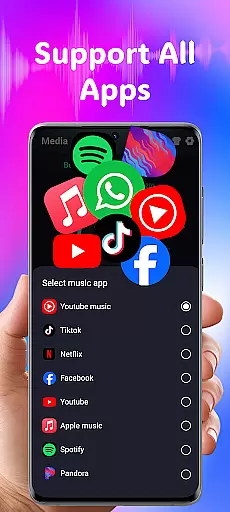
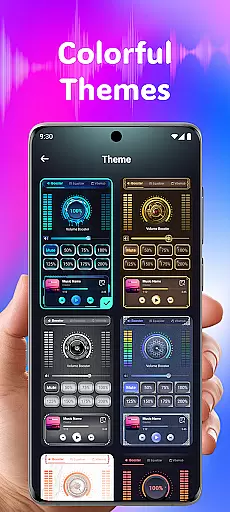
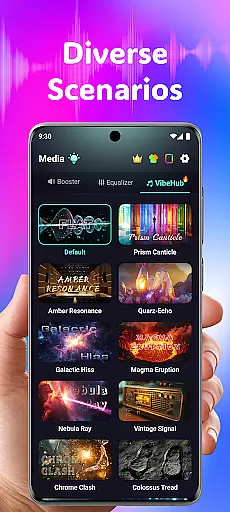
Volume Booster Bass Booster EQ is a versatile audio enhancement application designed to elevate your sound experience across various scenarios. The app's core functionality lies in its ability to amplify media volume up to 200%, making it an ideal solution for outdoor parties, movie watching, and gaming sessions where audio clarity is crucial.
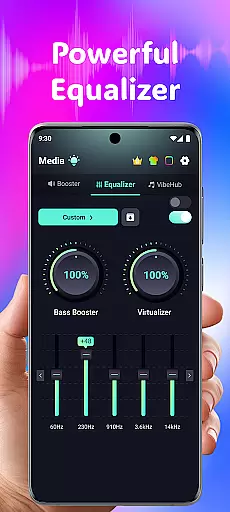
Beyond simple volume control, the application features an advanced 5-band equalizer that allows users to fine-tune specific frequency ranges. This ensures optimized audio performance for different types of content and listening environments. Additionally, the app includes specialized hearing support features such as independent left and right ear adjustments and real-time noise reduction, making it particularly valuable for users with hearing challenges.
The combination of powerful volume boosting capabilities with hearing assistance features creates a unique value proposition in the medical category. Users can enjoy enhanced entertainment experiences while having access to tools that support their hearing needs, all within a single intuitive interface.
The application distinguishes itself through a comprehensive suite of audio enhancement tools. At its foundation is the Powerful Volume Boost feature, which provides precise control over media volume amplification up to 200%. This capability is complemented by Super Loud Volume Booster technology, ensuring clear and impactful sound reproduction across different devices and environments.
A standout characteristic is the Advanced Equalizer system, featuring a robust 5-band configuration (60Hz, 230Hz, 910Hz, 3.6kHz, 14kHz) that enables detailed sound customization. Users can enhance bass response, adjust virtualization settings, and optimize audio profiles for specific content types. The inclusion of 3D Surround Sound Effect further enriches the listening experience, particularly beneficial for headphone and Bluetooth device users.
The app's hearing support features represent another significant advantage. Independent Left & Right Ear Control allows for asymmetrical hearing compensation, while Advanced Frequency Amplification provides granular control over six distinct sound ranges. Real-Time Noise Reduction utilizes AI-powered filtering to eliminate background disturbances, and the Live Sound Recorder & Playback function enables users to capture and review important audio moments. These features collectively create a comprehensive solution for both entertainment enhancement and hearing support needs.
In the realm of medical applications, content credibility is paramount for user trust and safety. Volume Booster Bass Booster EQ addresses this by incorporating advanced features that are designed with precision and care. The app's Advanced Hearing Mode includes independent left and right ear control, as well as frequency amplification across six sound ranges, which have been fine-tuned to support various hearing needs.
These capabilities are not just about amplifying sound but doing so in a way that can enhance speech clarity and ambient noise, making it invaluable for users who require auditory assistance. By providing real-time noise reduction through AI-powered filtering, the app ensures crystal-clear sound quality, which is crucial when understanding spoken content or enjoying audio in less-than-ideal environments.
The app also emphasizes expert validation by offering an equalizer tailored to specific sound frequencies, demonstrating a level of detail that suggests input from audio engineering professionals. This technical sophistication reassures users that they are engaging with a product that respects their health and auditory well-being while delivering on its promise of superior sound enhancement.
While Volume Booster Bass Booster EQ does not offer traditional teleconsultation services, it enhances the experience of remote communication through superior audio quality. Clear audio transmission is essential during virtual consultations, ensuring that both parties can communicate effectively without misunderstandings caused by poor sound quality.
With features like 3D Surround Sound Effect and optimized performance for headphones and Bluetooth devices, the app provides an immersive listening environment. This allows healthcare providers and patients to focus on the consultation itself rather than being distracted by technical limitations, thus improving overall teleconsultation quality.
Moreover, the app's ability to reduce background noise using AI-powered filtering means that even in bustling settings, clear dialogue can be maintained. This functionality supports high-quality interactions between doctors and patients regardless of location, contributing positively to patient outcomes and satisfaction with digital healthcare solutions.
Powerful volume boost
Advanced equalizer
Hearing support features
User-friendly interface
Wide device compatibility
Potential hearing risk
Speaker damage warning
No physical controls
Requires careful use
Limited warranty

A scientifically-proven method to help people with dementia or memory impairment
 4.4
4.4
Check and Track your Blood Pressure & Heart Rate.
4.50
Be more confident prescribing homeopathy at home for your family.
4.80
Radiographic Positioning Guide for Medical Imaging Professionals and Students
4.50
Control your hearing aids discreetly with the touch of a finger
4.30
Save up to 80% on your pharmacy prescriptions & medications with free Rx coupons
4.70
Internal medicine literature at your fingertips.
4.50
Take your aphasia therapy to the next level with 4 evidence-based advanced apps
4.70
The world's best selling 3D Human Anatomy app with groundbreaking 3D technology
2.00
A comprehensive 3D atlas of the human body
4.80
Want to make it easier to manage your health? We’re with you, wherever you are.
4.70
The NightOwl Companion app allows you to interact with the NightOwl sensor.
4.70
Coaches you through labour using hypnobirthing techniques & tracks contractions
4.70
Boost reading, writing, speaking and listening with a scientifically proven app.
4.70
This app is simply 1 book (also large app) and 17 other apps combined into 1
4.70
3rd trimester? Counting Kicks is what moms should do-It’s important & easy too!
4.30
Assess and treat left neglect more effectively in stroke and brain injury rehab.
4.30
Over 1,200 review questions and 5 exams—pass the NREMT with EMT Review Plus!
4.10
Continuous Glucose Monitoring
3.40


User Reviews