
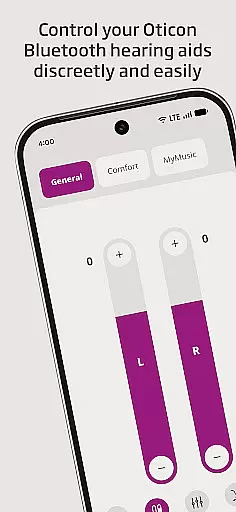
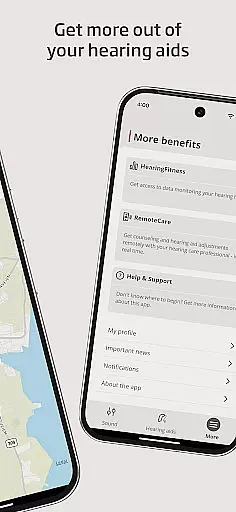
Oticon Companion is a medical application designed to enhance the hearing aid experience for users. This app allows you to control your hearing aids directly from your mobile device, providing convenience and accessibility. With features such as adjusting sound volume, muting surroundings, and switching between programs set by your hearing care professional, it offers comprehensive control over your hearing aids.
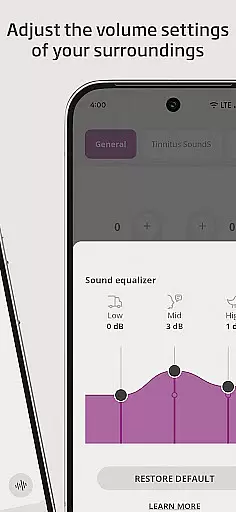
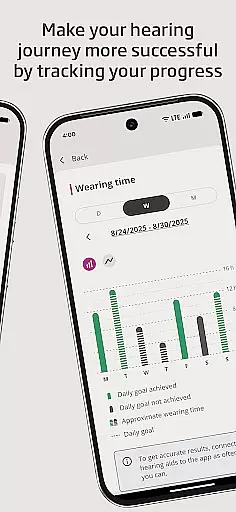
Additionally, Oticon Companion provides advanced functionalities like SpeechBooster to reduce background noise, streaming equalizer, and sound equalizer for specific models. It also includes practical tools such as finding lost hearing aids, tracking progress with HearingFitness™, and handling wireless accessories. The app ensures compatibility with most hearing aid models and recommends regular updates for optimal performance.
This app is particularly beneficial for individuals who require frequent adjustments to their hearing aids and seek an integrated solution that combines multiple functionalities into one platform. By offering remote access to hearing care professionals and troubleshooting solutions, Oticon Companion significantly improves the quality of life for hearing aid users.
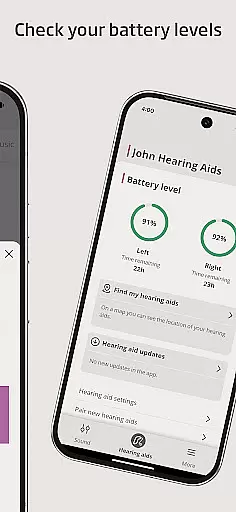
Oticon Companion boasts a wide array of features tailored to meet the needs of hearing aid users. One of its standout capabilities is the ability to adjust the sound volume for each hearing aid either together or separately, allowing personalized sound settings. The app also enables users to mute their surroundings for better focus, switch between pre-set programs, and check battery levels, ensuring uninterrupted usage.
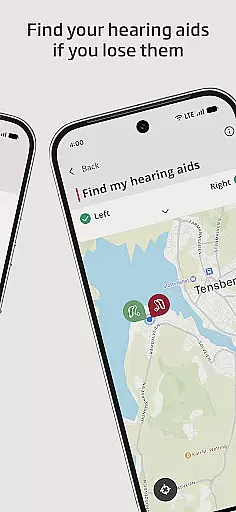
For enhanced audio clarity, the SpeechBooster feature reduces background noise and enhances speech, available for all hearing aid models except Oticon Opn™. Streaming capabilities allow users to stream calls, music, and podcasts directly to their hearing aids, depending on their phone model. Furthermore, the app helps locate lost hearing aids using location services and offers access to app support and troubleshooting solutions.
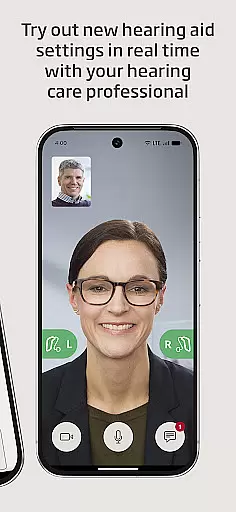
Additional features include meeting your hearing care professional for online visits, adjusting streaming sounds with a streaming equalizer, and fine-tuning sounds around you with a sound equalizer for specific models. The HearingFitness™ feature tracks user progress, while wireless accessory management supports devices like TV Adapters, Oticon EduMic, or ConnectClip. These features collectively ensure a seamless and enriched hearing aid experience.
In the realm of medical applications, content credibility is paramount. Oticon Companion ensures that all information and functionalities provided are thoroughly vetted by hearing care professionals. This guarantees that users receive guidance and adjustments based on scientifically-backed practices.
The app offers features such as adjusting sound volume, muting surroundings, and switching between programs set by experts. These capabilities are designed in collaboration with audiologists to ensure they meet the nuanced needs of hearing aid users. Furthermore, access to app support and troubleshooting solutions is directly integrated, offering a reliable resource for any concerns.
For users seeking an online consultation, the option to meet their hearing care professional virtually is available by appointment. This feature underscores the app's commitment to connecting users with qualified experts who can provide personalized advice and adjustments tailored to individual hearing profiles.
Teleconsultation has become an essential aspect of modern healthcare, and Oticon Companion excels in this domain. The app facilitates high-quality virtual visits with hearing care professionals, ensuring users can discuss their needs and receive expert guidance without geographical constraints.
Features like the HearingFitnessu2122 tracker and sound equalizer adjustments are supported during these teleconsultations. Users of Oticon Intentu2122 and Oticon Realu2122 models can particularly benefit from tracking progress and fine-tuning settings under professional supervision. This interactive approach enhances user experience and treatment efficacy.
Additionally, the app supports handling wireless accessories paired with hearing aids, such as TV Adapters and ConnectClip. During virtual appointments, professionals can assist in configuring these devices, ensuring seamless integration into the useru2019s auditory environment. This comprehensive support system highlights the app's dedication to delivering top-notch teleconsultation services.
User-friendly interface
Comprehensive hearing aid control
Advanced noise reduction
Remote professional consultations
Wireless accessory management
Limited model compatibility
Dependent on phone model
Requires regular updates
Location services needed
Some features model-specific

Download the PulsePoint app and use your CPR skills to save a life!
 4.60
4.60
MHealth is the mobile version of MEDITECH’s Patient and Consumer Health Portal.
3.10
Enjoy 200%+ volume booster with bass booster, equalizer and headphone supported.
4.60
Good for You. Great for Life.
4.00
Assess and treat left neglect more effectively in stroke and brain injury rehab.
4.30
This app is simply 1 book (also large app) and 17 other apps combined into 1
4.70
Discover the source of pain with Muscle Trigger Point Anatomy.
4.70
ASCCP Management Guidelines- There’s an app for that!
4.60
A rapid reference for healthcare professionals caring for pediatric patients.
4.30
Manage your prescriptions and pharmacy care anytime, anywhere.
4.80
Access health information and communicate with your care team anytime, anywhere.
4.80
Leafly is a weed app for finding dispensaries, cannabis strains, & more.
4.70
The NightOwl Companion app allows you to interact with the NightOwl sensor.
4.70
Remote, medical-grade heart care at your fingertips
4.70
Sync your blood glucose device, log values automatically and tame your diabetes!
4.60
Log your symptoms in the MyZio app — the perfect companion to the Zio monitor!
4.60
PPP provides quick offline access to over 350 field treatment protocols.
4.60
Radiographic Positioning Guide for Medical Imaging Professionals and Students
4.50
A fantastic 3d reference that includes over 300 structures and a quiz function.
3.00


User Reviews