
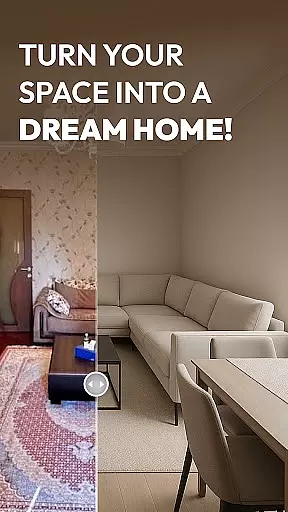
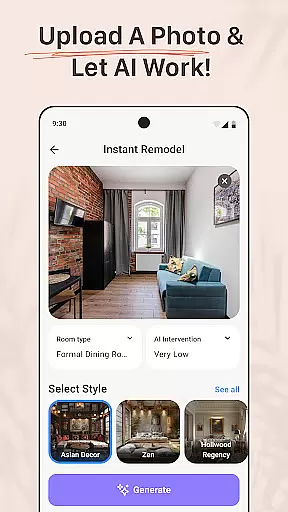
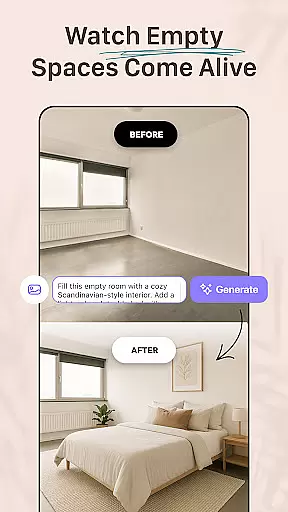
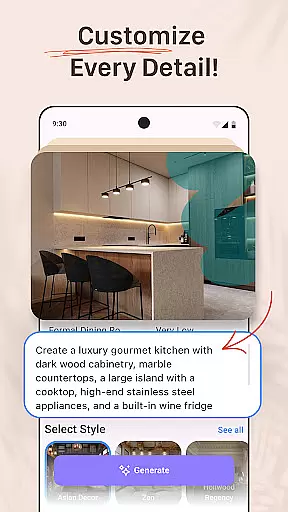


AI Remodel is a cutting-edge AI home design application that empowers users to plan, design, and visualize their dream spaces with professional precision. The app offers intuitive tools for creating accurate floor plans and immersive 3D renderings, making it accessible even to those without prior design experience. Whether remodeling a single room or redesigning an entire home, AI Remodel provides creative control over every detail.
One standout feature is its advanced interior design AI, which suggests layouts, color palettes, furniture arrangements, and material combinations. Users can experiment with styles like minimalism, boho, or mid-century modern, preview changes in real-time, and make confident decisions before starting physical renovations. Additionally, the app integrates seamlessly with Planner 5D, ensuring high-resolution designs and precise measurements for professional-level results.
This app is ideal for homeowners, renters, and professional designers alike. DIY enthusiasts can test layout ideas virtually, renters can explore non-permanent design changes, and professionals can present polished concepts to clients. With AI Remodel's powerful combination of smart layout tools, room AI interior design functionality, and Planner 5D integration, users have everything they need to bring their creative visions to life.
AI Remodel stands out with its robust set of features tailored for modern home design projects. At its core is the interactive Room Planner 3D tool, which allows users to drag, drop, and rotate furniture, decor, and fixtures within a fully responsive 3D environment. This feature ensures that every element of the design can be visualized from multiple angles, providing unparalleled clarity and precision.
The app also leverages advanced AI algorithms to guide users through each stage of their project. By uploading photos or starting from scratch, users receive personalized suggestions for layouts, color schemes, and material pairings. These AI-driven insights help users explore new styles and confidently experiment with bold ideas. Furthermore, the app supports detailed customization options such as drawing custom floor plans, moving walls, adding lighting, and testing different materials—all within a unified workspace.
Another key advantage is the seamless integration with Planner 5D, enabling users to scale accurately, measure in real time, and export high-resolution plans. This functionality bridges the gap between conceptual design and practical implementation, ensuring that users achieve polished, professional-grade results. With these innovative features, AI Remodel transforms how people approach home renovation by combining creativity with technical precision.
When it comes to home renovation and design, having accurate and reliable property information is crucial. AI Remodel ensures the authenticity of its virtual property listings by using advanced AI algorithms that generate realistic 3D renderings based on real-world measurements. This means users can trust that the spaces they are designing truly reflect the possibilities within actual property dimensions.
The app's integration with tools like Planner 5D enhances the precision of property listings by allowing users to create detailed floor plans with exact scaling and real-time measurement features. Whether you're a homeowner looking to remodel or a designer presenting concepts to clients, this level of accuracy provides confidence in your planning process.
Additionally, AI Remodel updates its design templates and material suggestions regularly, ensuring that all listed options remain current and true-to-life. This commitment to authenticity allows users to explore various styles and layouts while maintaining a realistic expectation of potential outcomes.
By providing verified and up-to-date property data, AI Remodel empowers users to make informed decisions about their renovation projects, ultimately saving time and resources while delivering professional-quality results.
AI Remodel goes beyond basic design functionalities by offering comprehensive home management features that streamline the entire renovation process. With smart layout tools, users can easily manipulate walls, fixtures, and furniture within a responsive 3D environment, making it simple to visualize changes before committing to them physically.
The app's ability to sync seamlessly with other design platforms ensures that every aspect of your project remains organized and accessible. From experimenting with color palettes to testing different materials, AI Remodel provides an intuitive platform where ideas can be transformed into polished mockups ready for implementation or sharing with stakeholders.
Moreover, the inclusion of curated looks and customizable design options caters to both novice DIYers and professional designers alike. These features enable renters to redesign spaces virtually without permanent alterations, while professionals can present innovative concepts to clients with clarity and style.
By combining powerful room AI interior design capabilities with practical home management tools, AI Remodel creates a versatile platform tailored for modern creators who demand precision, flexibility, and creativity in their home renovation projects.
User-friendly interface
Advanced AI tools
3D visualization
Planner 5D integration
Versatile use cases
Steep learning curve
Premium features cost
Limited offline access
Occasional bugs
Device compatibility

Universal TV Remote for TV, control all Smart TVs with your mobile phone.
 4.3
4.3
Our app allows Sunrun customers to monitor systems, pay bills, and get support.
3.80
IP camera view and playback, for your WiFi cam or home security cctv system.
3.70
Schlage Lock Company LLC
4.00
Control your Vivint Smart Home with the next generation Vivint App.
4.30
Samsung remote app helps control all Samsung Smartthings TVs. Fast and Stable!
4.10
An easier way to make payments and maintenance requests from anywhere.
3.50
Connect with reliable pros for maintenance services, plumbing, and home design!
4.80
Make your phone a surveillance camera remote with a home camera app for Android!
4.40
Download today to join the community to help bring lost pets home faster.
4.70
Tailored Care Guides For Houseplants, Indoor Plants, Garden Plants & Flowers.
4.60
Looking for the perfect apartment finder app? Find beautiful rental homes here!
4.60
Resident Center, powered by Buildium, is designed with simplicity in mind.
4.50
Fire & Power Safety
4.50
SmartRent - Opening Doors To A Smarter World
4.40
Smart AI plant care schedules, Real plant experts, support & Thriving community!
4.20
Floor Plan Creator Home Design with 2D interior design and 3d view.
3.90
Unlock AI-based barcode scanning and support the development of Grocy Android
4.5
PRO Version of GLB AR Viewer
4.4


User Reviews