
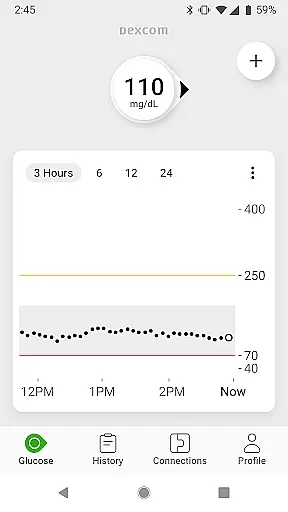
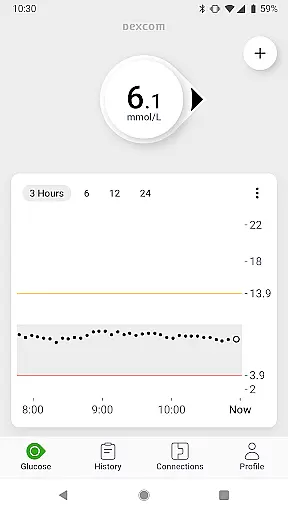
The Dexcom G7 app is a cutting-edge Continuous Glucose Monitoring (CGM) system designed to empower individuals managing diabetes. This innovative solution provides real-time glucose data every 5 minutes, eliminating the need for traditional fingerstick tests. The system's sleek, low-profile wearable sensor seamlessly connects to compatible Android devices, offering users immediate access to crucial health information.
What sets Dexcom G7 apart is its comprehensive approach to diabetes management. Users can benefit from customizable alerts that warn of potential high or low glucose levels, while remote monitoring capabilities enable loved ones and healthcare providers to stay connected. The app also integrates with third-party health applications and lifestyle devices, creating a unified ecosystem for health tracking and analysis.
This application proves particularly valuable during travel or busy workdays when constant monitoring might be challenging. By providing continuous updates and trend analysis, Dexcom G7 helps users maintain optimal glucose levels, ultimately leading to better long-term health outcomes and peace of mind.
Dexcom G7 distinguishes itself through several remarkable features that enhance diabetes management. The system's Quick Glance functionality allows users to view glucose readings directly on their device's lock screen, ensuring vital information is always accessible. Additionally, the Clarity Clinic integration within the G7 connections tab streamlines data sharing with healthcare professionals, facilitating more informed medical consultations.
The application supports an extensive sharing network, enabling users to connect with up to 10 followers through the Dexcom Follow app. This feature proves invaluable for parents monitoring children's glucose levels or caregivers supporting elderly patients. Furthermore, the system's compatibility with digital health apps creates opportunities for comprehensive health tracking, incorporating activity data into glucose trend analysis.
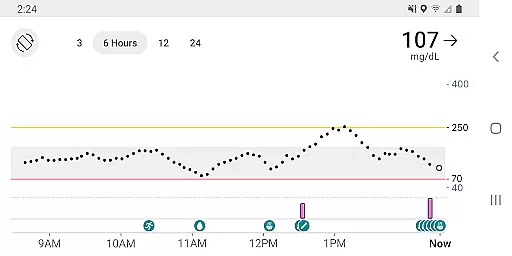
Another notable innovation is the estimated fasting glucose logging feature, which helps users identify patterns in their glucose levels over time. The integration of health and activity data visualization on the G7 trend graph provides deeper insights into how lifestyle choices affect glucose management. These sophisticated features collectively contribute to a more holistic approach to diabetes care.
The Dexcom G7 Continuous Glucose Monitoring (CGM) System offers personalized planning by providing real-time glucose data every 5 minutes, enabling users to make informed decisions about their diabetes management. This constant stream of data allows for a tailored approach to understanding individual glucose trends and patterns.
With customizable alerts for high or low glucose levels, the system empowers users to set thresholds that suit their personal health needs. These alerts serve as an essential tool in personalized planning, helping prevent potential health issues before they arise.
In addition to monitoring, the Dexcom G7 app allows logging of estimated fasting glucose, which is crucial for identifying long-term trends in glucose control. By regularly tracking fasting glucose, users and healthcare teams can adjust treatment plans to better fit the user's lifestyle and health goals.
Integration with third-party health apps and lifestyle devices further enhances personalized planning, allowing for a comprehensive view of the user's health and activity data. This holistic approach supports users in managing their diabetes with insights that are specifically relevant to their daily routines.
Progress visualization in the Dexcom G7 CGM System is exemplified through its trend graph feature, which displays health and activity data from connected apps and devices. Users can easily interpret their glucose level fluctuations over time, making it simpler to understand their progress in managing diabetes.
Dexcom Clarity summary insights are integrated into the G7 app, offering both real-time and retrospective glucose insights. This dual perspective is invaluable for visualizing progress, as it not only shows current glucose levels but also provides context by comparing them with historical data.
The Quick Glance feature allows for immediate access to glucose data on the lock screen of a smart device, ensuring that users have the most up-to-date information at their fingertips. This instant access to key metrics is vital for effective progress visualization and timely decision-making.
Sharing glucose data with followers and healthcare teams via the Dexcom Follow app and Clarity Clinic integration respectively, enables a supportive network for discussing progress. This collaborative environment fosters a deeper understanding of one's health journey and promotes accountability in maintaining healthy glucose levels.
Real-time glucose monitoring
Customizable alert system
Remote monitoring capabilities
Seamless device integration
User-friendly interface design
Limited device compatibility
Requires internet connection
Potential connectivity issues
Subscription fees may apply
Learning curve for new users

Chair Workout: Women's Edition for safe, flexible, and personalized fitness.
 4.40
4.40
Meditation app, head space app provides calm music to help you meditate & sleep
5.00
Using Recognise™ has been shown to reduce pain and improve performance
4.3
Track heart rate & HRV in 30s! Get live health insights and anomaly alerts
4.40
Your portable blood pressure tracker. Record, monitor, and analyze BP anytime.
4.30
Blood Pressure Log, HRV & Heartbeat Tracker. Pulse Checker.
4.40
Your personal BP tracking companion, focus on helping you achieve wellness goal.
4.10
The most accurate heart rate app to monitor and track your heart rate & pulse.
4.40
Workouts for everyone
4.70
Medbridge GO gets you moving - get back to doing what you love, faster!
4.90
Easy access to health benefits
4.70
a fun app full of surprises :)
4.70
A brain game that moves you
4.70
Step Counter, track steps when you walk or run
4.70
SportWerks - Workout Tracker for Wear OS Watches
3.90
HRV4Training helps you optimize goals and improve performance. No sensors needed
3.30
Live Heart Rate Pro - Real Time Heart & Workout Data For Wear OS & Bluetooth BLE
3.20
Your plan in your pocket 24/7
3.00
Insanity blocks of intense physical activity, short breaks of 30 seconds.
4.1


User Reviews