
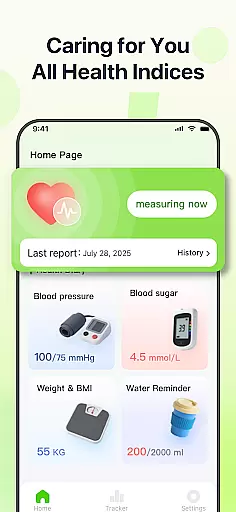
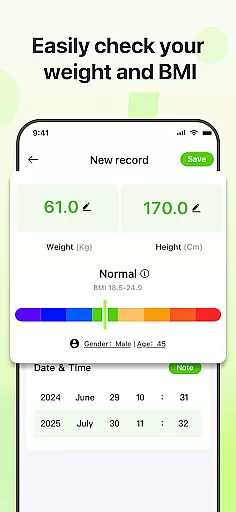
PulseSense is a comprehensive health tracking application designed to simplify wellness management. The app allows users to effortlessly log key metrics such as blood pressure, glucose levels, and heart rate while providing intelligent reports and personalized recommendations based on the entered data. Its sleek trend visualizations span days, weeks, months, and years, helping users uncover patterns and track progress over time.
Designed with privacy in mind, PulseSense ensures all health data remains on the user's device with end-to-end encryption, no cloud storage, and no account requirements. Whether managing chronic conditions like hypertension or diabetes, building healthier routines, or assisting seniors, PulseSense serves as a secure and dependable health companion.
PulseSense stands out with its effortless logging system for critical health metrics such as blood pressure, glucose levels, and heart rate. Users can attach personal notes and custom tags to their entries, adding valuable context to their health records. The app also generates intelligent health reports and offers tailored lifestyle recommendations based on individual data trends.
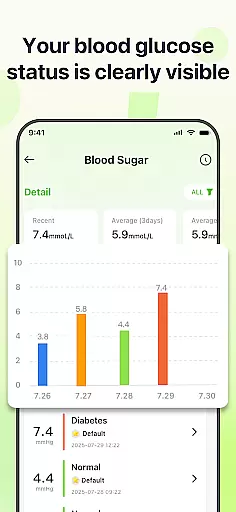
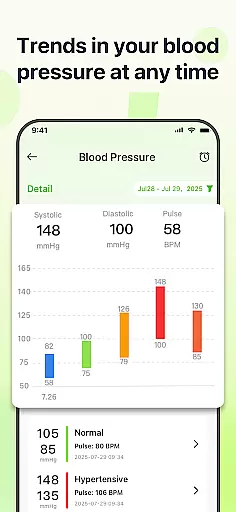
One of the app’s core strengths lies in its sleek trend visualizations, which allow users to analyze their health metrics across different timeframes—days, weeks, months, or years. These intuitive graphs help users identify patterns and stay consistent with their wellness goals. Additionally, customizable reminders ensure users maintain healthy habits without fail.
PulseSense prioritizes user privacy by keeping all data securely stored on the device. With no cloud uploads, no account requirements, and end-to-end encryption, users can trust that their sensitive health information remains private and protected at all times.
Personalized planning in health applications refers to the ability to tailor health goals and strategies based on individual user data. PulseSense excels in this area by offering intelligent health reports and personalized lifestyle recommendations derived directly from your logged metrics.
The app analyzes trends in blood pressure, glucose levels, and heart rate over days, weeks, or even years, providing customized insights that help you understand your health patterns. These recommendations are not generic; they adapt to your specific health journey, ensuring relevance and effectiveness.
Users benefit from this feature by receiving actionable advice that goes beyond raw numbers. For instance, if the app detects a consistent rise in blood pressure at certain times, it might suggest reviewing your daily routine or consulting with a healthcare provider for timely intervention.
This level of personalization empowers users to make informed decisions about their wellness while fostering long-term behavior change through achievable, data-driven objectives.
Progress visualization is a crucial component of any fitness or health application, enabling users to track their improvements over time visually. PulseSense offers sleek trend visuals that span various timelinesu2014from daily logs to yearly summariesu2014making it easier than ever to monitor your health journey.
These visualizations include intuitive graphs and charts that display fluctuations in key metrics like blood pressure, glucose levels, and heart rate. By presenting complex data in an easily digestible format, the app ensures that users can quickly identify trends, spot anomalies, and celebrate milestones.
For individuals managing chronic conditions such as hypertension or diabetes, these visual tools provide invaluable feedback. They allow users to uncover patterns that may require attention, reinforcing the importance of regular monitoring and preventive care.
Ultimately, progress visualization in PulseSense not only enhances user engagement but also motivates continued adherence to healthy habits by transforming abstract numbers into tangible achievements.
User-friendly interface
Comprehensive health metrics
Advanced trend analysis
Strong privacy controls
Actionable insights
No direct measurement tools
Limited third-party integrations
Manual data entry required
Premium features may cost extra
Not a medical device

Enjoy the Gluten Free living with the best app. SCAN the barcodes & SEARCH.
 3.60
3.60
See what's really going on inside your head! Real time EEG graphs from your Muse
4.40
Show your support for the development of FitNotes - Gym Workout Log
4.90
3D Body Measurement System
3.60
Monitor, analyze, track, and convert blood sugar & help you control diabetes.
4.10
Personal step counter for you, private and accurate
4.50
Blood Pressure Log, HRV & Heartbeat Tracker. Pulse Checker.
4.40
Dexcom G7 Continuous Glucose Monitoring
3.70
Easy to use step counter, calorie counter helps lose weight, count steps offline
4.80
Power-lifting, weightlifting and Wendler 531 app to track your workout program.
4.90
Get lasting results with Chair Yoga, Wall Pilates, and Walking workouts!
4.60
Personal Measurements - Track your gains!
4.50
Get alert about getting out of desired heart rate zone.
4.10
Looking to take control of your health? Our psychology-based programs can help.
4.10
Your Health Has Met Its App (℠)
3.90
Pupillary distance PD with camera quick and easy, checking glasses frames on you
3.70
HRV4Training helps you optimize goals and improve performance. No sensors needed
3.30
Your plan in your pocket 24/7
3.00
Insanity blocks of intense physical activity, short breaks of 30 seconds.
4.3


User Reviews