
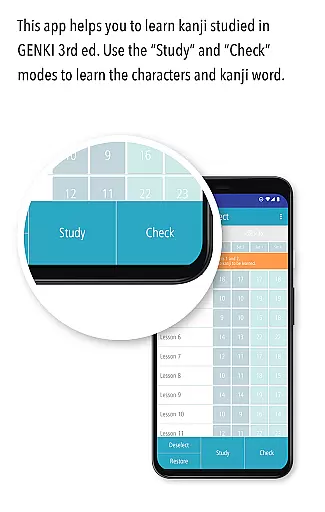
GENKI Kanji for 3rd Ed. is an educational app designed to help users learn and recognize 317 basic kanji characters through over 1,100 kanji words. Developed as part of the best-selling GENKI series of Japanese learning materials, this app offers a structured yet flexible approach to mastering essential kanji. It features three main modes: Study, Check, and List, each crafted to enhance different aspects of the learning process.
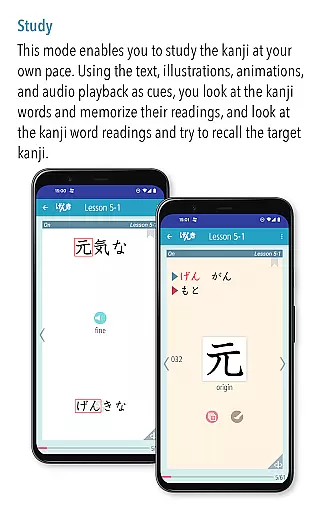
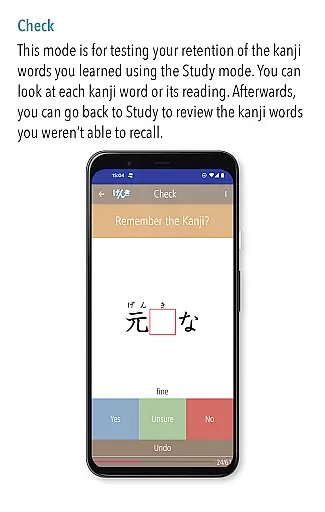
The Study mode allows learners to view kanji words alongside their readings and stroke order animations, with audio recordings by native speakers. The Check mode enables users to assess their progress by sorting words into mastered and unmastered categories. Finally, the List mode provides various organizational views, such as lesson order or alphabetical order, helping users track their advancement systematically.
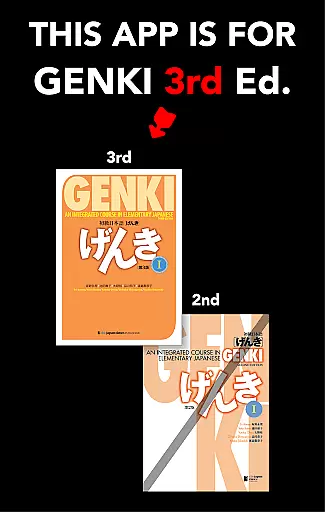
This app is ideal for students using the third edition of the GENKI textbook series, offering a seamless integration of classroom learning with digital practice. By combining mnemonic hints, illustrations, and interactive features, GENKI Kanji ensures an engaging and efficient learning experience tailored to individual pacing.
GENKI Kanji for 3rd Ed. stands out with its comprehensive study tools and user-friendly interface. One of its key features is the ability to customize the learning experience through bookmarking and progressive filtering of mastered words. This ensures that users can focus on challenging kanji while reviewing previously learned material efficiently.
The app includes audio recordings of natural pronunciations by native Japanese speakers for all kanji words, enhancing pronunciation skills. Additionally, fun illustrations and mnemonic hints derived from the popular "Kanji Look and Learn" resource make memorization easier. Stroke order animations further assist in proper writing techniques.
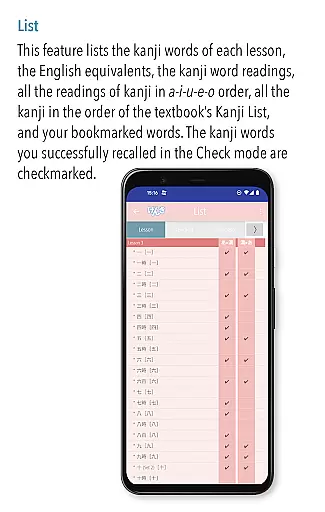
Another notable feature is the variety of list views available in the List mode, including lesson order, a-i-u-e-o order, and alphabetical order. These views display checkmarks next to mastered words, providing clear visual feedback on progress. With no distracting ads, GENKI Kanji creates an uninterrupted learning environment conducive to focused study sessions.
GENKI Kanji for 3rd Ed. offers a meticulously curated selection of over 1,100 kanji words designed to help learners recognize 317 basic kanji characters. This app draws its content from the widely acclaimed GENKI: An Integrated Course in Elementary Japanese series, which has sold more than 2.5 million copies. The educational material is both accurate and authoritative, ensuring that users receive high-quality instruction aligned with established Japanese learning standards.
The app provides detailed information on each kanji character, including stroke order animations and mnemonic hints sourced from the popular 'Kanji Look and Learn' resource. These features not only enhance understanding but also make the learning process engaging and memorable. Additionally, audio recordings by native speakers are included for every kanji word, reinforcing correct pronunciation and usage.
By using this app, students can be confident in the reliability of their learning materials. The structured approach allows users to progress at their own pace while mastering essential kanji readings and recognition skills. This ensures that learners build a solid foundation in Japanese writing, crucial for advancing to higher proficiency levels.
GENKI Kanji for 3rd Ed. supports personalized learning paths through its innovative study modes: Study, Check, and List. In the Study mode, users can explore kanji words along with their readings and target kanji at their convenience. This flexibility enables learners to tailor their study sessions according to individual preferences and schedules, promoting effective self-paced learning.
The Check mode facilitates tracking mastery by allowing users to sort kanji words into mastered and unmastered categories. As learners identify words they have already grasped, these items are removed from the active study set, enabling focused practice on challenging kanji. This adaptive mechanism optimizes the learning experience by concentrating efforts where they are most needed.
Furthermore, the List mode displays various lists of all covered words and kanji, helping users monitor progress and review efficiently. With options to view entries in lesson order, a-i-u-e-o order, or alphabetical order, learners can easily navigate through their studies. Bookmarked words and quick review features further enhance customization, making the app an invaluable tool for anyone seeking to master basic kanji effectively.
User-friendly interface
Comprehensive study tools
Progressive learning system
Native speaker audio
No distracting ads
Limited to 3rd edition
OS10 required
Potential compatibility issues
Additional purchases needed
No advanced kanji

Turn scrolling hours into improving your knowledge, communication, intelligence
 4.50
4.50
Astronomy app ? Discover the universe scope, explore solar system model in 3D.
4.20
Learn and joke with the Silly Turkey!
4.5
Break Language Barriers with AI—Learn Language Anytime, Anywhere!
4.00
Pickleball guide complete with illustrated Pickleball drills and helpful info
4.1
Astronomy Guide To Night Sky
4.30
An aviator’s preparation, study and test tool for FAA Knowledge Exams.
3.80
Stack the States makes learning about the 50 states fun!
4.70
Train, track, and reward potty training using Potty with Pull-Ups® ft. Disney®
4.70
Explore myths and gods across cultures with in-depth insights and stories.
5.00
Hebrew Vocab
4.90
Learning the ancient Viking language made simple
4.70
Universe simulator: Find & explore planets system, outer space, astronomy events
4.60
Intuitive Transformer Lab - By a Lineman, For Linemen & Apprentices
4.50
The Fighter Verses Bible memory system helps you memorize God's Word.
4.50
Learn to make peaceful contact with extraterrestrial civilizations
4.10
Explore numbers the Starfall way!
4.00
Snap a dog photo to identify its breed instantly. Fast, accurate and easy to use
3.40
scanner body part for fun Prank friends realistic scan effects
3.00


User Reviews