
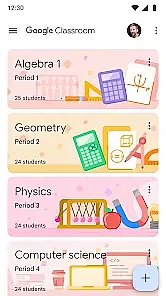
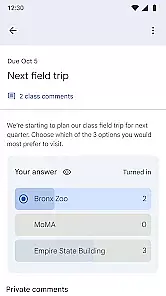
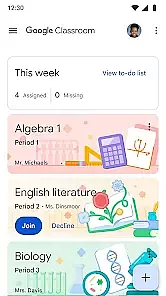
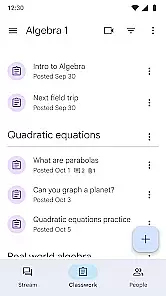
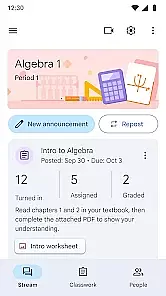
Google Classroom is an educational app designed to simplify teaching and learning processes. It enables educators to create, distribute, and grade assignments in a paperless environment. The app seamlessly integrates with Google's suite of productivity tools like Google Docs and Drive, making it easy to organize class materials and collaborate with students. Teachers can provide timely feedback while students can stay organized and keep track of their coursework.
This application is particularly useful for schools that have adopted Google Workspace for Education. With its cloud-based system, users can access class materials from any device with internet connectivity. The app also supports communication between teachers and students through announcements and discussion features, creating an interactive learning environment.
Google Classroom offers a range of features that enhance the educational experience. One key feature is the ability to create and manage classes digitally. Teachers can easily add students to their classes using unique codes, streamlining the enrollment process. Assignments can be created and graded directly within the app, allowing for efficient workflow management.
The integration with Google Workspace tools such as Docs, Sheets, and Slides allows for seamless collaboration on projects and assignments. Additionally, the app provides real-time notifications about class activities, ensuring that both teachers and students are always informed. With options to share resources like videos and links, Google Classroom becomes a comprehensive platform for digital education.
In the realm of educational applications, content authority and curriculum alignment are paramount. Google Classroom ensures that all educational materials provided are vetted by educational experts and align with established curricula.
The app integrates seamlessly with other Google services like Google Docs and Google Drive, allowing educators to distribute assignments that adhere strictly to academic standards. This guarantees that students receive only the most relevant and authoritative content for their learning needs.
By using machine learning algorithms, Google Classroom suggests additional resources and activities that match the student's current coursework, enhancing the learning experience while maintaining strict adherence to curriculum guidelines.
This meticulous attention to detail in content selection not only aids in standardized testing preparation but also fosters a deeper understanding of subjects, making it an invaluable tool for both teachers and students.
Gamification has revolutionized the way students engage with educational content, and Google Classroom excels in integrating game-like elements into the learning process. By incorporating features such as badges and progress tracking, the platform motivates students to complete their assignments and participate actively in class activities.
Teachers can set up challenges and quests that encourage students to achieve specific learning objectives, transforming routine homework into exciting missions. These gamified elements are carefully designed to reinforce educational goals without detracting from the seriousness of the subject matter.
Moreover, the analytics dashboard provides insights into student performance, highlighting areas where learners excel or need improvement. This data-driven approach allows educators to tailor their teaching strategies, ensuring that each student receives personalized support.
Ultimately, the blend of gamification and traditional learning methods within Google Classroom creates an engaging environment that promotes sustained motivation and better academic outcomes.
User-friendly interface
Seamless Google integration
Efficient assignment handling
Real-time notifications
Free to use
Limited offline functionality
Requires Google account
Basic grading system
No advanced analytics
Dependent on internet

A must-have sequel to our Learn Letter Sounds with Carnival Kids app
 4.30
4.30
Tracing, phonics & spelling games for toddlers, preschool & kindergarten kids!
4.50
Glow Doodle! Baby Coloring & Drawing games for toddlers: Color and Learn! NoAds!
4.40
A cube building game for small (and large) builders.
4.40
Master your phonics letters and sounds with the Alphablocks!
3.80
A fan of cute games? Try animal games & take care of fluffy virtual pets!
4.20
Kids age 2-8 can create, explore, and play Toca Boca games their way!
3.50
Play safe educational games & learn with Daniel Tiger, Wild Kratts & more
4.40
Create, customize & explore your Toca Boca story! Endless fun & creativity await
4.30
Design dreamhouses and dress up creatively in the ultimate role-playing game!
4.70
Play educational games for preschool toddlers—plus more to discover ►AdsFree◄
4.60
Creative beauty & fashion
4.50
A world for little builders to create, imagine, and learn through play.
4.20
Fun drawing games with coloring book, glow and paint by numbers! Color for kids.
4.20
Dress up, Makeover, and Party! Design a Wonder World!
3.90
Spark your little ones’ imagination!
3.80
Creating emotional connections
4.3
Have fun learning Alef Beit
4.5
Fun step-by-step drawing & coloring app to learn and create art!
4.0


User Reviews