
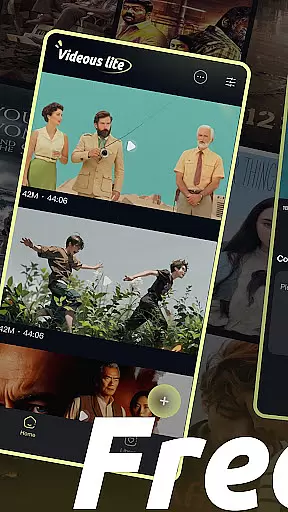
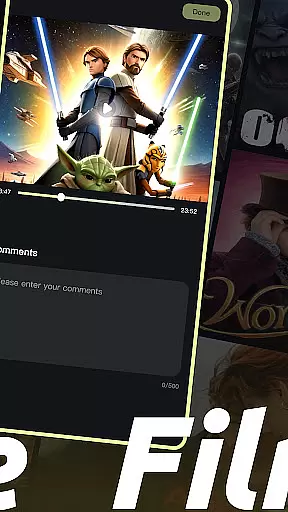
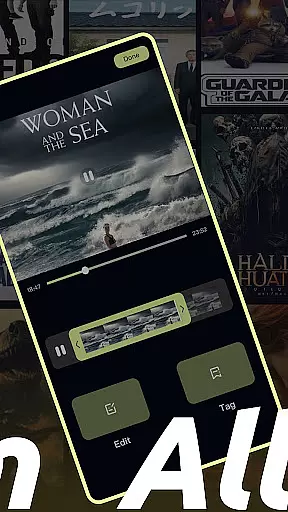
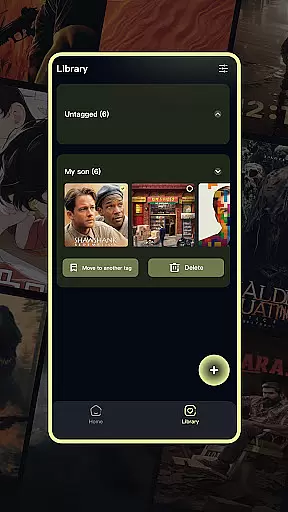
Videous lite is a streamlined video management and editing application tailored for both casual users and professional creators. Its user-friendly interface allows for efficient video processing, making it simple to organize, edit, and manage your video library. The app supports essential functions such as video uploads, intuitive timeline-based editing, and customizable tagging for easy categorization.
Designed with practicality in mind, Videous lite offers features like chronological video arrangement, detailed metadata display (length and size), and seamless navigation through its well-structured Library Page. Whether you're looking to enhance personal entertainment or streamline professional workflows, this app provides the tools needed to transform raw footage into polished content.
The app's value lies in its ability to simplify complex tasks without compromising functionality. From quick uploads via the + button to advanced editing options that include trimming and tagging, Videous lite empowers users to unleash their creativity while maintaining an organized and accessible video collection.
Videous lite stands out with its comprehensive yet straightforward feature set designed to cater to various video management needs. One of its key strengths is the intuitive video editing tool, which includes a progress bar for precise cuts and customizable tags for better organization. This ensures that even beginners can achieve professional-looking results with minimal effort.
The app also excels in video management capabilities. The Library Page presents a clear overview of all video tags, allowing users to filter and access specific content quickly. Additional functionalities such as batch selection, moving, and deleting videos help maintain a tidy library. Furthermore, the app's settings menu offers customization options, enabling users to tweak preferences to suit their unique requirements.
Another notable feature is the effortless video upload process facilitated by the prominent + button on the homepage. This function not only simplifies expanding your video library but also enhances the overall user experience by reducing unnecessary steps. Collectively, these features make Videous lite a versatile tool for anyone seeking efficient video handling solutions.
In the realm of digital content, having a diverse and frequently updated library is crucial for user engagement. Videous lite-Made Easy offers an extensive array of video management and editing features that cater to both personal entertainment and professional creation needs. The application's intuitive interface allows users to effortlessly upload, edit, and manage their video libraries.
One of the standout aspects of Videous lite is its ability to keep content fresh and engaging. Users can quickly upload local videos through the prominent + button on the homepage, instantly expanding their video collection. This ease of adding new content ensures that users always have something new to explore and work with, keeping their libraries dynamic and up-to-date.
Moreover, the app provides practical functions such as chronological video arrangement, length and size markers, and customizable tags. These features not only enhance the variety of content but also make it easier for users to organize and retrieve videos efficiently. By offering these capabilities, Videous lite ensures that users can maintain a vibrant and well-managed video library, which is essential for sustained user interest and creativity.
User engagement duration and retention are pivotal metrics for any entertainment application. Videous lite-Made Easy excels in this area by providing an intuitive and feature-rich platform that encourages prolonged usage. Its easy-to-navigate interface and robust functionality ensure that users remain engaged and find continued value in the app.
The app's design focuses on user-centric features that promote longer interaction times. For instance, the drag-and-edit functionality allows users to create ideal clips swiftly, while the tag customization feature aids in efficient video categorization. These tools not only simplify the editing process but also make it more enjoyable, encouraging users to spend more time refining their videos.
Additionally, Videous lite offers comprehensive video management options, including the ability to select, move, and delete videos easily. Such features help users maintain an organized and appealing video library, further enhancing their engagement and likelihood of returning to the app. By focusing on these aspects, Videous lite effectively boosts user retention, ensuring that users continue to find value and enjoyment in their video projects over time.
User-friendly interface
Efficient video editing
Customizable tagging system
Intuitive video management
Quick video uploads
Limited advanced editing
Fewer filters and effects
No cloud backup option
Basic audio tools
Occasional bugs

Exclusive Short Drama Video! All in HD. Bringe trending reels & enjoy drama time
 3.80
3.80
Practice and master your ESP and intuition with five mode trainer.
4.20
Create melty bead designs by numbers, photos or your imagination
4.40
Music visualizer and party effects for Hue
3.90
Direct access to the most complete Guitar Tab Archive in Spanish: LaCuerda.net
4.60
Chat with AI characters! Anime, games, roleplay & more.
4.50
NFL, NBA, NHL, MLB, local sports coverage, shows, movies & news!
3.20
Stream live TV shows, sports, news, movies & more - all without cable.
3.00
Explore the unknown!
3.00
Colorful flows will relax and calm you down, or get you trippy and creative!
4.90
Classic dynamic pixel art from Mark Ferrari.
4.70
Find out if you're on Santa's Naughty or Nice List with this magical scanner!
4.60
Unleash Your AI Imagination
4.60
The Xbox app keeps you connected to your gaming community.
4.50
Realistic Baby Simulator App
4.00
Binge-worthy short dramas on DramaRush—engaging stories that fit your day.
3.90
Watch New Episodes & Live TV
3.80
Create your Songs. Cover Maker with any Voice, Song Generator
3.30
Neon Christmas Tree Animated: Festive Wear OS watch face with fitness info
4.3


User Reviews