

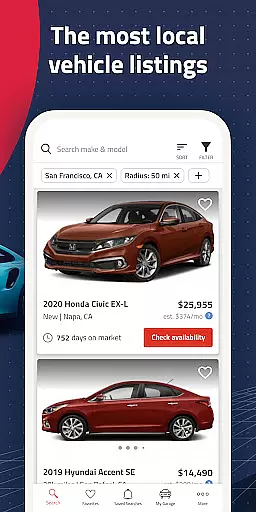
Autolist is a premier automotive marketplace app that simplifies the used car search process. With access to millions of listings from thousands of sources, it aggregates the largest selection of local cars, trucks, and SUVs in one place. Whether you're looking for a specific make, model, or year, Autolist provides an extensive inventory that caters to every preference and budget.
The app's powerful tools make finding the perfect vehicle effortless. Users can filter searches by price, color, features, and more. Autolist also offers price history and Listimate values for each car, empowering buyers with crucial market insights. Additionally, users can directly contact dealers or private sellers through the app to check availability, request quotes, or schedule test drives.
Ideal for anyone in the market for a used car, Autolist ensures you find the best ride at the optimal price. Its comprehensive features and user-friendly interface have earned it recognition from top publications like CNET, Road & Track, and The New York Times.
Autolist stands out with its robust set of features designed to streamline the car-buying experience. The app's most notable feature is its vast inventory, which compiles millions of used car listings from various sources into a single, easy-to-navigate platform. This unparalleled selection ensures users have access to the widest range of vehicles possible.
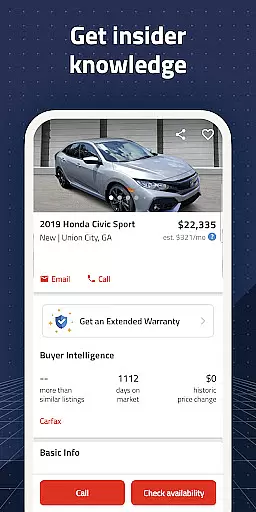
Another key feature is the advanced filtering system. Users can refine their search using numerous criteria such as price range, vehicle year, exterior and interior colors, and installed features. This allows for a highly personalized search experience tailored to individual preferences. Furthermore, Autolist provides detailed price histories and Listimate values for each car, giving users the confidence to negotiate fair prices.
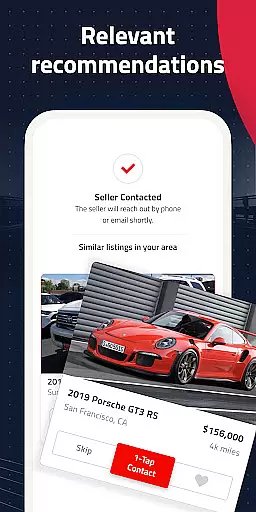
Convenience is further enhanced by in-app communication tools. Users can call, text, or email dealers and private sellers directly through the app to inquire about availability, request price quotes, or schedule test drives. Autolist also sends instant notifications for saved searches and tracks favorite listings for price drops and availability changes, ensuring users never miss an opportunity.
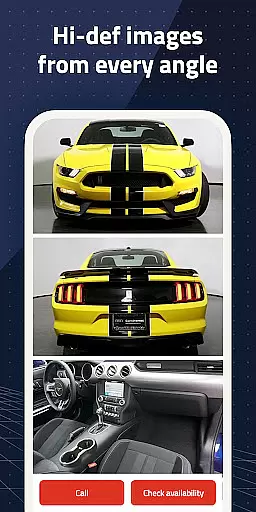
When searching for a used car, having access to comprehensive vehicle details is crucial. Autolist provides an extensive database that includes specific information on every listed car, ensuring users can make informed decisions. The app aggregates data from thousands of sources, presenting users with detailed specifications such as make, model, year, mileage, and installed features.
The importance of detailed vehicle information cannot be overstated in the car-buying process. Autolist's robust filtering system allows users to narrow down choices based on precise criteria like exterior color, interior features, and more. This level of detail helps buyers quickly identify vehicles that meet their exact requirements.
Users benefit significantly from this feature as it saves time and effort in gathering necessary information. Instead of visiting multiple websites or dealerships, all relevant details are available in one place. This consolidated approach streamlines the research phase, enabling users to focus on test drives and negotiations.
The value of having detailed vehicle information at your fingertips is immense. It empowers buyers to compare options effectively, understand market values better, and ultimately secure the best possible deal. With Autolist, users gain confidence in their purchasing decisions through access to complete and accurate vehicle data.
Price transparency is a fundamental aspect of any successful car purchase, and Autolist excels in this area. The app provides complete price histories for each vehicle listing, along with its proprietary Listimate value estimation tool. These features help users understand current market values and historical pricing trends for specific makes and models.
The significance of price transparency extends beyond mere numbers; it directly impacts negotiation power and buying confidence. Autolist's detailed pricing information enables users to identify overpriced listings and recognize fair deals. By offering both dealer prices and private seller options, the app creates a comprehensive view of the used car market landscape.
For users, this level of transparency translates into substantial financial benefits. They can time their purchases strategically, knowing when prices are most favorable. Additionally, the ability to request quotes directly through the app enhances bargaining power during dealer interactions.
Autolist's commitment to price transparency sets it apart from other automotive apps. By equipping users with accurate pricing data and valuable insights, the platform transforms what could be an overwhelming process into an empowering experience. This dedication to openness ultimately leads to more satisfied customers and better-informed purchasing decisions.
User-friendly interface
Extensive vehicle inventory
Advanced search filters
Comprehensive price insights
Direct seller communication
Limited new car listings
Occasional listing inaccuracies
Ads can be intrusive
Varied seller responsiveness
Requires constant updates

DIY Vehicle Wheel Alignment
 4.4
4.4
* This app needs an adapter cable and a certain OBD2 adapter to work *
4.20
Buy and sell your boat
4.70
BlueDriver® is a Premium Diagnostic OBD2 Scan Tool. www.BlueDriver.com
3.90
View your car’s service records and find out when maintenance is due.
4.70
Automotive Electrical Wiring Diagrams
4.40
Secure mobile payments & fuel savings at Phillips 66®, Conoco® and 76® stations
4.40
MySubaru: Download. Connect. Love.
4.70
Autotrader is your online solution for buying and selling new and used cars.
4.40
Lexus app currently supports 2010 or newer vehicles (2018 or newer for Hawaii).
4.80
Car Values, Research and More
4.80
Browse millions of cars, track vehicle listings or sell your car today
4.70
Your Path to Driving Licensing Success Begins Here! Develop your driving skills.
4.40
AI Powered - Automotive Mechanic Assistant
4.30
myAudi offers users services and Audi connect services for Audi drivers
4.10
Boost profits and hit your goals faster with GigU's amazing tools for gigworkers
4.00
Take state-specific DMV permit tests and ace the exam.
3.90
App Mirroring for Tesla Car's Browser
2.80
Theme for Car Launcher
4.2


User Reviews