
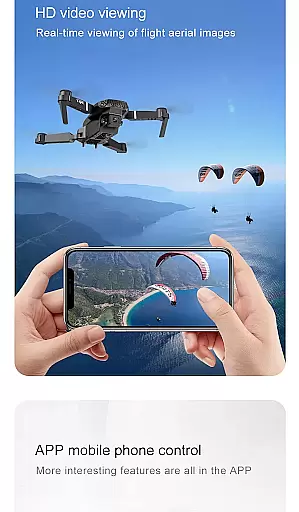
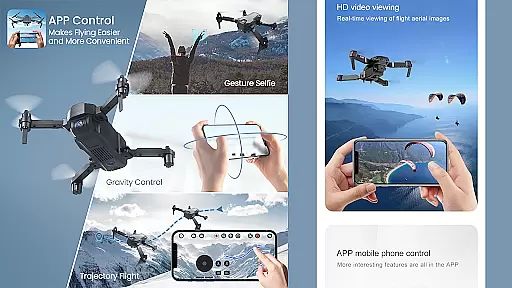
Drone Remote Controller is an innovative application that transforms your Android phone into a powerful drone control device. This app allows users to seamlessly operate various drones using their smartphones, replicating the functionality of traditional RC controllers. With intuitive configuration and familiar controls, it provides an accessible solution for both amateur enthusiasts and experienced pilots.
The application supports advanced features like flight planning, automated operations, and live FPV streaming. Users can capture images and record videos through the integrated camera controls. Whether you're looking to manage your own drone fleet or surprise a drone-enthusiast friend, this app offers a comprehensive and entertaining remote control experience.
Particularly useful for controlling modern drones, Drone Remote Controller enables precise command over flight paths and camera functions. Its ability to disable auto-flight and resume manual control with a single tap makes it an essential tool for drone operators who value flexibility and responsiveness during their aerial adventures.
Drone Remote Controller stands out with its versatile feature set designed for comprehensive drone management. The app's primary advantage is its universal compatibility, allowing users to control multiple drone models through a standardized interface. It supports sophisticated functions such as automated takeoff and landing sequences, programmed flight paths, and continuous image capture during missions.
A key innovation is the live First Person View (FPV) streaming capability, which provides real-time video feedback directly to the user's device. The app maintains stable connections with WiFi-enabled camera systems, enabling seamless photo and video recording. Advanced features include adjustable FPS settings for video capture and uninterrupted mapping of large areas through continuous flight sessions.
What sets this application apart is its dual functionality as both a control interface and entertainment tool. While serving as a practical replacement for physical RC controllers, it also offers playful features for surprising fellow drone enthusiasts. The combination of professional-grade tools with recreational possibilities makes this app a unique offering in the drone control category.
Functionality completeness is a critical aspect of any drone remote controller application. Drone Remote Controller offers an extensive range of features that ensure comprehensive control over compatible drones. The app allows users to create detailed flight plans on their Android devices, automate essential functions such as takeoff, flight maneuvers, image capture, and landing.
In addition to basic controls, the application provides advanced capabilities like live streaming First Person View (FPV), disabling auto-flight modes, and resuming manual control with just a single tap. These functionalities are crucial for both amateur enthusiasts and professional operators who require precise command over their drone's operations.
Users benefit from uninterrupted flights which enable mapping large areas efficiently. With dedicated options for video recording and capturing frames per second (FPS), this app caters to various needs whether itu2019s photography or surveillance. Such thorough coverage ensures that all aspects of drone operation are addressed within one intuitive platform.
Usability plays a significant role in determining how effectively users can interact with Drone Remote Controller. This application boasts an easy-to-configure interface that mirrors traditional RC Drone controls, making it accessible even for beginners. Its design emphasizes simplicity without compromising on functionality, allowing seamless integration into existing workflows.
Operational smoothness is evident through its responsive performance during critical tasks such as connecting WiFi camera devices for real-time viewing, picture taking, and video recording while simultaneously controlling the drone. By ensuring lag-free communication between the useru2019s device and drone, it enhances overall flying experience significantly.
The ability to switch between automated flight paths and manual override at any moment adds another layer of flexibility, catering to diverse operational scenarios. Whether fooling around with friendsu2019 quAdcopters or managing serious projects involving multiple drones, this app delivers consistent reliability and ease-of-use across different contexts.
User-friendly interface
Wide drone compatibility
Advanced FPV capabilities
Automated flight functions
Free to use
Not compatible with older hardware
Limited physical controls
Requires stable connection
Dependent on device performance
No offline functionality

If you are looking for melon playground mod that fun you deffinitely try our app
 2.70
2.70
SmartCast mirrors Android phone to TV screen With Cast Screen, Chromecast.
4.80
Identify securely online
3.10
Test DPC is a sample device policy controller for use with Android Enterprise.
4.20
Turn your phone into a wireless Xbox controller – play, stream & control anytime
4.5
A Pydroid Quick Install repository provider.
4.00
Mirror phone to TV effortlessly! Stream, share & connect with Airplay ease.
3.60
Now Available on Android ™
3.40
Unlock the hidden menus of your phone with our mobile secret codes app.
4.20
Game booster GFX may reduce interruptions and improve gaming experience.
4.50
View your cameras anywhere and anytime
4.20
Android secret code for smart phone, mobile codes, with secret codes app
4.20
a wireless controller that provides a seamless and gaming experience for players
3.80
Connect and find your Smart Tag 2 devices through our app.
3.60
CloudEye 365 is a easy-handling APP
3.60
Record with Double Camera Video Recording using Dual Camera Front and Back Video
3.00
Collection of high-quality, trendy skins and outfits!
4.0
Enjoy hours of entertainment with our Roblox mobile games app
4.2
Mirror Link Car Display to share your screen with car dashboard wirelessly
4.0


User Reviews