
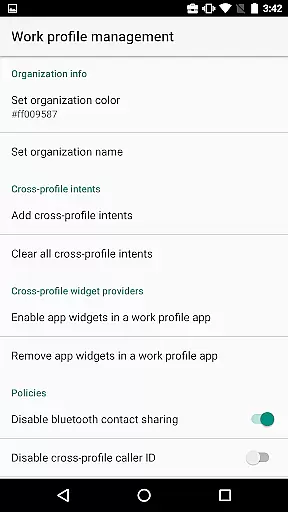
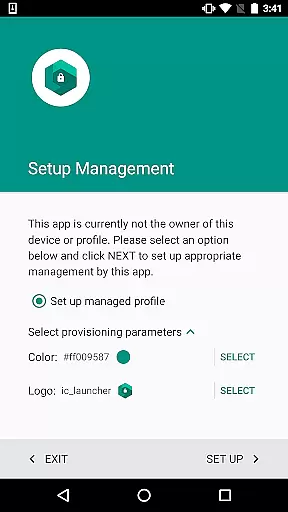
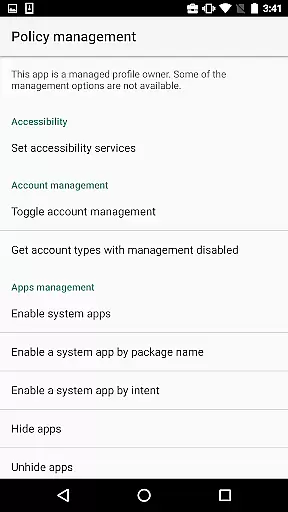
Test DPC is a specialized development tool designed exclusively for Android Enterprise management testing. This application serves as a sample device policy controller, enabling developers to simulate and test managed environments such as device owner mode or managed profiles.
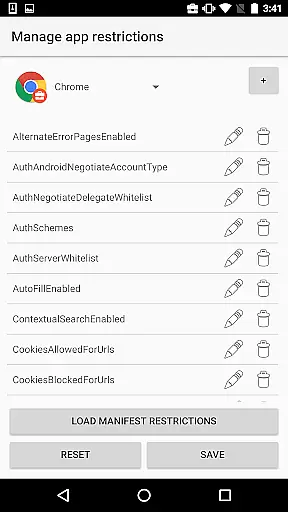
The app provides comprehensive features for testing enterprise mobility management capabilities. Developers can experiment with work profile setup, enable enterprise apps, configure application restrictions, and manage security policies. These robust functionalities make it an essential tool for organizations building mobile device management solutions.
While strictly intended for development purposes, Test DPC demonstrates significant value in its ability to help developers understand how their applications behave in managed enterprise contexts. The availability of its source code further enhances its utility for educational and implementation reference purposes.
Test DPC offers an extensive set of features specifically tailored for enterprise mobility management testing. The application allows developers to create and manage work profiles, providing granular control over enterprise application configurations and permissions.
One of the key capabilities is its support for implementing various security policies and application restrictions. Developers can test different management scenarios, including device owner mode functionality and managed profile behaviors. The app also enables experimentation with various enterprise mobility management features.
Additional notable features include its open-source nature, allowing developers to use it as an implementation reference for building their own device policy controllers. The availability of complete source code on GitHub makes it particularly valuable for educational purposes and for understanding best practices in enterprise mobility management development.
Functionality completeness refers to the extent to which an application provides features that cover all necessary use cases for its intended purpose. For Test DPC, this means offering a comprehensive set of tools that allow developers to simulate various managed contexts within Android Enterprise environments.
The app enables users to configure device policies, set up work profiles, and manage security policies. This wide range of functionalities ensures that developers can thoroughly test how their applications behave under different enterprise conditions. Such extensive coverage is crucial for identifying potential issues before deployment in real-world scenarios.
By providing these capabilities, Test DPC supports both basic and advanced testing needs, making it an invaluable resource for developers aiming to ensure their apps are fully compatible with managed Android environments. The availability of source code further enhances its utility by allowing developers to understand the underlying implementation details.
Usability focuses on how easily users can interact with an application's interface to achieve their goals efficiently and effectively. Operational smoothness pertains to the seamless execution of tasks without interruptions or errors. In the case of Test DPC, usability is enhanced through clear navigation paths and intuitive controls designed specifically for developer workflows.
Test DPC offers straightforward options for setting up work profiles, enabling work apps, and applying application restrictions. These streamlined processes help reduce complexity, allowing developers to focus more on testing rather than struggling with cumbersome configurations. Additionally, operational smoothness is maintained by ensuring stable performance even when executing complex policy changes or managing multiple devices simultaneously.
Overall, Test DPC delivers a user-friendly experience while maintaining robust operational capabilities. Its design prioritizes efficiency and reliability, empowering developers to conduct thorough tests confidently. By leveraging this tool, they can optimize their development cycles and deliver high-quality enterprise-ready applications.
Comprehensive testing capabilities
Open-source implementation
Enterprise feature simulation
Developer-friendly toolset
Official Google sample
Not for production use
Limited end-user functionality
Complex for beginners
No real data support
Development-focused only

Game Booster GFX for smoother gaming experience. Enjoy 120 FPS and 4x Game Space
 4.20
4.20
Record with Double Camera Video Recording using Dual Camera Front and Back Video
3.00
Collection of high-quality, trendy skins and outfits!
4.1
An essential GFX utility developed for specific FPS mobile games
4.50
charging your phone by other phone easly
4.00
Demo version of the mcpro24fps manual video camera. Try and buy a full version!
4.00
DamonSx2 is the open Source LGPL Emulator
3.20
A Pydroid Quick Install repository provider.
4.00
Unlock the hidden menus of your phone with our mobile secret codes app.
4.20
SmartCast mirrors Android phone to TV screen With Cast Screen, Chromecast.
4.80
Android secret code for smart phone, mobile codes, with secret codes app
4.20
Easily evaluate the performance of Scandit's barcode and ID scanning SDK
4.10
You can remote control and play much easier.
4.10
Sad ringtones full of feeling, sad music ringtones
3.90
With Endoscope Camera Connector you can connect your phone with endoscope cam
3.70
CloudEye 365 is a easy-handling APP
3.60
Experience virtual reality on your smartphone with Cardboard.
3.50
Read Quran pak offline & listen online mp3 Quran in Al Quran Majeed app
4.3
Mirror Link Car Display to share your screen with car dashboard wirelessly
4.2


User Reviews