
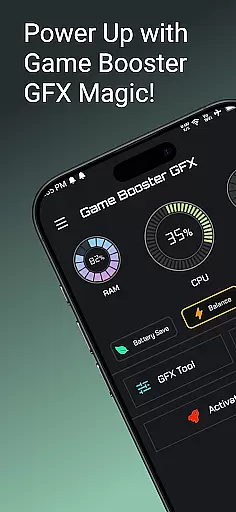
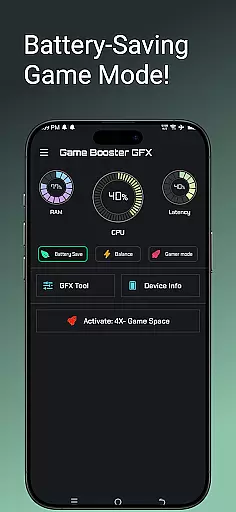
Game Booster GFX 4x is a powerful tool designed to enhance your mobile gaming experience. This app allows gamers to optimize their device performance specifically for gaming, offering features like 4x Game Space expansion and customizable resolution settings. With support for up to 120 FPS on compatible devices, it ensures smoother gameplay without lag. The Gamer Mode and GFX Tool provide additional customization options, letting users tailor graphics styles and unlock extreme frame rates. Whether you're playing graphically intensive games or simply want better performance, this app delivers an improved gaming experience.
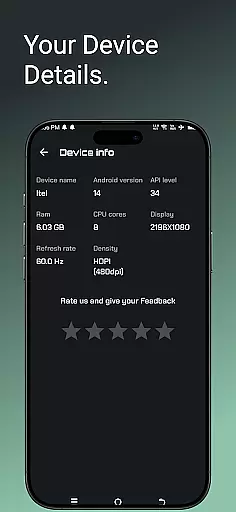
The application's main value lies in its ability to transform regular gameplay into a professional-level experience. By providing options to adjust graphics settings such as Ultra HD and HDR, along with multiple graphic styles like Realistic and Colorful, it caters to both casual and hardcore gamers. Additionally, the Device Info feature gives users insights into their hardware, helping them make informed decisions about performance tweaks. Suitable for various Android devices, Game Booster GFX 4x is an essential utility for mobile gamers looking to maximize their device's potential.
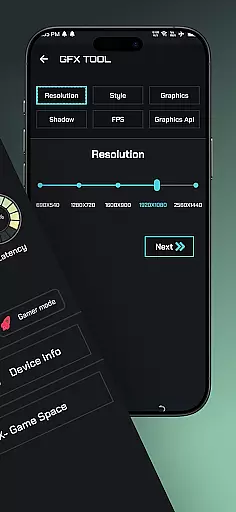
Game Booster GFX 4x stands out with its comprehensive suite of gaming optimization features. The app's most notable capability is the GFX Tool, which allows users to customize game resolution and frame rates without experiencing lag. Gamers can unlock Extreme FPS settings of up to 90 or 120, significantly enhancing the smoothness of their gameplay. The tool also provides multiple graphics style options including Realistic, Colorful, Soft, and Classic modes, giving players control over their visual experience.
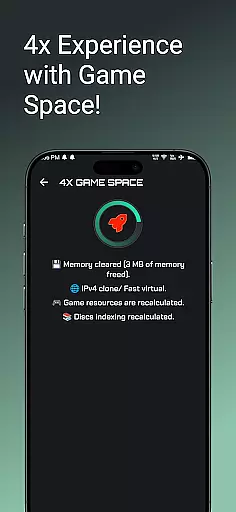
Beyond graphics optimization, the app offers practical features like 4x Game Space expansion, which helps manage game storage more efficiently. The Gamer Mode creates an optimized environment for gaming sessions by prioritizing system resources. Additionally, the Device Info feature provides valuable insights about hardware specifications, enabling users to understand their device's capabilities and limitations. These features collectively create a robust solution for gamers seeking to improve their mobile gaming performance while maintaining high-quality visuals.
Functionality completeness is a critical aspect of any application, especially for tools like Game Booster GFX 4x. This app offers a comprehensive suite of features designed to enhance gaming performance.
The app includes a 4x Game Space feature that allows users to enjoy their favorite games without lag, providing smoother gameplay with up to 120 FPS on supported devices. The GFX Tool lets gamers customize resolution settings, unlock extreme frame rates of up to 90 and 120 FPS, and choose from various graphics styles such as Realistic, Colorful, Soft, and Classic.
With its Gamer Mode and Device Info features, Game Booster GFX ensures that users have all the necessary tools to optimize their gaming experience. These functionalities cover a wide range of needs, from performance enhancement to device monitoring.
By offering such extensive coverage, Game Booster GFX 4x stands out in the Libraries & Demo category, ensuring that users can fully enjoy their gaming sessions with professional-grade enhancements.
Usability and operational smoothness are essential for user satisfaction, particularly in applications like Game Booster GFX 4x. This app focuses on delivering an intuitive and seamless experience for gamers.
Game Booster GFX provides a user-friendly interface that makes it easy to activate features such as Gamer Mode and customize settings through the GFX Tool. Users can effortlessly adjust resolutions, select preferred graphic styles, and unlock higher frame rates without encountering complex procedures.
The app's design emphasizes smooth operation, ensuring that users can switch between different modes and settings without experiencing delays or interruptions. This operational efficiency enhances the overall gaming experience by maintaining consistent performance levels.
Ultimately, Game Booster GFX 4x excels in usability and operational smoothness, making it a reliable choice for gamers seeking to optimize their gameplay with minimal hassle.
Enhances gaming performance
Customizable graphics settings
Supports high frame rates
Optimizes device resources
User-friendly interface
Limited to supported devices
May cause battery drain
Potential compatibility issues
Requires technical knowledge
No iOS version available

Do you want to drive easy ? do you wanna full mirror link Mobile with your car
 4.10
4.10
Collection of high-quality, trendy skins and outfits!
4.4
Wireless reverse charging using phone now is possible
4.30
Block and secure the microphone and protect from secret listening and recording.
4.50
Connect your phone to any endoscope camera, USB camera, or borescope with ease.
3.70
DamonSx2 is the open Source LGPL Emulator
3.20
Game booster GFX may reduce interruptions and improve gaming experience.
4.50
Endoscope camera an app to connect with endoscope cam or any device
3.30
Phone Software Update Quick Checker helps you to keep your phone apps up to date
4.50
Block, disable and secure phone camera from secretly taking photos by spyware.
4.50
Barcode scanning made simple!
4.40
Manage apps & elevate your gaming experience with Game Launcher: Gaming Hub app.
4.30
use your smartphone as Remote control drones .
4.20
a wireless controller that provides a seamless and gaming experience for players
3.80
Mobile Connect To TV - HDMI USB & WiFi Screen Mirroring
3.70
Mirror phone to TV effortlessly! Stream, share & connect with Airplay ease.
3.60
Experience virtual reality on your smartphone with Cardboard.
3.50
Record with Double Camera Video Recording using Dual Camera Front and Back Video
3.00
Zlink Carplay Android a mirror link app with a Carplay interface style
4.0


User Reviews