
Expo Go is a powerful development tool that allows users to build interactive mobile experiences directly from their Android device. The app leverages JavaScript and React Native, enabling developers to create rich applications with features like Camera integration, Background Location tracking, Audio/Video playback, and SQLite database management.
This application is particularly useful for developers who want to prototype or test their React Native projects on the go. With its comprehensive feature set, Expo Go provides an ideal platform for experimenting with various mobile functionalities without needing complex setups. Whether you're building a multimedia app or working on location-based services, this tool streamlines the development process.
The value of Expo Go lies in its accessibility and versatility. By simply downloading the app, developers can instantly preview their projects on a real device, significantly speeding up the development cycle. This makes it an essential companion for both beginners learning React Native and experienced developers looking to quickly iterate on their ideas.
Expo Go stands out with its diverse range of built-in features tailored for mobile development. One of its key strengths is the ability to access native device capabilities such as the camera, geolocation, and media playback through simple JavaScript APIs. This eliminates the need for complex native code integrations, making it easier to focus on building the core functionality of your app.
Another notable feature is its seamless integration with the Expo ecosystem. Developers can use the Expo CLI to publish projects directly to Expo Go, allowing for instant updates and testing across multiple devices. Additionally, the app supports Over-the-Air (OTA) updates, which means developers can push updates to their apps without going through the traditional app store review process.
For those new to React Native, Expo Go offers extensive documentation and community support, ensuring that help is always available when tackling challenging development tasks. These features collectively make Expo Go an indispensable tool for anyone involved in cross-platform mobile development.
Expo Go offers a comprehensive suite of tools that cater to both novice and experienced developers. The app provides an extensive range of functionalities, including access to device features like the camera, background location services, audio and video capabilities, and SQLite databases.
With Expo Go, developers can seamlessly integrate complex features into their applications without needing to write additional native code. This is made possible through its well-documented APIs and libraries, which are designed to work harmoniously with JavaScript and React Native.
The completeness of Expo Go's offerings ensures that developers have everything they need at their fingertips. Whether it's for prototyping or full-scale app development, users can rely on Expo Go to deliver a robust set of features that cover most development needs.
This broad coverage allows developers to focus more on the creative aspects of app design rather than getting bogged down by the technical limitations often associated with cross-platform development.
Expo Go stands out in the Libraries & Demo category due to its emphasis on usability and operational smoothness. The application is engineered to provide a seamless experience from installation to daily use, ensuring that developers can quickly adapt and make the most out of its capabilities.
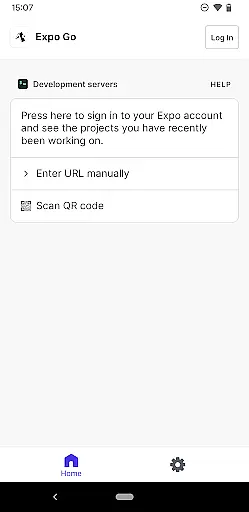
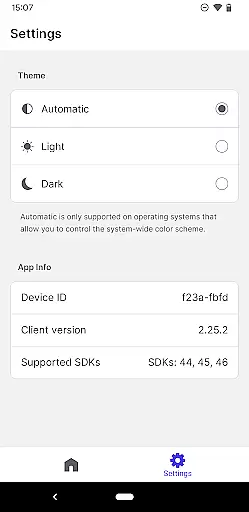
Its user-friendly interface simplifies navigation through various tools and settings, making it accessible even for those new to mobile app development. Clear documentation and community support further enhance the overall usability of the platform.
Operational smoothness is another cornerstone of Expo Go's design philosophy. The app runs efficiently on Android devices, maintaining performance even when executing demanding tasks such as real-time data processing or multimedia handling.
By prioritizing these aspects, Expo Go not only facilitates a smoother workflow but also enhances productivity, allowing developers to bring their ideas to life with minimal friction.
User-friendly interface
Wide feature selection
Instant project previews
Active community support
Cross-platform compatibility
Limited native customization
Requires programming knowledge
Internet connection needed
Performance overhead
No direct app store deployment

Game Booster GFX for smoother gaming experience. Enjoy 120 FPS and 4x Game Space
 4.20
4.20
View your cameras anywhere and anytime
4.20
Tune your game graphics with our GFX optimizer for optimal gaming experience
4.50
With Endoscope Camera Connector you can connect your phone with endoscope cam
3.70
Read Quran pak offline & listen online mp3 Quran in Al Quran Majeed app
4.1
Study Bible King James Version: the correct way to learn the Bible with audio
4.80
A Pydroid Quick Install repository provider.
4.00
Ps2 plugins for 64 bit artitechture
3.70
Endoscope camera an app to connect with endoscope cam or any device
3.30
Demo for Key Attestation feature of the Android system.
4.80
Wireless reverse charging using phone now is possible
4.30
Recite Quran Majeed القران with special 16 line real Kuran page in hand
4.30
You can remote control and play much easier.
4.10
Connect and find your Smarttag devices through our app.
4.00
a wireless controller that provides a seamless and gaming experience for players
3.80
Mobs maker Minecraft help MCPE creators make their own mob by using Blockbench
3.50
Zlink Carplay Android a mirror link app with a Carplay interface style
4.3
Enjoy hours of entertainment with our Roblox mobile games app
4.2
Mirror Link Car Display to share your screen with car dashboard wirelessly
4.1


User Reviews