
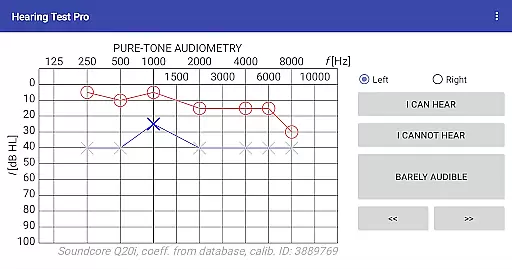
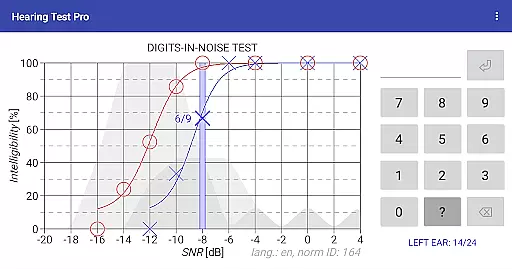
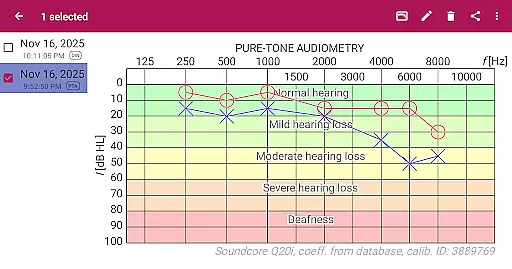
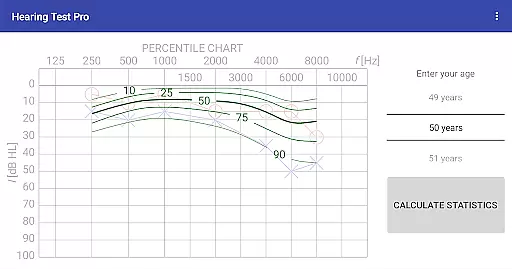
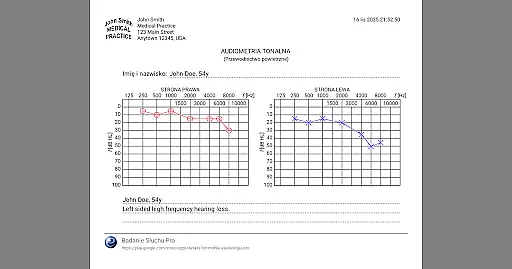
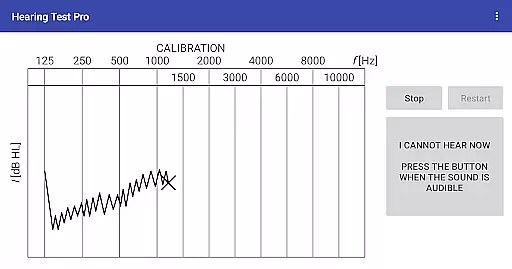
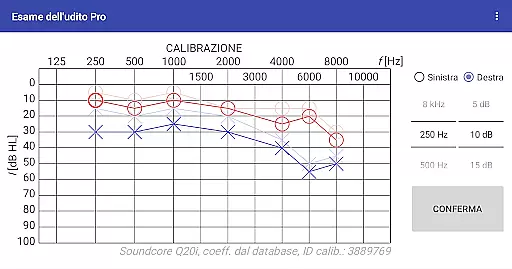
Hearing Test Pro is a professional-grade mobile application designed for users to conduct detailed hearing assessments. The app offers two primary testing methods: pure-tone audiometry and the digits-in-noise test (digit triplet test), which evaluate both hearing sensitivity and speech intelligibility. Pure-tone audiometry measures the quietest sounds across different frequencies that a user can hear, providing an accurate hearing threshold. The digits-in-noise test assesses speech recognition by having users identify spoken numbers amidst background noise.
In addition to these core features, Hearing Test Pro includes advanced functionalities such as high-frequency audiometry, classification of hearing loss, and comparison with age-related norms. Users can calibrate their devices, measure ambient noise levels, and even adjust calibration coefficients based on clinical audiometer results. With its comprehensive suite of tools, this app serves as an essential resource for individuals monitoring their hearing health or professionals conducting diagnostic evaluations.
Hearing Test Pro stands out with its robust feature set tailored for both personal and professional use. The app provides pure-tone audiometry using bundled headphones and predefined calibration data, ensuring reliable results. Its digits-in-noise test evaluates speech intelligibility by presenting spoken digits within varying levels of background noise, offering insights into real-world listening scenarios.
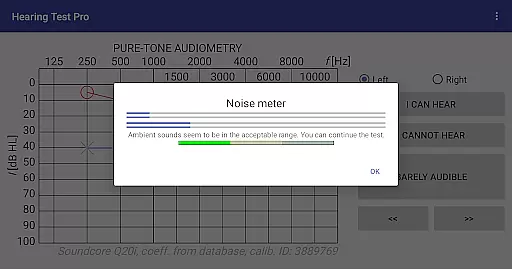
Additional features include a built-in noise meter to monitor environmental sound during tests, customizable calibration options, and the ability to classify types of hearing loss. Users can compare their results against age-specific norms, print test outcomes, and add personalized notes. The Pro version enhances functionality further with offline database access, cloud synchronization for easy data management across devices, and manual stimulus control during audiometry tests.
These capabilities make Hearing Test Pro a versatile tool for tracking auditory health over time, supporting both individual users and healthcare providers in maintaining optimal hearing wellness.
When it comes to medical applications, the credibility of content and expert review is paramount. Hearing Test Pro demonstrates a strong commitment to accuracy by offering scientifically-validated tests such as pure-tone audiometry and the digits-in-noise test. These assessments are widely recognized in audiological fields for determining hearing thresholds and speech intelligibility.
The app includes features like high-frequency audiometry and classification of hearing loss, which are essential tools used by professionals. By providing functionalities that compare results with age-related norms and allow calibration adjustments based on clinical audiometers, the application ensures its data aligns with professional standards. This level of precision reassures users that their test outcomes are reliable and clinically relevant.
Furthermore, additional options such as adding notes and printing test results enhance the utility for both patients and healthcare providers. With these comprehensive tools at hand, Hearing Test Pro establishes itself not only as an accessible solution but also one grounded in expert-reviewed methodologies, making it a trustworthy choice for monitoring auditory health.
While Hearing Test Pro does not offer teleconsultation services directly, it enhances the quality of potential virtual consultations through detailed and accurate diagnostic information. The app's ability to conduct pure-tone audiometry and digits-in-noise tests provides essential data that can be shared with healthcare professionals during a teleconsultation session.
One significant advantage is the synchronization feature available in the Pro version, which allows test results to be stored in the cloud. This means users can easily share their hearing test outcomes with doctors from different devices without any hassle. Such seamless access ensures that medical professionals receive up-to-date and precise information, facilitating more informed discussions during teleconsultations.
In addition, having offline access to a local database guarantees uninterrupted availability of critical health data. Whether used independently or alongside professional guidance, these capabilities ensure Hearing Test Pro supports high-quality remote care interactions where auditory diagnostics play a crucial role.
Comprehensive hearing tests
Accurate calibration options
Speech intelligibility evaluation
High-frequency audiometry support
Cloud synchronization in Pro version
Complex for casual users
Pro version is paid
Requires proper calibration
Limited free features
Dependent on headphone quality

Identify pills, search different drugs, get drug information and much more!
 4.50
4.50
Check and Track your Blood Pressure & Heart Rate.
4.50
Amplify surrounding sounds, conversations, TV or lectures for louder hearing.
4.70
Live vet support by text/video
4.80
Log your symptoms in the MyZio app — the perfect companion to the Zio monitor!
4.60
Save up to 80% on your pharmacy prescriptions & medications with free Rx coupons
4.70
Good for You. Great for Life.
4.00
Over 1,200 review questions and 5 exams—pass the NREMT with EMT Review Plus!
4.10
CPR Timer for High Performance AHA BLS / ACLS
5.00
Spruce is the leading platform for HIPAA-compliant communication and care.
4.90
Behavioral Health Portal
4.70
Leafly is a weed app for finding dispensaries, cannabis strains, & more.
4.70
Molina Members: My Molina. Manage your health anytime, anywhere!
4.30
Use the phone microphone or headset mic as sound amplifier for louder hearing.
4.30
The Client Portal app empowers you to manage care from one secure place
4.10
Hearing aid app for Android solves your hearing problems.
4.00
700 questions, 2 full exams, Predictive Scoring—your key to NREMT success!
3.90
Care Simplified by MyChart
3.40
MHealth is the mobile version of MEDITECH’s Patient and Consumer Health Portal.
3.10


User Reviews