
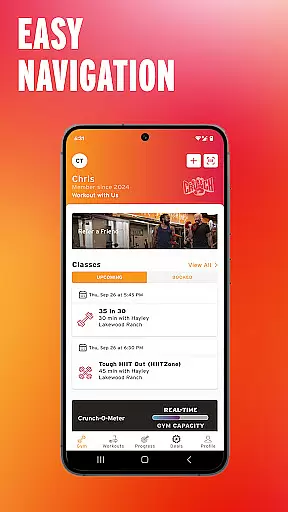
Crunch Fitness is a comprehensive mobile application designed specifically for fitness enthusiasts who are members of Crunch gyms. The app serves as a digital companion to enhance your gym experience by providing essential features that streamline your fitness routine. With this app, users can conveniently check into the gym, track their attendance, and monitor their progress over time.
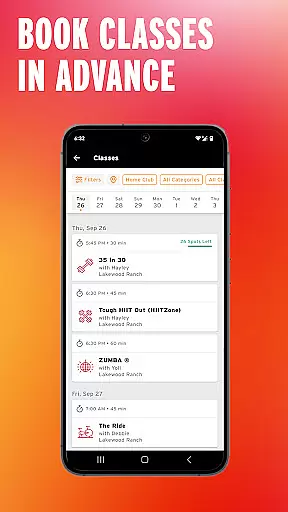
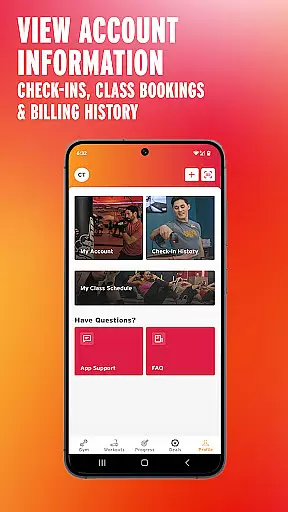
In addition to gym check-ins, Crunch Fitness allows users to manage their group class bookings directly from their mobile devices. You can review your scheduled classes, make changes as needed, and never miss an opportunity to participate in your favorite workouts. The app also provides access to billing history, making it easier to keep track of your payments and membership status.
One of the standout features of Crunch Fitness is its ability to integrate with fitness wearables. This integration enables users to record their workouts, set personal fitness goals, and seamlessly track their activity both inside and outside the gym. Whether you're looking to improve your overall health or achieve specific fitness milestones, Crunch Fitness offers the tools you need to succeed.
Crunch Fitness stands out due to its diverse range of features tailored to meet the needs of modern gym-goers. One of the key functionalities is the seamless gym check-in system, which eliminates the need for physical membership cards and speeds up the entry process. This feature not only saves time but also enhances security by ensuring that only members can access the facilities.
Another significant feature is the ability to manage group class bookings through the app. Users can browse available classes, reserve their spots, and receive reminders about upcoming sessions. This ensures that you can plan your workout schedule efficiently and make the most of your gym membership. Additionally, the app provides detailed insights into your gym attendance, helping you stay accountable and motivated.
The integration with fitness wearables is another innovative aspect of Crunch Fitness. By connecting your wearable device, you can automatically record your workouts, monitor your heart rate, and track calories burned. This data is then synced with the app, giving you a comprehensive overview of your fitness journey. Moreover, the app allows you to set personalized goals and track your progress towards achieving them, making it an invaluable tool for anyone serious about their health and fitness.
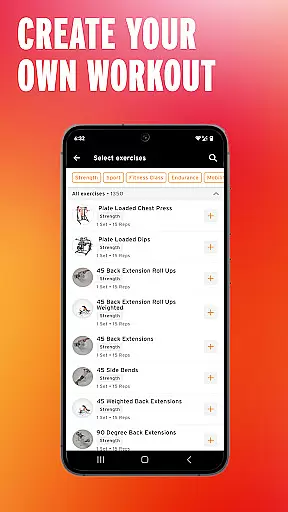
Personalized planning in fitness applications is crucial for tailoring workouts to individual needs and goals. The Crunch Fitness app excels in this area by offering features that allow users to set personal fitness goals and record their workouts. This personalized approach ensures that each user's fitness journey is aligned with their specific objectives, whether it's weight loss, muscle gain, or overall health improvement.
The app provides an intuitive interface where users can easily input and adjust their fitness goals. By integrating with fitness wearables, the app automatically tracks activities and adjusts plans based on real-time data. This seamless connection not only simplifies the process of tracking but also enhances the accuracy of personalized recommendations.
Members benefit from a more engaging and effective workout experience as the app adapts to their progress and changes in their fitness levels. With personalized planning, users can maintain motivation and achieve better results, knowing that their workout plans are specifically designed for them.
Visualizing progress is essential for maintaining motivation and achieving fitness goals. The Crunch Fitness app offers robust tools for members to track and visualize their gym check-ins, class bookings, and personal workout records. This feature allows users to see their advancement over time, providing a clear picture of their fitness journey.
Through detailed graphs and charts, the app displays various metrics such as frequency of gym visits, types of classes attended, and milestones reached in personal fitness goals. Users can access this information easily, helping them understand their habits and make informed decisions about their workout routines.
By showcasing tangible evidence of progress, the app fosters a sense of accomplishment and encourages continued commitment to fitness. Members can celebrate their achievements and stay motivated, knowing they have visual proof of their hard work and dedication.
User-friendly interface
Comprehensive tracking tools
Seamless wearable integration
Convenient class booking system
Secure digital check-in
Limited to Crunch members
No offline functionality
Occasional syncing issues
Requires stable internet
Premium features locked behind subscription

Insanity blocks of intense physical activity, short breaks of 30 seconds.
 4.2
4.2
Optimization for TRT & Enhanced Athletes
4.3
When the night comes, we prepare your eyes for deep, sweet dreams
4.70
50 HD sounds to help you relax during the day and sleep great at night!
4.40
Measure real-time wrist & ambient temperature with your Galaxy Watch (Wear OS)
3.20
Relax. Sleep Better. Feel Better.
4.50
Get lasting results with Chair Yoga, Wall Pilates, and Walking workouts!
4.60
You deserve easy access to important insurance information. Download for FREE.
4.70
Your portable blood pressure tracker. Record, monitor, and analyze BP anytime.
4.30
Medbridge GO gets you moving - get back to doing what you love, faster!
4.90
A brain game that moves you
4.70
Walk. Earn: Get rewarded for every step! Walk, move, and earn real rewards.
4.70
Step Counter, track steps when you walk or run
4.70
Binaural Beats - Fully Customizable Waves - Pure Sound - No Loops
4.50
Personal step counter for you, private and accurate
4.50
Chair Workout: Women's Edition for safe, flexible, and personalized fitness.
4.40
For Absolute Novices to Strength Training. Simple. Effective.
4.40
Monitor, analyze, track, and convert blood sugar & help you control diabetes.
4.10
Your plan in your pocket 24/7
3.00


User Reviews