
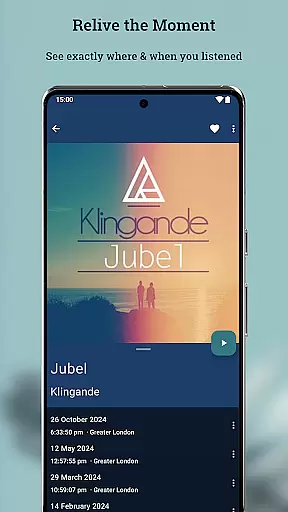
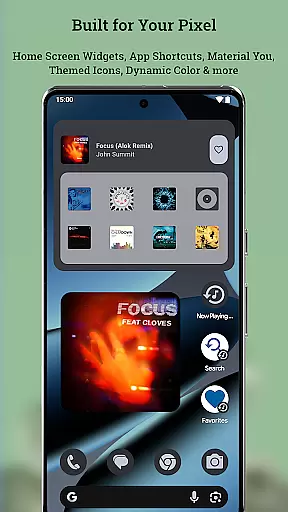
Now Playing History for Pixel is an essential music companion app that captures and archives every song your Google Pixel phone identifies through its 'Now Playing' feature. This app creates a permanent, searchable record of your listening history with detailed album art, ensuring you never lose track of the music that shapes your life.
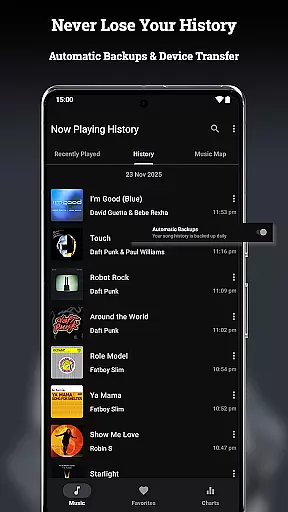
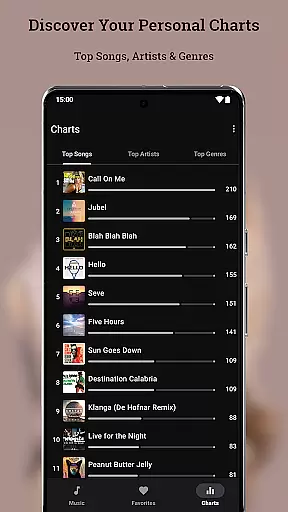
The app offers advanced features like Music Map to visualize where you discovered songs, personal charts to analyze your top artists and genres, and a metadata editor for correcting song information. With robust backup and restore functionality, you can transfer your entire music history across devices while maintaining complete control over your data.
This application is particularly valuable for music enthusiasts who want to preserve their listening journey and gain deeper insights into their musical preferences. The app's privacy-focused design ensures all your data stays on your device, making it a secure and reliable choice for managing your music history.
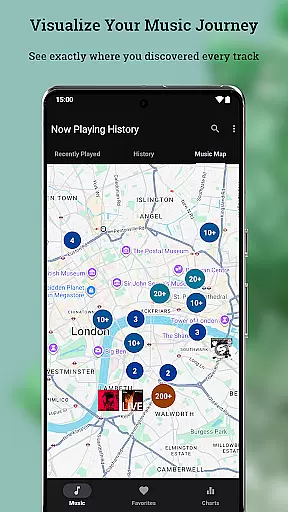
Now Playing History stands out with its comprehensive feature set designed to enhance your music discovery experience. The app automatically saves every song detected by your Pixel's 'Now Playing' feature, creating a permanent archive that includes song details, timestamps, and location data.
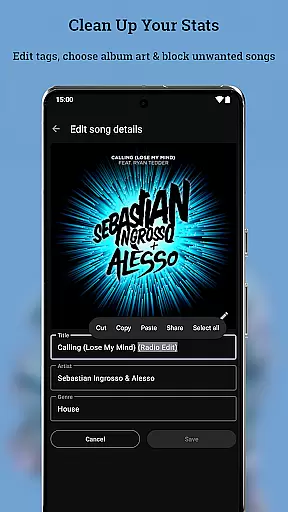
One of the app's key innovations is the Music Map feature, which lets you explore where you've encountered specific songs. Combined with personal charts that display your top songs, artists, and genres, this creates a powerful tool for understanding your musical journey. The built-in metadata editor and album art selector give you complete control over how your music history is displayed and organized.
Performance-wise, the app excels with its lightweight architecture that ensures zero crashes, instant loading through smart caching, and minimal battery consumption. The privacy-first approach means no accounts, no data sharing, and full local storage, while additional features like notification access, optional location services, and file permissions enhance functionality without compromising security.
Now Playing History for Pixel offers a unique approach to building a personal music library. Unlike traditional music apps, it automatically captures every song detected by your Pixel's 'Now Playing' feature, creating an ever-growing archive of your listening history.
The app doesn't rely on streaming services or manual input. Instead, it intelligently logs each track identified by Google's recognition system, ensuring that your music collection expands naturally as you encounter new songs in your daily life. This creates a truly personalized and authentic music library that reflects your actual listening habits.
Regarding copyright authenticity, the application operates within legal boundaries by only logging metadata and album art without storing actual audio files. Users can enjoy peace of mind knowing their music archive is built through legitimate detection methods while maintaining complete control over their data.
This innovative approach to music library creation ensures that your collection remains both extensive and genuine, capturing your musical journey while respecting copyright regulations.
While Now Playing History for Pixel doesn't directly manage audio quality in terms of playback, it excels in preserving high-quality music experiences through its sophisticated metadata management system. The app captures detailed information about each detected song, including multiple album art options, ensuring that your music archive maintains a premium visual presentation.
The built-in album art selector allows users to choose from various high-resolution cover options, enhancing the overall quality of their music library's presentation. This attention to detail extends to the comprehensive metadata editing capabilities, enabling precise corrections and enhancements to song information.
Although the app doesn't handle audio file formats directly, its integration with Google's detection system ensures that only properly recognized tracks are logged, maintaining a certain standard of quality in the archived music entries. The application's focus on accuracy and detail contributes to a superior music cataloging experience.
Furthermore, the app's efficient background operation guarantees that these quality features don't come at the cost of device performance, maintaining less than 1% battery usage while delivering a rich, detailed music history archive.
User-friendly interface
Comprehensive music tracking
Robust privacy protection
Advanced customization options
Seamless device transfer
Limited to Pixel devices
No existing history import
Dependent on Now Playing
Optional features require permissions
Not optimized for tablets

Performance-Synthesizer & Multi-Track-Sequencer, polyphonic + multi timbral!
 4.70
4.70
Gorgeous UI, Powerful music Search and Equalizer, the great choice for you!
4.70
JBL PartyBox APP works with 110/310/710/120/320/520/Encore/Encore 2/Encore Ess 2
4.80
Save hundreds of dollars for a physical strobe tuner and instead use this app.
4.50
Advanced 10-Band Audio Graphic Equalizer Sound Booster Pro
4.30
Recording studio w/ 10k beats, pro vocal FX and a network of 20M rappers & fans!
4.60
PowerAudio is a powerful offline music player.
4.20
Versatile MP3 recorder with auto-backup to Dropbox and Google Drive
4.10
Sing, record, and create music together — enhanced by smart voice tools.
4.00
Play your hearts out on TouchTunes jukeboxes & connect with fellow music lovers.
4.80
Walkout Song DJ is the most intuitive app to manage your sports music.
4.70
Simple & Intuitive Metronome
4.70
Taal player that lets you sing any Indian & Western song with Tabla & Tanpura
4.60
Bass Booster & Volume Equalizer Pro improves your music and video sound quality
4.60
A synth that really lets you shape your sounds!
4.50
Time Guru will strengthen your internal sense of musical time via random muting.
4.30
USB audio recording and playback finally possible on Android 3.1 or higher!
3.90
Learn to play the piano using falling notes!
3.80
Control your MIDI USB or Bluetooth devices in app and avoid some trampling
3.30


User Reviews