
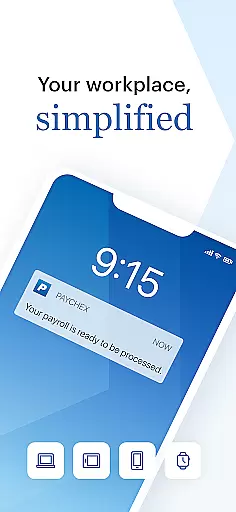
Paychex Flex is a comprehensive business application designed to streamline payroll and benefits management for both employers and employees. The app offers registered users the ability to access vital payroll features, submit payroll on the go, and retrieve essential employee documents such as check stubs and tax forms.
Employers can benefit from advanced authentication methods like Touch ID and Face ID, generate detailed reports, manage employee profiles, and oversee retirement plans and health benefits. Employees, on the other hand, can conveniently view their pay stubs, update retirement contributions, and access insurance details. This makes Paychex Flex an indispensable tool for businesses looking to enhance operational efficiency and maintain seamless communication between employers and employees.
One of the standout features of Paychex Flex is its robust security measures, including Touch ID and Face ID authentication, ensuring that sensitive payroll and employee data remains protected. Employers have the capability to enter, review, and submit payroll from their mobile devices, allowing for greater flexibility and time savings.
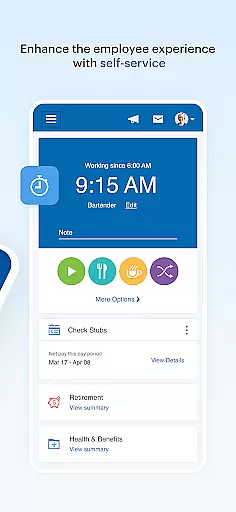
The app also provides extensive reporting tools, giving employers access to payroll reports, cash requirements, and detailed employee profiles. For employees, Paychex Flex offers easy access to personal financial information such as check stubs, W2s, and retirement plan details. Additionally, employees can make updates to their retirement contributions and investments directly through the app, providing them with greater control over their financial future.
Collaborative work features are essential for modern business applications as they enable seamless interaction between employers and employees. The Paychex Flex app excels in this area by providing distinct functionalities tailored to both employers and employees.
For employers, the app offers Touch ID and Face ID authentication, ensuring secure access. Employers can submit payroll on the go, review reports, and access employee profiles, compensation details, tax documents, and more. This comprehensive suite of tools facilitates efficient management and oversight, allowing employers to maintain control over vital payroll and benefits information from anywhere.
Employees also benefit from collaborative features such as secure authentication and easy access to their personal information. They can view check stubs, W2s, retirement balances, and update contributions. Additionally, employees have access to health benefits details and time-off balances. These features ensure that employees stay informed and engaged with their employment details, fostering a transparent and connected work environment.
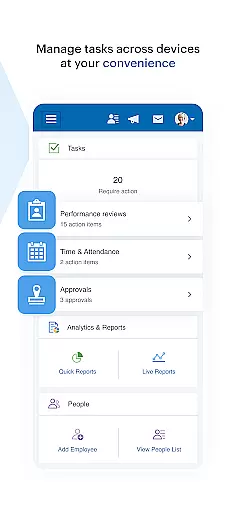
Effective task management is crucial for businesses aiming to streamline operations and enhance productivity. The Paychex Flex app provides robust task management capabilities designed to simplify payroll processes and improve overall efficiency.
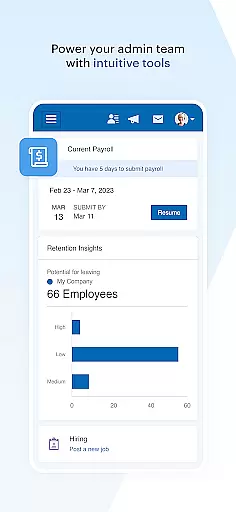
Employers using Paychex Flex can manage tasks such as submitting payroll with ease. The app allows them to enter, review, and submit payroll data directly from their mobile devices. This flexibility ensures that even if payroll is initiated on another device like a tablet or desktop, it can be resumed and completed via the app, offering unparalleled convenience and continuity.
Additionally, the app enables employers to access all necessary reports including payroll reports and cash requirements. By having these tools at their fingertips, employers can efficiently track financial obligations and employee-related data. This level of accessibility not only saves time but also enhances decision-making capabilities, ensuring that businesses run smoothly and without interruption.
User-friendly interface
Comprehensive payroll features
Advanced security options
Extensive reporting tools
Employee self-service capabilities
Limited to registered users
Feature availability depends on company plan
No offline functionality
Potential learning curve for new users
Requires reliable internet connection

Find jobs and make money fast with JobStack.
 4.60
4.60
Completed Course Lectures on how to use IBM Maximo in Maintenance issues
4.1
Your employer must have UKG Ready software configured for Mobile.
4.60
Find work, shifts and gigs near you. Jobs lasting a few hours to a few months.
4.30
Deliver and earn money
4.30
All your team communication in one place
4.70
Make invoices, bills, receipts & estimates on the go with Invoice Generator.
4.70
The app that lets you deliver with Amazon.
4.50
Make money as a delivery driver with DoorDash and work when you want as a Dasher
4.30
GoTo Mobile is a simple & secure calling, messaging & meetings solution
4.80
The MyWalmart App is available for all associates in stores.
4.70
Access to Paylocity, empowering employees with information they need 24/7.
4.70
Chat, meet, and collaborate to achieve more together, all in one place on Teams
4.60
ANDROID'S TOP MOBILE OFFICE - Word, Excel, PowerPoint and PDF at your fingertips
4.50
One marketplace. Hundreds of services. Unlimited possibilities. All on Fiverr.
4.40
Formerly Facebook Ads Manager. Manage and create ads on the go.
4.20
Find flexible, hourly jobs hiring near you in restaurant, retail & hospitality!
4.00
Quickly open and manage PDF files on your device.
3.80
viewing and sharing of PDFs
3.60


User Reviews