

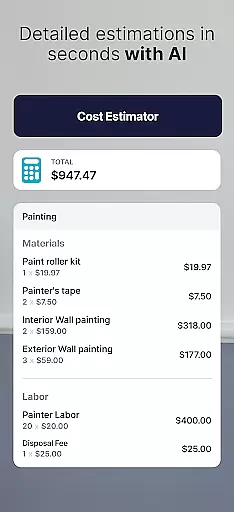

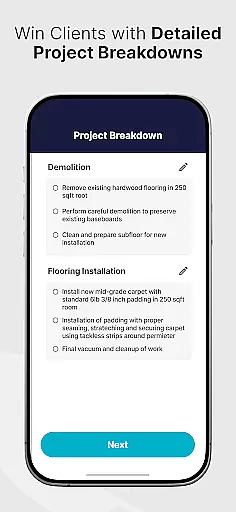

SimplyWise Cost Estimator is a cutting-edge construction cost estimation tool designed to streamline the planning of home repair and renovation projects. This app provides accurate financial insights within just six seconds, making it an essential resource for both homeowners and contractors. Whether you're undertaking a major renovation or smaller projects, SimplyWise ensures precise budgeting while avoiding unexpected expenses.
The app goes beyond basic cost estimation by integrating advanced receipt and document scanning OCR technology. Users can create custom folders to organize project expenses and generate detailed financial reports that break down costs, helping maximize tax returns. With its user-friendly interface and AI-powered revision tools, SimplyWise empowers users to make informed decisions and manage their construction budgets with unparalleled ease and efficiency.
SimplyWise Cost Estimator stands out with its innovative features tailored for construction professionals and homeowners alike. The app's core functionality revolves around its ability to deliver instant, accurate estimates for home repairs and material costs. By simply uploading a photo and describing the project, users receive detailed breakdowns of labor and material expenses in seconds.
Another standout feature is the built-in OCR technology, which scans receipts and organizes project-related documents into customizable folders. This allows users to track expenses meticulously and generate itemized financial reports. Additionally, the AI-driven revision system flags potential discrepancies and helps refine estimates before sharing them with clients in PDF format. These robust features collectively ensure seamless project management and precise financial planning.
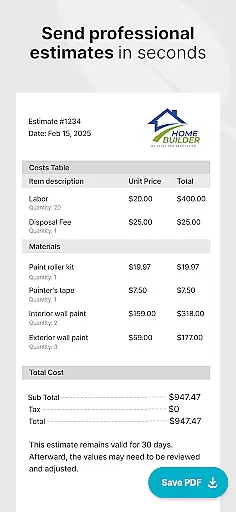
Effective collaboration is essential in construction projects, and the SimplyWise Cost Estimator app excels in this area. The app allows users to seamlessly share detailed estimates with clients in PDF format, ensuring transparency and clarity in project planning.
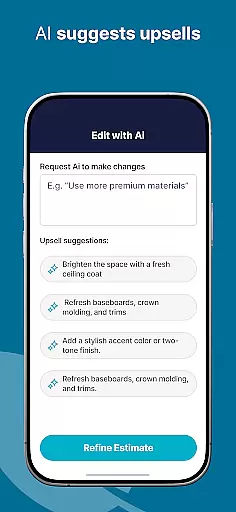
The AI-powered revision system provides an additional layer of accuracy by flagging important details before sharing with clients. This ensures that all parties are working with the most precise information, reducing misunderstandings and costly errors during the construction process.
Contractors can easily adjust estimates based on client feedback, creating a dynamic and responsive workflow. This collaborative approach not only saves time but also enhances communication between contractors and their clients, leading to more successful project outcomes.
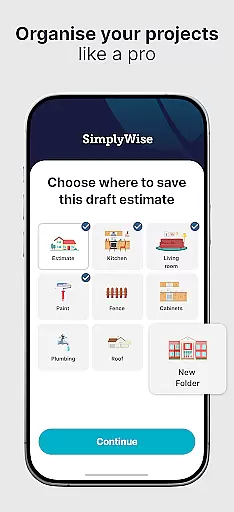
Task management is crucial for construction projects, and the SimplyWise app offers robust tools to keep projects organized. Users can create custom folders to categorize and manage different aspects of their construction expenses, ensuring everything remains systematically arranged.
The app's receipt and document scanning OCR technology simplifies expense tracking by automatically organizing financial data. This feature generates itemized financial reports, providing a clear breakdown of costs that helps users maximize their tax returns and maintain accurate financial records.
With the ability to save and update projects as they progress, users can effectively track ongoing expenses and modifications to their initial estimates. This comprehensive task management system empowers users to maintain control over their project's financial aspects from start to finish.
User-friendly interface
Accurate cost estimates
Advanced OCR scanning
Customizable expense tracking
AI-powered revisions
Limited free features
Requires stable internet
Premium subscription cost
Steep learning curve
Occasional AI errors

Find flexible, hourly jobs hiring near you in restaurant, retail & hospitality!
 4.00
4.00
FX Plus adds media, networking, and cloud capabilities to FX File Explorer.
4.10
Recover what matters — quickly and easily.
4.70
All your team communication in one place
4.70
Access All PDF Files
3.40
Collaborate seamlessly with Google Chat, part of Google Workspace
4.50
Ship, Track, Find a Location or Get a Quote with UPS. Anytime. Anywhere.
4.60
The app that lets you deliver with Amazon.
4.50
We help people get jobs
4.70
FaxCover - Create fax cover pages. Works with any app or fax machine.
4.90
Earn free swag, G-Cards & food • Enter sweepstakes • Find stores • So much more.
4.70
USPS Mobile®Access USPS.com’s most popular tools on-the-go.
4.70
Mobile POS for any business: sales, invoices, retail, restaurants & appointments
4.60
Drive and earn extra money
4.50
Master crypto trading with real-time simulations and exciting challenges!
4.50
Formerly Facebook Ads Manager. Manage and create ads on the go.
4.20
VSD Viewer - Visio Drawings Viewer for Android Preview VSD, VDX, VSDX drawings
4.10
Shop, deliver, and earn with the Spark Driver™ App
4.10
Take the stress out of storage with the all-in-one app to manage your space.
3.70


User Reviews