
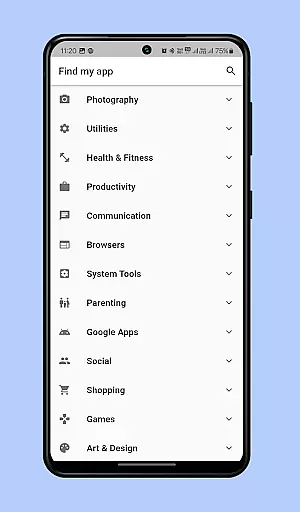
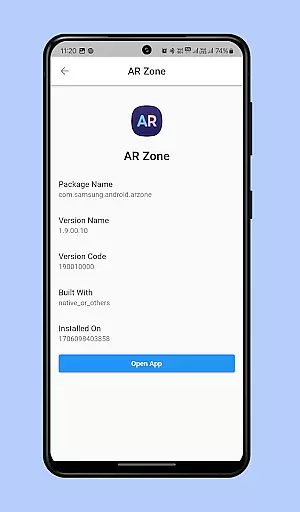
Find my app is a powerful personalization tool designed to help users efficiently manage and locate their installed applications. The app employs advanced technology to instantly identify both existing and newly installed apps on your device, organizing them into a well-structured menu categorized for easy navigation.
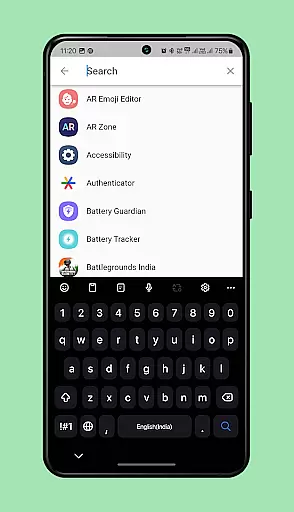
One of its standout features is the smart search functionality, which allows users to type either the full name or part of an app's name to quickly find and open it. This eliminates the tedious process of scrolling through numerous pages of app icons, saving valuable time and enhancing user experience.
Whether you're struggling to locate a specific app among many or simply looking to streamline your app management process, Find my app offers an intuitive solution that makes accessing your apps faster and more efficient than ever before.
Find my app stands out with several key features that enhance its usability and effectiveness. First, the app's ability to categorize installed applications provides a structured overview, making it easier for users to navigate through their collection of apps without confusion.
The smart search feature is another highlight, allowing users to input partial or complete app names to instantly retrieve and launch desired applications. This feature significantly reduces the time spent searching for specific apps, especially on devices with numerous installations.
Additionally, the app supports real-time updates, ensuring that newly installed apps are immediately integrated into the organized menu system. This dynamic capability ensures that users always have an up-to-date and comprehensive view of their app library, further enhancing the overall efficiency of app management.
Customization options variety refers to the range of features that allow users to tailor their app experience according to their preferences. Find my app offers a unique level of customization by organizing installed apps into categorized menus, making navigation intuitive and personalized.
The application goes beyond simple organization by providing users with the ability to search for apps using keywords. This feature enhances user interaction as it adapts to individual search patterns and preferences, ensuring quick access to desired applications.
With this personalization, users can save time and effort when managing their apps. The categorized grouping and search functionality lead to an increase in productivity, as users no longer need to sift through numerous pages of app icons to find what they need.
Ultimately, the customization options available in Find my app contribute significantly to a streamlined and efficient mobile experience. Users have control over how they interact with their collection of apps, leading to a more satisfying and tailored smartphone usage.
Theme compatibility is the app's ability to adapt its appearance to match the visual style set by the user or the system. While Find my app focuses primarily on app organization and search, its design ensures seamless integration with various themes that users might have on their devices.
Although Find my app may not offer theme setting options itself, its interface is crafted to maintain consistency with the device's current theme. This means whether a user prefers a light or dark mode, the app will display accordingly without losing functionality or aesthetic appeal.
This compatibility enhances the overall user experience by providing a cohesive look and feel across the device. Users won't experience jarring differences in visual presentation when switching between Find my app and other applications on their phone.
By ensuring that its interface remains visually harmonious with different themes, Find my app maintains a professional appearance while delivering its core functionalities. This attention to visual detail supports an uninterrupted and enjoyable user journey through one's digital environment.
User-friendly interface
Instant app identification
Efficient category organization
Smart search functionality
Real-time updates
Limited customization options
Occasional performance lags
Requires significant storage space
No cross-device syncing
Ads in free version

Art & Emoji Keyboard with Cool Fonts, Cute Themes and Custom Designs.
 4.40
4.40
Add cute Shimeji pets to screen, interact with them and relax with cute motions
4.60
Ultimate Gallery Lock App - Hide Pictures, Videos and Lock Apps Instantly!
4.60
100+ Stylish Fonts, Emojis, Symbols keyboard for Instagram & TikTok!
4.80
Unique Fonts, typefaces and stylish text. Fonts for Instagram, Whatsapp & others
4.20
Zip lock screen with magic wallpaper to decorate your phone with fun zipper lock
4.60
Customize glowing edges, wallpapers, and caller screen with EdgeAura.
3.50
Your home screen, just the way you like it.
4.30
Customize phone with anime themes, 3D icons, aesthetic widgets & wallpapers
4.80
Only for Wear OS devices!
4.90
A retro cartoon style watch face and a punch right in the face of the copyright
4.60
Ninja Turtles Cowabunga SE watch face for Wear OS
4.50
Try creating your own keyboard with "Keyboard theme for android" app now!
4.50
Launcher OS™ Pro without ads help make your phone simple and pretty
4.30
Ultimate widget creator. Design custom widgets for a truly unique home screen!
3.90
Design your screen with unique, vibrant clocks
3.80
Transform your phone with stunning video wallpapers and a unique, personal touch
3.80
HappyLighting is a Bluetooth lamp control software.
3.40
Capture moments that pass like a storm, second by second.
4.1


User Reviews