
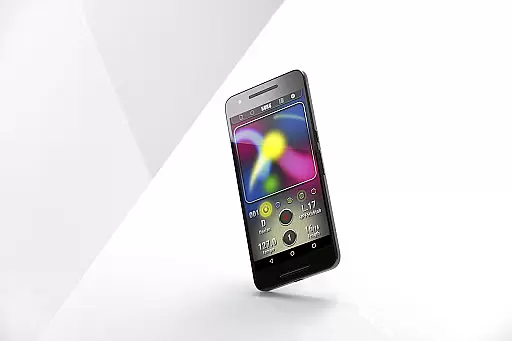
KORG Kaossilator for Android is a powerful mobile synthesizer app that brings professional-grade music production to your fingertips. Designed for both beginners and experienced musicians, this app allows users to create complex melodies and beats with simple touch gestures on their Android devices.
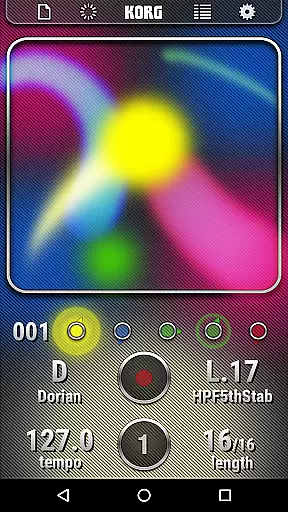
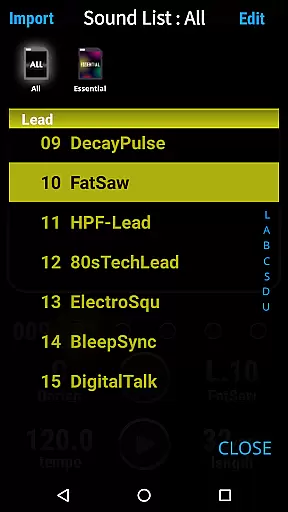
The app features an intuitive X-Y interface that lets you generate melodies and phrases by simply moving your finger across the screen. With 150 built-in sounds covering various music genres, users can explore different styles including EDM, hip-hop, and techno. The unique Scale/Key feature ensures harmonious performances by eliminating wrong notes, while the loop sequencer enables multi-layered track creation for dynamic compositions.
Whether you're producing electronic tracks at home or performing live on stage, KORG Kaossilator provides a versatile toolset that fits in your pocket. Its compatibility with Android 5.0 and above makes it accessible to a wide range of smartphone users, offering a portable solution for music creation anytime, anywhere.
KORG Kaossilator stands out with its innovative touch-based performance capabilities. The app's signature X-Y interface transforms simple finger movements into expressive musical phrases, making it easy for anyone to create professional-sounding tracks without extensive music theory knowledge.
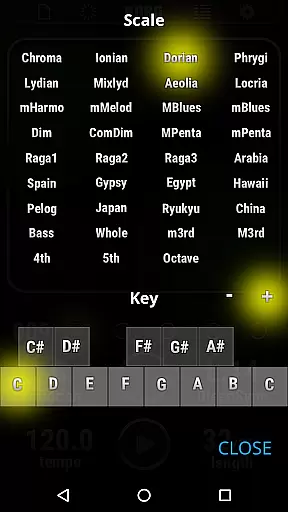
The app includes 150 diverse sounds spanning multiple genres, from electronic beats to acoustic instruments. Each sound has been carefully crafted to ensure high-quality output. The Scale/Key function offers 35 scale options, allowing users to stay in key while experimenting with different musical ideas. This feature is particularly helpful for those still learning music theory fundamentals.
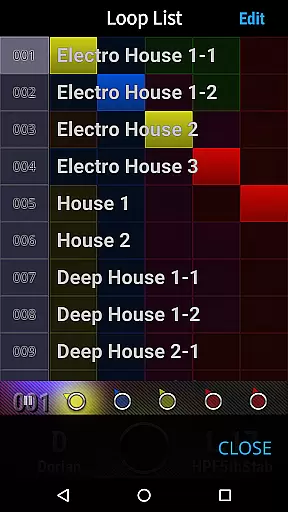
For more advanced music production, the built-in loop sequencer enables layering of up to five musical parts. Users can record different elements such as basslines, chords, and percussion, then mix them together to create complete compositions. This functionality, combined with the app's intuitive interface, makes KORG Kaossilator a comprehensive mobile music studio suitable for both casual experimentation and serious music production.
When evaluating a music application like KORG Kaossilator for Android, the size and diversity of its sound library are crucial factors. This app offers an impressive selection of 150 built-in sounds that cater to various music styles including EDM, hip-hop, house, techno, dubstep, nu-disco, and electro. Such variety ensures that users can explore different genres and find the perfect sound for their compositions.
Beyond sheer numbers, the authenticity and legality of these sounds are equally important. KORG, being a reputable brand in the music industry, guarantees that all sounds provided in the Kaossilator app are properly licensed. Users can rest assured that they are accessing high-quality audio content that respects copyright laws, allowing them to create music without legal concerns.
The inclusion of such a comprehensive sound library not only enhances creativity but also provides practical benefits. Musicians can experiment with different sounds and styles, from electronic beats to acoustic instruments, all within a single app. This versatility makes KORG Kaossilator a valuable tool for both beginners and experienced producers looking to expand their sonic palette.
Audio quality is paramount when it comes to music production applications. KORG Kaossilator for Android excels in this area by offering superior audio processing capabilities. The app supports high-fidelity sound output, ensuring that every note and beat retains its clarity and richness during playback and recording.
In addition to standard audio formats, the app provides various options for adjusting sound parameters. Users can tweak settings to achieve the desired audio quality, whether they prioritize file size or sonic detail. These customization features empower musicians to optimize their tracks according to specific requirements, such as streaming platforms or professional studio mixing.
Furthermore, the app's compatibility with Android 5.0 and later versions ensures that users benefit from the latest advancements in mobile audio technology. By leveraging modern smartphone hardware, KORG Kaossilator delivers consistent performance and reliable sound reproduction. This commitment to audio excellence establishes the app as a top choice for discerning music creators who demand nothing less than the best sound quality for their productions.
Intuitive touch interface
Wide range of built-in sounds
Beginner-friendly scale system
Powerful loop sequencer
Professional sound quality
Limited to five loop layers
No MIDI support mentioned
Android-only availability
Requires newer OS versions
Interface may feel small on phones

The Skullcandy App Experience
 3.20
3.20
Tune in to the greatest hits on UK Radio | The home of Capital, Smooth & Heart.
4.90
Walkout Song DJ is the most intuitive app to manage your sports music.
4.70
More downloads than any other metronome. Includes drum machine & tempo trainer.
4.80
Guzheng Master supports many playing techniques as an acoustic Guzheng
4.50
The alternative folder based music player.
4.20
The original SP-1200 experience on your iPad
4.20
Ringtone Maker is free app create ringtone from music files or your recording.
4.40
Offline Tunes, Unlimited Vibes
3.90
Unleash your creativity! Turn simple prompts into full fledged songs.
4.70
Pay Once, no monthly payment
4.60
Your HD audio recorder on the go for music, meetings, ambience, animal sounds…
4.30
The Music Journey in Your Hands
4.30
A sleek, no-frills player designed for true music lovers.
4.20
VB-AUDIO Software / VBAN-Receptor allows listening to any VBAN Streams
4.10
Next generation modular control surface
4.10
Learn to play the piano using falling notes!
3.80
Slow music down without changing pitch.
3.70
Simple mp3 and mp4 player with advanced features.
3.40


User Reviews