





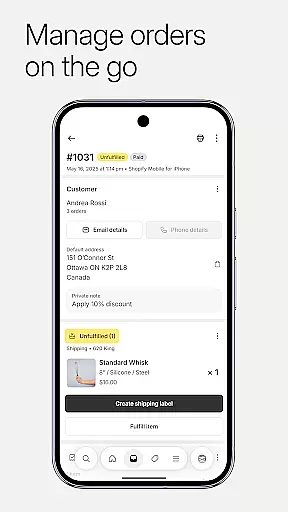


Shopify stands as a comprehensive commerce platform tailored for entrepreneurs seeking to establish and manage an online business with ease. It eliminates the need for coding or design expertise, enabling users to operate their ecommerce ventures from any location. The app supports selling across multiple channels including online, in-person, locally, globally, direct, wholesale, on desktop, and mobile platforms.
One of Shopify's key strengths is its ability to empower business owners to handle all aspects of their operations on-the-go. This includes processing orders, tracking inventory, analyzing sales data, and launching marketing campaigns directly from a mobile device. Its innovative suite of AI tools further enhances this flexibility, allowing users to turn their business aspirations into reality while managing their stores efficiently.
The platform also offers extensive integration capabilities, connecting seamlessly with social media outlets like Instagram, Facebook, and Messenger. This interconnected ecosystem ensures that inventory and orders remain synchronized across all channels, providing real-time insights and facilitating efficient order fulfillment and customer relationship management.
Shopify boasts an array of features designed to simplify and enhance the ecommerce experience. A standout capability is its dropshipping management system, which streamlines inventory handling, automates order processing, and optimizes operational efficiency for maximum profitability. Users can effortlessly upload product photos, set pricing, organize collections, and adjust inventory by scanning barcodes.
The app provides powerful tools for quick order processing, allowing merchants to fulfill, refund, or archive orders with minimal effort. Integration with shipping services enables hassle-free purchase and printing of shipping labels, while conversion tracking helps refine business strategies. Real-time business insights are readily available, displaying live sales and visitor traffic alongside instant order notifications.
Marketing capabilities are robust, featuring easy setup of Google Smart Shopping campaigns and creation of social media ads on-the-go. The platform supports comprehensive customer relationship management, enabling users to view and manage customer segments, edit details, and communicate directly through the app. Additionally, Shopify's customization options allow for dynamic store updates, professional theme browsing, and seamless access to various Shopify apps.
In today's fast-paced business environment, the ability to collaborate effectively is crucial for success. Shopify offers a comprehensive suite of tools that enable entrepreneurs and their teams to work together seamlessly, regardless of location. The platform allows multiple users to manage various aspects of the business simultaneously, ensuring that everyone stays on the same page.
Shopify's collaborative features include real-time order processing, inventory management, and sales analytics. Team members can fulfill orders, adjust stock levels, and analyze business performance from their mobile devices. This ensures that critical business operations continue uninterrupted, even when team members are not physically present in the office.
The app also facilitates smooth communication among team members. Users can leave timeline comments on orders, providing important updates or instructions to colleagues. Additionally, customer relationship management tools allow teams to view and update customer information, ensuring that all interactions are informed and personalized.
By enabling such extensive collaboration capabilities, Shopify empowers businesses to operate more efficiently and responsively. This feature set is particularly valuable for growing enterprises that need to maintain operational consistency while expanding their teams and operations.
Effective task management is essential for maintaining operational efficiency in any business. Shopify addresses this need by providing robust tools that help entrepreneurs organize and prioritize their daily operations. The platform's intuitive interface allows users to handle multiple business tasks from a single dashboard, streamlining their workflow significantly.
Through Shopify, users can process orders with just a few taps, whether they need to fulfill shipments, issue refunds, or archive completed transactions. The app simplifies inventory management by enabling barcode scanning to adjust stock levels instantly. These features ensure that business owners can maintain accurate records and prevent stockouts or overstock situations.
The platform also offers powerful marketing tools that integrate with task management capabilities. Users can launch Google Smart Shopping campaigns, create social media advertisements, and track campaign performance directly from their mobile devices. This integration allows for more coordinated marketing efforts that align with overall business objectives.
Furthermore, Shopify provides real-time business insights that help merchants make informed decisions about task prioritization. Live sales data and visitor traffic statistics enable business owners to identify peak periods and allocate resources accordingly. This comprehensive approach to task management helps merchants optimize their operations and drive growth effectively.
User-friendly interface
Extensive integration options
Powerful AI tools
Comprehensive financial management
Real-time business insights
Subscription costs may be high
Limited free themes
Transaction fees apply
Steep learning curve
Occasional app instability

Measure distances, surfaces and draw plans in seconds with CamToPlan!
 4.40
4.40
Windows App allows you to connect to remote PCs and virtual apps.
3.70
Get instant construction estimates: accurate home repair & material calculator.
4.70
Recover what matters — quickly and easily.
4.70
Use Generative Summary to understand your rental or insurance docs in seconds.
4.70
Start earning fast. Apply Today.
4.80
view, manage, and share every PDF file you have
3.60
Find part-time earning opportunities near you that pay within days.
3.20
Make money as a delivery driver with DoorDash and work when you want as a Dasher
4.30
Permission Guard is a security app that helps you manage app permissions.
4.80
USPS Mobile®Access USPS.com’s most popular tools on-the-go.
4.70
Ask Accio anything about business. Alibaba-backed, built by experts, not just AI
4.60
Earn crypto with secure cloud mining. Monitor, track & withdraw easily
4.40
Find work, shifts and gigs near you. Jobs lasting a few hours to a few months.
4.30
Formerly Facebook Ads Manager. Manage and create ads on the go.
4.20
The Penny Puss app with DG penny finder
4.10
Shop, deliver, and earn with the Spark Driver™ App
4.10
On the go? Take FedEx with you.
4.00
viewing and sharing PDFs and other files—anytime, anywhere!
4.1


User Reviews