
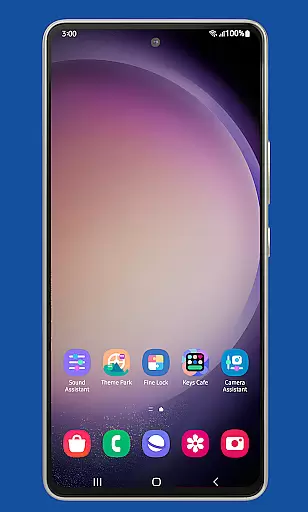
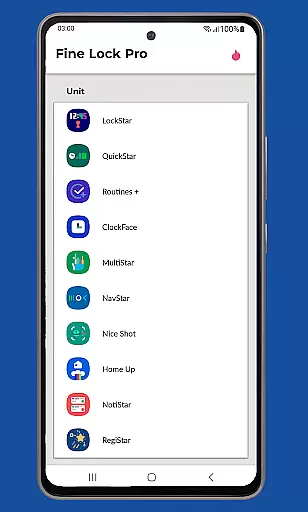
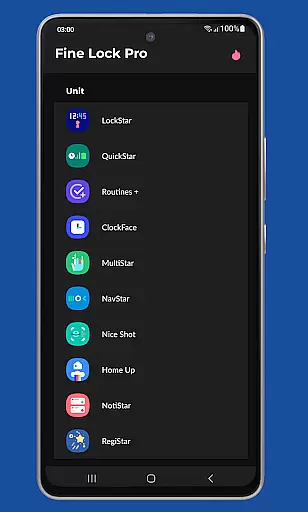
Fine Lock is a specialized launcher app designed exclusively for Samsung devices running official One UI and Android versions 8 or later. It enables users to access and utilize Good Lock and Galaxy Labs modules, which are otherwise restricted to specific markets. The app acts as a bridge, allowing users to customize and optimize their Android experience without regional limitations.
One of the key features of Fine Lock is its ability to integrate with PRO functionalities such as module shortcuts on the home screen, background update checks, and dynamic wallpapers that adapt to Dark/Night modes. These features enhance both usability and personalization options for Samsung device owners. However, it's important to note that Fine Lock does not support AOSP-based operating systems like LineageOS and is incompatible with non-Samsung devices.
The app caters specifically to power users who want deeper control over their device’s interface while ensuring compliance with Google Play policies by requiring users to download necessary APK modules from trusted sources like APKMirror or Sammobile. This makes Fine Lock an essential tool for those seeking advanced customization capabilities within the Samsung ecosystem.
Fine Lock offers several distinctive features tailored for Samsung device enthusiasts. Firstly, it provides seamless integration with Good Lock and Galaxy Labs modules, unlocking advanced customization options typically unavailable in certain regions. Users can personalize their device interfaces through these modules, enhancing both functionality and aesthetics.
Another standout feature is the inclusion of PRO functionalities, which include creating shortcuts for module apps directly on the home screen, enabling background checks for updates, hiding uninstalled modules, and utilizing dynamic wallpapers that change based on the device's Dark/Night mode settings. These features collectively offer a more streamlined and visually appealing user experience.
Additionally, Fine Lock ensures compliance with Google Play policies by not facilitating direct downloads of modules. Instead, users must obtain the latest APK files from reputable sources like APKMirror or Sammobile. This approach maintains security standards while providing flexibility for users to explore various customization options available within the Samsung ecosystem.
Fine Lock offers a diverse range of customization options tailored specifically for Samsung devices running official One UI. This app acts as a launcher for Good Lock and Galaxy Labs modules, which are powerful tools for personalizing the Android experience.
With Fine Lock, users can access features such as module app shortcuts on the home screen, providing quick entry to their favorite customization settings. The ability to hide uninstalled modules ensures a clutter-free interface, enhancing user experience by displaying only relevant options.
The app also supports dynamic wallpapers that adapt to the device's Dark or Night modes, provided the device runs on Android 9 or later. This feature not only adds aesthetic value but also aligns with user preferences for different lighting conditions, ensuring optimal visibility and comfort.
By offering these varied customization options, Fine Lock empowers users to tailor their Samsung devices to match their personal style and functional needs, making it an essential tool for those seeking a highly personalized smartphone experience.
Theme compatibility is a crucial aspect of Fine Lock, ensuring that all visual customizations are seamlessly integrated into the Samsung One UI environment. As a launcher for Good Lock and Galaxy Labs modules, Fine Lock maintains high standards of theme coherence across the user interface.
Users benefit from consistent theming elements that work harmoniously with Samsungu2019s design language. Whether applying dynamic wallpapers or custom icons, Fine Lock ensures these changes blend effortlessly with the overall look and feel of the device, preserving the integrity of the One UI experience.
This compatibility extends to various display settings, including Dark and Night modes. By supporting themes that dynamically adjust based on these modes, Fine Lock guarantees a visually pleasing and comfortable viewing experience at any time of day.
Ultimately, Fine Lock's commitment to theme compatibility allows users to enjoy a cohesive and aesthetically pleasing interface, reinforcing its position as a vital tool for Samsung device owners who prioritize both form and function in their mobile experience.
Enhances device customization
Supports dynamic wallpapers
Background update checks
Module app shortcuts
Compliance with Google Play policy
Limited to Samsung devices
No AOSP OS support
Manual APK downloads required
Potential compatibility issues
Regional restrictions apply

Interactive Miniature Painting Catalogue
 3.30
3.30
Vibrant Adaptive Icons with Material You and Enhanced Monet Colors.
4.50
Adorable pets roam and play right on your phone screen!
3.30
One 8 icons glass color version
4.80
Your home screen, just the way you like it.
4.30
A minimalist productivity launcher. One-hand-friendly. Zero ads.
4.70
Fast SMS & group chat - use GIFs and emojis from your home screen launcher.
4.50
Install amazing sticker packs: endless styles, always cool.
4.70
Transform your phone with stylish zipper lock themes and 4D live wallpaper
4.10
Dark icon pack based on One 8
4.80
Nothing Icon pack with more than 3750+ highly crafted icons.
4.70
Make your phone look simple & luxury, like iDevice
4.60
Choose your keyboard with RGB colors effect, themes, fonts, emojis.
4.60
Stylish Pink Cute Hippo keyboard with 10000+ customized keyboard themes!
4.60
3D, live, and moving wallpapers & themes in 4K and HD for your device.
4.50
Try creating your own keyboard with "Keyboard theme for android" app now!
4.50
Turn text & photos into stunning AI videos, art, and creative visual stories.
4.50
Unique Fonts, typefaces and stylish text. Fonts for Instagram, Whatsapp & others
4.20
Customizable flower power digital watch face for Wear OS watches.
4.00


User Reviews