
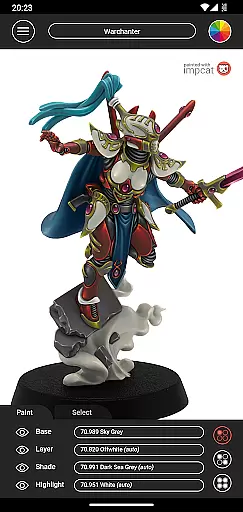
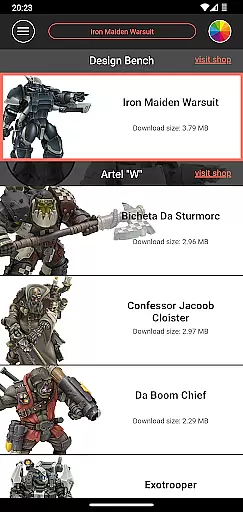
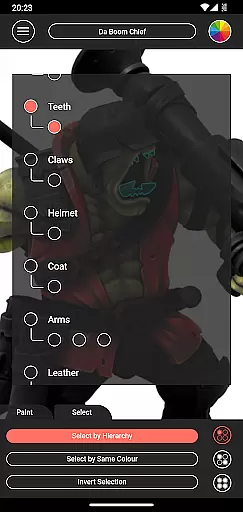
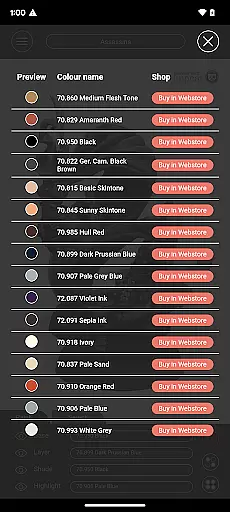
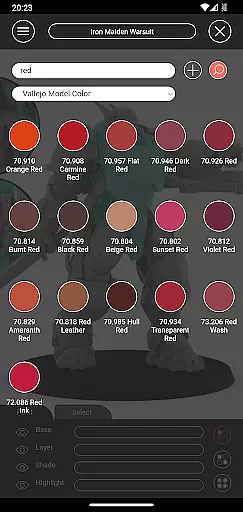
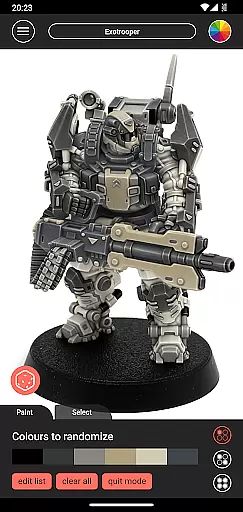
Impcat is an innovative simulator designed for hobbyists and professionals in the gaming and tabletop miniatures space. This application allows users to achieve photorealistic painting results on miniature models by simulating a comprehensive four-step painting process: base colouring, layering, shading, and highlighting. With a focus on personalization, impcat provides a unique platform where painters can experiment with different colours and techniques virtually before applying them to physical models.
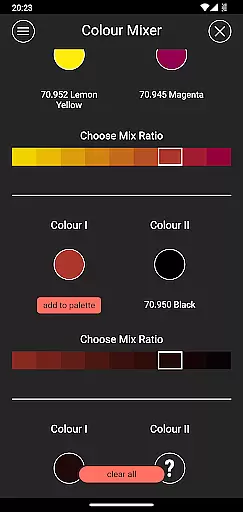
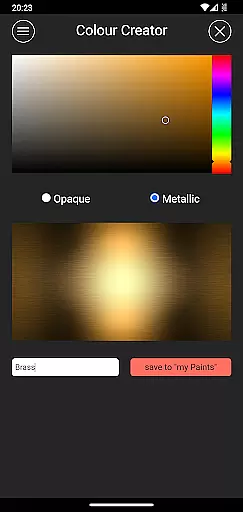
The app comes equipped with six built-in miniatures and a wide range of colour palettes from renowned manufacturers like Vallejo Model Color and Vallejo Game Color, totalling 308 colours. Additionally, it offers access to free downloadable content (DLCs) including more miniatures and colour palettes that update automatically. Impcat stands out by integrating practical tools such as a complement recommendation mode, a shopping list generator, a colour mixer, a colour creator, and a randomizer tool, all aimed at enhancing user experience and creativity.
Whether you're a seasoned painter or just starting, impcat serves as an invaluable resource for visualizing painting outcomes and planning your projects efficiently. Its ability to simulate high-quality results makes it an essential tool for anyone involved in miniature painting, providing both inspiration and practical assistance in equal measure.
Impcat distinguishes itself through its rich feature set tailored specifically for miniature painting enthusiasts. One of its core functionalities is the simulation of a four-step painting process which includes base colouring, layering, shading, and highlighting. This simulation ensures that users can visualize the end result of their painting efforts with impressive accuracy.
Beyond the basic painting simulation, impcat offers advanced tools such as a complement recommendation mode that suggests harmonious colours based on a selected base colour. Users also benefit from a shopping list generator that compiles all used colours into a convenient list complete with links to purchase them. Furthermore, the inclusion of a colour mixer and creator tool empowers users to experiment with custom colours, while a randomizer tool adds an element of surprise by distributing colours across a model randomly.
With support for predefined colour palettes from leading brands and seamless integration of new content via DLCs, impcat continuously enhances the painting experience. These features collectively contribute to making impcat not just a painting simulator but a comprehensive creative suite for miniature artists.
Customization is at the heart of impcat, allowing users to explore a vast array of miniature painting possibilities. With six built-in miniatures and over 300 color options from Vallejo Model Color and Vallejo Game Color, the app provides an extensive palette for creativity.
The inclusion of DLCs for additional content ensures that your library stays fresh and expansive without any extra cost. This means more templates and color palettes are available as you continue to use the app, enhancing its customization capabilities.
One standout feature is the complement recommendation mode, which suggests harmonizing colors for layering, shading, and highlighting. Users can then tweak these suggestions, providing both guidance and freedom in personal expression.
Moreover, tools like the color mixer and creator enable painters to experiment with unique shades, making each piece truly one-of-a-kind. These robust customization options ensure that every user can achieve their desired look with precision.
While impcat focuses on detailed miniature painting, it also excels in theme compatibility, ensuring that all visual elements align seamlessly with user preferences. The app supports various themes through its diverse range of color palettes and painting styles.
Users can switch between different color schemes and instantly see how they affect the overall appearance of their miniatures. This flexibility allows for experimentation with contrasting or complementary themes, catering to individual tastes and project requirements.
In addition to supporting multiple themes, impcat's photorealistic simulation feature ensures that every change looks authentic and professional. Whether opting for vibrant hues or subtle tones, users can trust that the final output will meet high standards.
By offering such comprehensive theme compatibility, impcat empowers users to bring their artistic visions to life while maintaining consistency across different projects and styles.
User-friendly interface
Wide selection of colors
Automatic updates
Free DLC content
Advanced painting tools
Limited initial miniatures
Requires internet
No undo function
Complex for beginners
Occasional bugs

Wear Os Watch Face - Seasonal - Animated Snow Effect - 9 Animals
 4.20
4.20
Themes - Widget & Wallpaper: Customize home screen, icon changer w unique themes
4.30
Ultimate Gallery Lock App - Hide Pictures, Videos and Lock Apps Instantly!
4.60
Unique Fonts, typefaces and stylish text. Fonts for Instagram, Whatsapp & others
4.20
Aesthetic Widgets, HD Wallpapers, Themes in Mico Widget for Home and Lock Screen
4.50
Customize your home screen with stunning themes, blur, widgets & icons.
4.60
Unleash Your Creativity and Connect with Loved Ones with Lockscreen Drawing!
4.20
Modern Glass Icon Pack with glossy icons, clean minimal theme & aesthetic style
4.3
Enjoy a variety of amazing live wallpapers and colorful EDGE lighting borders!
4.80
350+ widgets with a premium glass-style finish, perfect for home & lock screens.
4.70
Make your phone look simple & luxury, like iDevice
4.60
3D, live, and moving wallpapers & themes in 4K and HD for your device.
4.50 4.50
4.50
Color phone with cool effects for call screen, flash alert & ringtones music
4.50
Art & Emoji Keyboard with Cool Fonts, Cute Themes and Custom Designs.
4.40
The definitive Icon pack maker and editor
4.30
Crystal-clear, square icon provides a sleek and sophisticated visual upgrade
4.00
Design your screen with unique, vibrant clocks
3.80
Your go to Weather App & Home Screen. Get your weather at a swipe of a finger!
3.80


User Reviews