
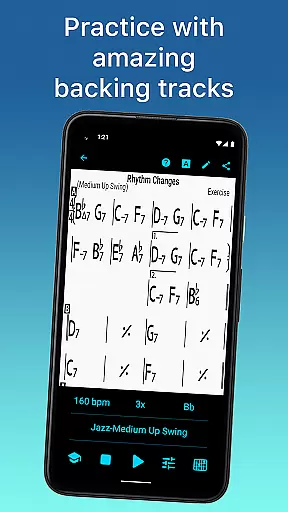
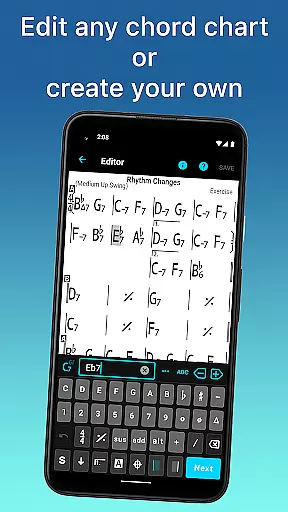
iReal Pro is an essential tool for musicians of all levels, designed to enhance practice sessions by providing realistic band accompaniments. The app simulates a full band with piano, guitar, bass, and drums, allowing users to practice in a variety of styles. It also features chord chart creation tools, making it easy to reference favorite songs while performing or practicing.
With over 51 included accompaniment styles and additional options available via in-app purchases, iReal Pro caters to diverse musical genres. Users can personalize their experience with different instrument sounds and even record themselves playing along. The app's extensive functionality includes the ability to download thousands of songs, edit existing ones, and create playlists, ensuring that musicians have access to a comprehensive library of music at their fingertips.
This versatile app is used by top music schools worldwide, including Berklee College of Music, underscoring its value as a learning and performance aid. Whether you're a beginner or a professional musician, iReal Pro offers the tools needed to improve skills and master your art.
iReal Pro stands out with its robust feature set tailored for musicians. One of its core functionalities is the virtual band accompaniment, which supports 51 different styles such as Swing, Ballad, Gypsy Jazz, and more. Each style can be personalized with various instrument sounds like piano, Fender Rhodes, acoustic and electric guitars, and basses, offering a rich and customizable practice environment.
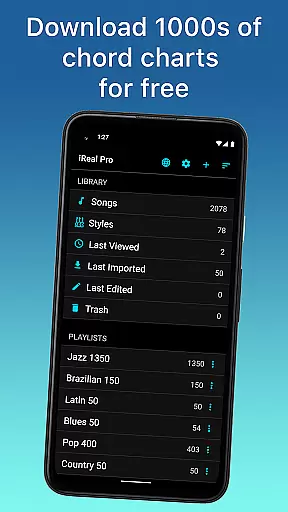
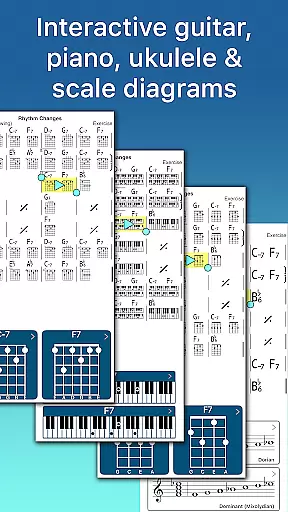
The app excels in song management capabilities. Users can download thousands of songs from forums, edit them using the built-in editor, and create multiple editable playlists. This flexibility ensures that musicians can tailor their practice sessions to specific needs. Additionally, the app provides chord diagrams and scale recommendations, displaying guitar, ukulele tabs, and piano fingerings to assist with improvisation and skill improvement.
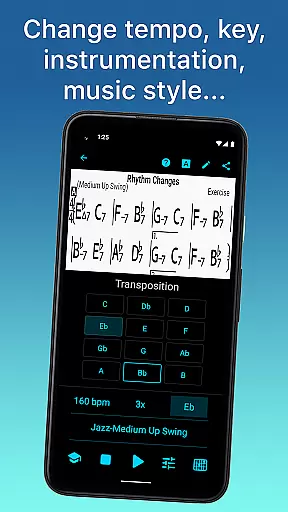
Advanced practice settings further enhance the user experience. Features like automatic tempo increase, key transposition, and global Eb, Bb, F, and G transposition cater to horn players' needs. Sharing and exporting options are abundant, allowing users to share charts via email, export as PDF or MusicXML, and even export audio files in WAV, AAC, and MIDI formats. These features ensure that iReal Pro is not just a practice tool but a comprehensive musical companion.
When evaluating a music application like iReal Pro, the size and variety of its music library are crucial factors. This app offers access to thousands of songs that can be downloaded in just a few simple steps from its forums. These aren't just any songs; they include a wide range of genres such as Swing, Ballad, Gypsy Jazz, Bluegrass, Country, Rock, Funk, Reggae, Bossa Nova, and Latin. This extensive collection ensures that musicians of all levels and tastes can find material that suits their practice needs.
In addition to the vast selection of music, iReal Pro also emphasizes copyright authenticity. The app provides legitimate content by allowing users to create, edit, print, share, and collect chord charts of their favorite songs. This feature is particularly beneficial for musicians who need reference materials while practicing or performing. By respecting intellectual property rights, iReal Pro fosters a trustworthy environment where users can confidently use the resources available.
The value of having such a comprehensive music library at your fingertips cannot be overstated. Musicians can explore different styles and expand their repertoire without worrying about legal issues. Furthermore, the ability to personalize each style with various soundsu2014including piano, Fender Rhodes, acoustic and electric guitars, basses, drums, vibraphone, organ, and moreu2014enhances the practice experience. This level of customization allows users to tailor their practice sessions to their specific preferences and goals.
Audio quality is paramount when it comes to music applications, especially those designed for professional musicians. iReal Pro excels in this area by offering high-quality audio options that enhance the practice experience. Users can choose from a variety of accompaniment styles, each with its unique sound profile. Whether you prefer the rich tones of an acoustic piano or the vibrant strumming of an electric guitar, the app delivers realistic audio that mimics a real band's performance.
Beyond the basic accompaniment, iReal Pro allows users to record themselves playing or singing along with the accompaniment. This feature not only helps in assessing one's performance but also ensures that the audio output meets high standards. The app supports exporting audio in multiple formats such as WAV, AAC, and MIDI, providing flexibility for different use cases. Whether you're preparing for a live performance or recording a demo, these options ensure that your music retains its quality across various platforms.
Moreover, the app includes advanced features like automatic tempo increase and key transposition, which contribute to a seamless practice experience. These tools help musicians gradually improve their skills by adjusting the difficulty level according to their progress. With global Eb, Bb, F, and G transposition options for horn players, iReal Pro caters to a diverse range of instruments and playing styles. Overall, the combination of high-quality audio and versatile export options makes iReal Pro an indispensable tool for serious musicians.
User-friendly interface
Extensive style options
Customizable sound settings
Comprehensive song library
Advanced practice features
Some styles require in-app purchases
Interface may overwhelm beginners
Limited free song downloads
Occasional syncing issues
Exporting features need premium access

Time Guru will strengthen your internal sense of musical time via random muting.
 4.30
4.30
Formerly known as Spotistats! View your top tracks, artists, albums and more!
4.40
VB-AUDIO Software / VBAN-Receptor allows listening to any VBAN Streams
4.10
Save hundreds of dollars for a physical strobe tuner and instead use this app.
4.50
Advanced 10-Band Audio Graphic Equalizer Sound Booster Pro
4.30
Bass Booster Pro takes auto-equalizing to the next level!
4.30
Slow music down without changing pitch.
3.70
Versatile MP3 recorder with auto-backup to Dropbox and Google Drive
4.10
Travel To The Music Universe
3.40
A synth that really lets you shape your sounds!
4.50
DJ Music Mixer - DJ Remix: remix songs, make beat music & record mix of DJ.
4.40
Your HD audio recorder on the go for music, meetings, ambience, animal sounds…
4.30
The original SP-1200 experience on your iPad
4.20
The only true audiophile music player with Hi-Fi audio rendering and DSP engine
3.90
Sheet music reader, piano & music note player. Play music score & learn to read.
3.90
Learn to play the piano using falling notes!
3.80
The Cubase remote control app
3.60
Simply convert wav to mp3. Clear. Reliable. Safe.
4.5
Make music anywhere. Turn your device into an instrument.
4.4


User Reviews